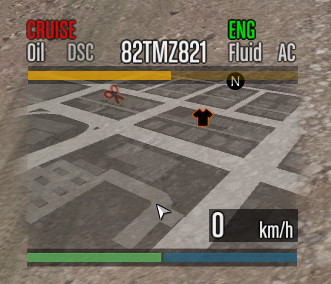
CarHud and HeliHUD Modified 5.0

0/5,
0
votes
Changelog
- Revise/Minimize internal header check, Declare "Speed" variable as local, Change default from kmh to mph, Improved gear logic to show D for driving, P for stopped/parked and R for reversing.
Description
This is a port of the (commonly known as "DoJ styled/themed") car/vehicle HUD from FiveM to GTA Singleplayer using JM36 Lua Plugin.
Features
- Ported from FiveM
- Uses JM36 Lua Plugin
Bugs:
FiveM specific things do not work and have either been disabled/removed or hard-coded to always be a static value, such as what gear your vehicle is in.
Installation Instructions
1: Ensure you have JM36 Lua Plugin
2: Put vehhud.lua into your JM36 Lua Plugin "Modules" folder (located within its "ScriptsDir-Lua" scripts directory).
Credits
JayMontana36
- Revise/Minimize internal header check, Declare "Speed" variable as local, Change default from kmh to mph, Improved gear logic to show D for driving, P for stopped/parked and R for reversing.
Description
This is a port of the (commonly known as "DoJ styled/themed") car/vehicle HUD from FiveM to GTA Singleplayer using JM36 Lua Plugin.
Features
- Ported from FiveM
- Uses JM36 Lua Plugin
Bugs:
FiveM specific things do not work and have either been disabled/removed or hard-coded to always be a static value, such as what gear your vehicle is in.
Installation Instructions
1: Ensure you have JM36 Lua Plugin
2: Put vehhud.lua into your JM36 Lua Plugin "Modules" folder (located within its "ScriptsDir-Lua" scripts directory).
Credits
JayMontana36
Direct Download Links
Version: 5.0Updated: 2 months ago
Total Size: 8.66 KB VehHUD-Release5-v19Port_modland.zip direct download · 8.66 KB · added 2 months ago
You Might Also Like »





0 Comments
There are no comments. Be first to comment!