GTA 6 Inspired HUD 0.1

0/5,
0
votes
Description
GTA VI Next-Gen HUD Radar System
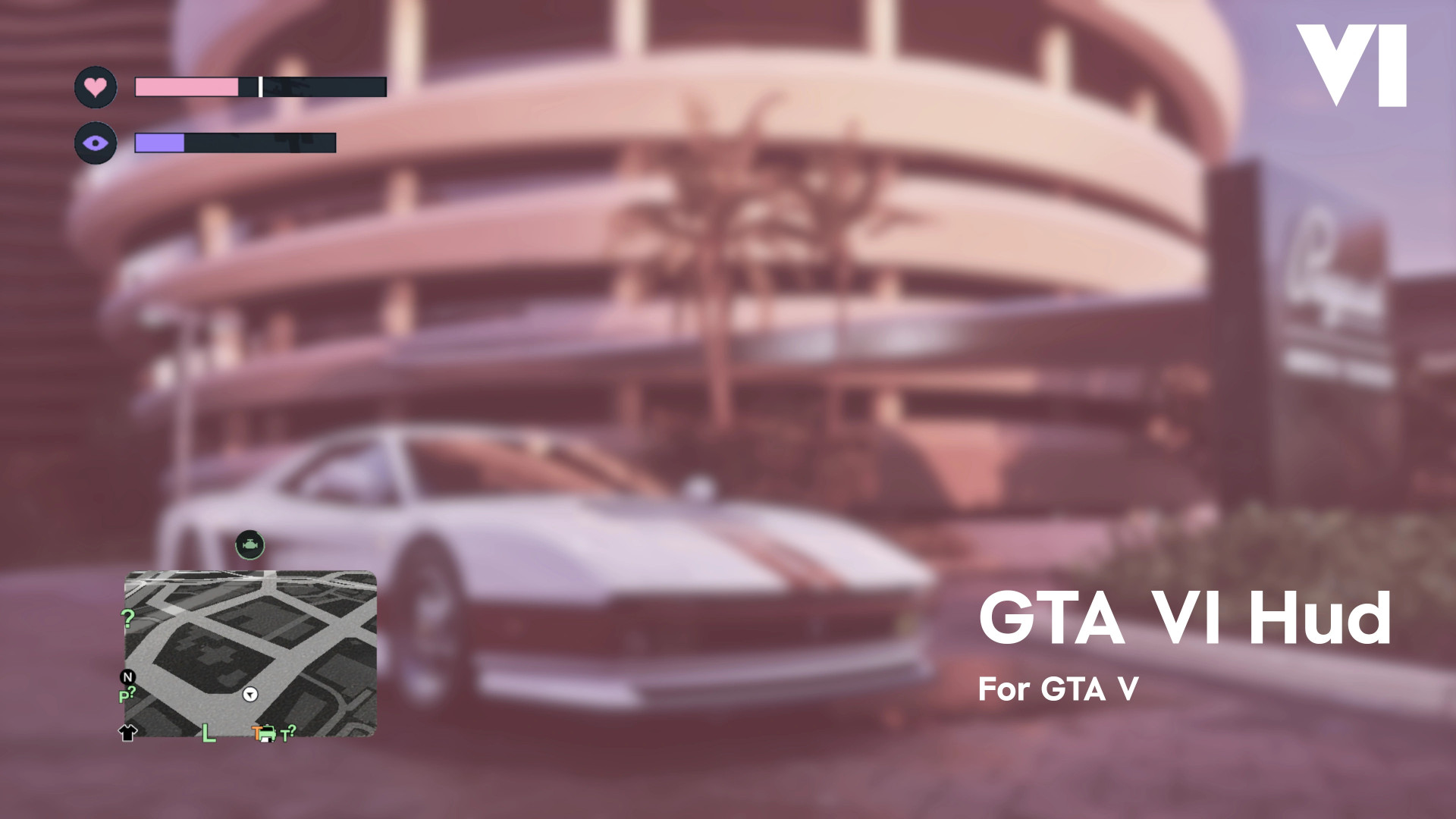
This work-in-progress mod brings a GTA VI-inspired HUD and radar layout to GTA V. It adds redesigned health and armor bars, a separate special ability meter, vehicle damage feedback, GPS distance information, and automatic HUD behavior.
Features
- GTA VI-style health and armor bars in the top-left corner
- Dark borders with a white separator between the bars
- Dedicated special ability or focus meter
- Vehicle engine status indicator above the minimap
- Engine icon stays faded during normal driving
- Vehicle damage turns the icon into a radial damage indicator
- Vehicle status icon position can be adjusted
- HUD automatically fades when inactive
- HUD becomes visible again after taking damage
- HUD also appears during ability use or when pressing the Radar Zoom control
- Pink GTA VI-inspired GPS route line
- Live waypoint distance display in kilometers or miles
- Health and ability bars adjust their position when notifications appear in the top-left corner
- INI configuration file with additional customization options
Live Calibration
- Hold Ctrl + Shift and use the Arrow Keys to move the vehicle status icon
- Position changes are applied in real time
- New position is automatically saved to the INI file
Controls
- W / Z / D-Pad Down: Wake the HUD and check status information
- Ctrl + Shift + Arrow Keys: Adjust vehicle icon position
Requirements
- Script Hook V
- ScriptHookVDotNet v3.6.0 or newer
Notes
- The mod is still under development
- Most testing has been done on GTA V Enhanced
- Additional improvements and bug fixes are planned
- Do not use the mod in GTA Online
Installation Instructions
- Download the correct version for either GTA V Legacy or GTA V Enhanced
- Do not mix files from the two versions
- Enhanced version: install the included OIV through CodeWalker
- Legacy version: install the included OIV through OpenIV
GTA VI Next-Gen HUD Radar System
This work-in-progress mod brings a GTA VI-inspired HUD and radar layout to GTA V. It adds redesigned health and armor bars, a separate special ability meter, vehicle damage feedback, GPS distance information, and automatic HUD behavior.
Features
- GTA VI-style health and armor bars in the top-left corner
- Dark borders with a white separator between the bars
- Dedicated special ability or focus meter
- Vehicle engine status indicator above the minimap
- Engine icon stays faded during normal driving
- Vehicle damage turns the icon into a radial damage indicator
- Vehicle status icon position can be adjusted
- HUD automatically fades when inactive
- HUD becomes visible again after taking damage
- HUD also appears during ability use or when pressing the Radar Zoom control
- Pink GTA VI-inspired GPS route line
- Live waypoint distance display in kilometers or miles
- Health and ability bars adjust their position when notifications appear in the top-left corner
- INI configuration file with additional customization options
Live Calibration
- Hold Ctrl + Shift and use the Arrow Keys to move the vehicle status icon
- Position changes are applied in real time
- New position is automatically saved to the INI file
Controls
- W / Z / D-Pad Down: Wake the HUD and check status information
- Ctrl + Shift + Arrow Keys: Adjust vehicle icon position
Requirements
- Script Hook V
- ScriptHookVDotNet v3.6.0 or newer
Notes
- The mod is still under development
- Most testing has been done on GTA V Enhanced
- Additional improvements and bug fixes are planned
- Do not use the mod in GTA Online
Installation Instructions
- Download the correct version for either GTA V Legacy or GTA V Enhanced
- Do not mix files from the two versions
- Enhanced version: install the included OIV through CodeWalker
- Legacy version: install the included OIV through OpenIV
External Download Links:
Direct Download Links
Version: 0.1Updated: 1 month ago
Total Size: 3.92 MB 16ad9d-GTA6Hud_-_Legacy_modland.rar direct download · 1.96 MB · added 1 month ago
You Might Also Like »



0 Comments
There are no comments. Be first to comment!