Media Player V 1.0

0/5,
0
votes
Description
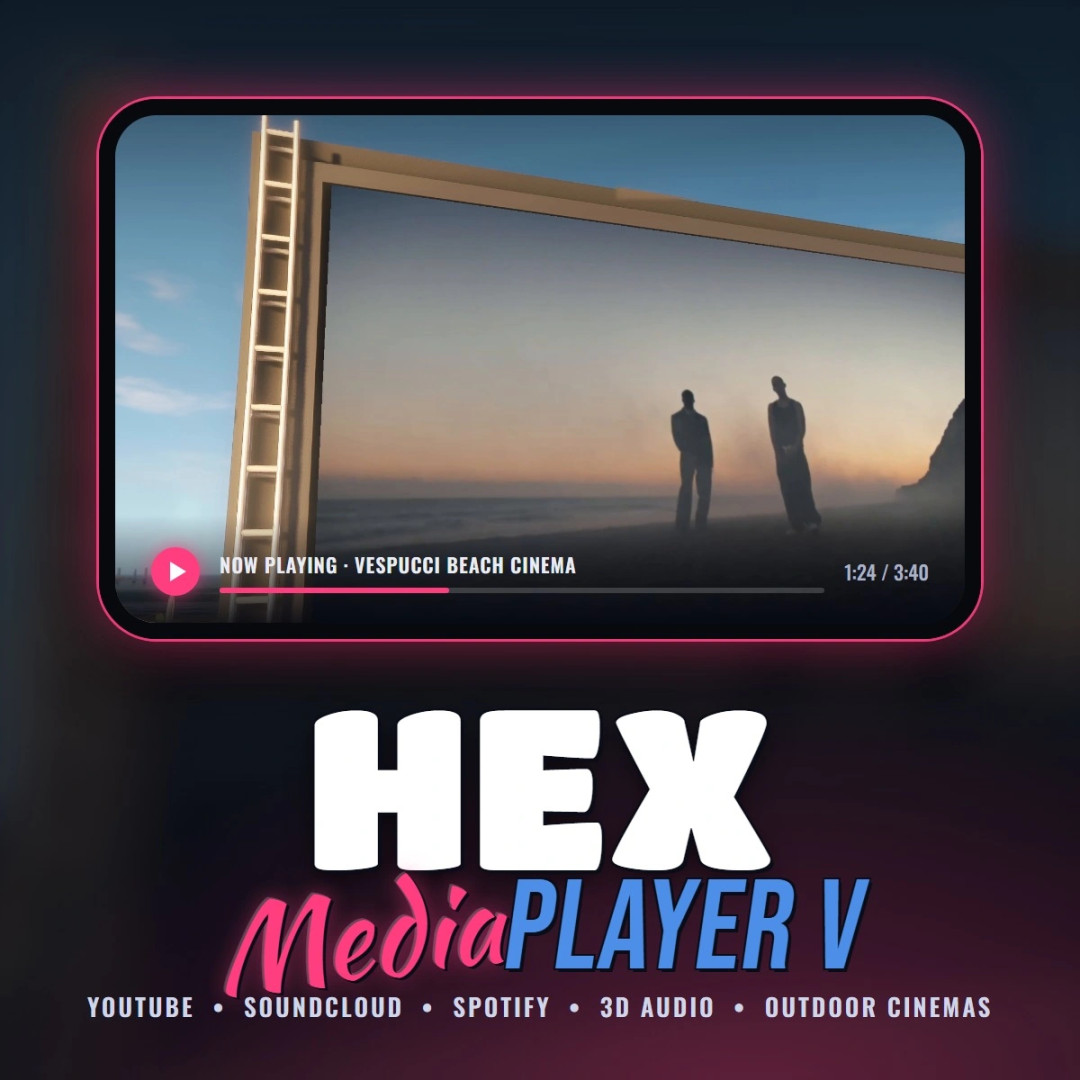
Hex Media Player V brings real YouTube, SoundCloud and Spotify music and video into GTA V single player. Place physical speakers and TVs anywhere in the world, paste a link, and it plays with positional 3D audio and HD video on the screen. Includes four ready-made outdoor cinemas around the map.
Features
- Spawnable speakers - boombox, ghetto blasters, hi-fi, radio, bookshelf, PA and club speakers
- Spawnable screens - flat TVs, old TV, CRT, office TV, huge display and cinema screen
- Free placement - carry, raise, rotate and drop any device, even onto walls
- YouTube, SoundCloud and Spotify - paste a link, or just type a song name to search
- Real 3D audio - sound comes from the device, fades with distance, pans as you turn, muffles behind walls and inside cars
- HD video on screens - real video drawn onto the TV, synced to the audio
- Screen light - screens cast light matching the video onto the area in front of them
- Mouse control box - play/pause, seek, skip, loop, queue, volume and range
- 4 outdoor cinemas with map blips: Vespucci Beach, Chumash Sunset, Vinewood Bowl and the Starlight Drive-In, with big screens, speakers, seating, people, security, night lighting and snack stands
- Snack stands - buy hot dogs, burgers, popcorn and drinks and eat them in game
- Fully configurable keys, video quality, ranges and brightness in MediaPlayerV.ini
Content is streamed live while you play. Nothing is downloaded or saved to your PC. Spotify audio is DRM protected, so Spotify links play the same track from YouTube.
Requirements
- GTA V Enhanced (story mode)
- Script Hook V with its ASI Loader (dinput8.dll)
- Windows 10 or 11 and an internet connection
Controls
- F8 - Media Player menu (spawn devices, outdoor cinemas, settings)
- F6 - control box for the nearest speaker or screen
- Placing: Mouse Wheel distance, Up/Down height, Left/Right rotate, Enter place, G drop to ground, Backspace cancel
- E at a cinema snack stand - buy food and drinks
- F8 >; Outdoor cinemas - Enter sets GPS, T teleports you there
Known issues and notes
- Frame Generation (DLSS / FSR 3) must be off for the HD video, or it will wobble when you move. The mod warns you if it is on. Normal DLSS/FSR upscaling is fine.
- HDR: if the video looks washed out, set ColorMode=hdr10 in MediaPlayerV.ini.
- The HD video is drawn over the screen, so people walking in front of a TV don't block it by default (optional beta setting available).
- Other on-screen overlays may stop the HD video from showing; the mod then switches to the in-world video mode by itself.
- Map mods near a cinema may overlap it. Use F8 >; Outdoor cinemas >; "Move the nearest cinema here".
- If links stop loading after a YouTube change, replace yt-dlp.exe with the newest version from the yt-dlp releases page.
- Works alongside ReShade graphics mods such as NVE and QuantV.
- Built for GTA V Enhanced only. Not for GTA Online.
VirusTotal scans
- ffmpeg.exe - official unmodified gyan.dev build
- yt-dlp.exe - official unmodified release
Installation Instructions
1. Open the "Game Files" folder in the download
2. Drag MediaPlayerV.asi and the MediaPlayerV folder into your GTA V Enhanced directory
3. Launch story mode and press F8
Credits
- Hex Modifications - mod design and code
- Alexander Blade - Script Hook V
- FFmpeg - included unmodified (gyan.dev build)
- yt-dlp - included unmodified
Hex Media Player V brings real YouTube, SoundCloud and Spotify music and video into GTA V single player. Place physical speakers and TVs anywhere in the world, paste a link, and it plays with positional 3D audio and HD video on the screen. Includes four ready-made outdoor cinemas around the map.
Features
- Spawnable speakers - boombox, ghetto blasters, hi-fi, radio, bookshelf, PA and club speakers
- Spawnable screens - flat TVs, old TV, CRT, office TV, huge display and cinema screen
- Free placement - carry, raise, rotate and drop any device, even onto walls
- YouTube, SoundCloud and Spotify - paste a link, or just type a song name to search
- Real 3D audio - sound comes from the device, fades with distance, pans as you turn, muffles behind walls and inside cars
- HD video on screens - real video drawn onto the TV, synced to the audio
- Screen light - screens cast light matching the video onto the area in front of them
- Mouse control box - play/pause, seek, skip, loop, queue, volume and range
- 4 outdoor cinemas with map blips: Vespucci Beach, Chumash Sunset, Vinewood Bowl and the Starlight Drive-In, with big screens, speakers, seating, people, security, night lighting and snack stands
- Snack stands - buy hot dogs, burgers, popcorn and drinks and eat them in game
- Fully configurable keys, video quality, ranges and brightness in MediaPlayerV.ini
Content is streamed live while you play. Nothing is downloaded or saved to your PC. Spotify audio is DRM protected, so Spotify links play the same track from YouTube.
Requirements
- GTA V Enhanced (story mode)
- Script Hook V with its ASI Loader (dinput8.dll)
- Windows 10 or 11 and an internet connection
Controls
- F8 - Media Player menu (spawn devices, outdoor cinemas, settings)
- F6 - control box for the nearest speaker or screen
- Placing: Mouse Wheel distance, Up/Down height, Left/Right rotate, Enter place, G drop to ground, Backspace cancel
- E at a cinema snack stand - buy food and drinks
- F8 >; Outdoor cinemas - Enter sets GPS, T teleports you there
Known issues and notes
- Frame Generation (DLSS / FSR 3) must be off for the HD video, or it will wobble when you move. The mod warns you if it is on. Normal DLSS/FSR upscaling is fine.
- HDR: if the video looks washed out, set ColorMode=hdr10 in MediaPlayerV.ini.
- The HD video is drawn over the screen, so people walking in front of a TV don't block it by default (optional beta setting available).
- Other on-screen overlays may stop the HD video from showing; the mod then switches to the in-world video mode by itself.
- Map mods near a cinema may overlap it. Use F8 >; Outdoor cinemas >; "Move the nearest cinema here".
- If links stop loading after a YouTube change, replace yt-dlp.exe with the newest version from the yt-dlp releases page.
- Works alongside ReShade graphics mods such as NVE and QuantV.
- Built for GTA V Enhanced only. Not for GTA Online.
VirusTotal scans
- ffmpeg.exe - official unmodified gyan.dev build
- yt-dlp.exe - official unmodified release
Installation Instructions
1. Open the "Game Files" folder in the download
2. Drag MediaPlayerV.asi and the MediaPlayerV folder into your GTA V Enhanced directory
3. Launch story mode and press F8
Credits
- Hex Modifications - mod design and code
- Alexander Blade - Script Hook V
- FFmpeg - included unmodified (gyan.dev build)
- yt-dlp - included unmodified
Videos
Direct Download Links
Version: 1.0Updated: 1 week ago
Total Size: 46.42 MB Hex_Media_Player_V_10_modland.rar direct download · 46.42 MB · added 1 week ago
You Might Also Like »
0 Comments
There are no comments. Be first to comment!