W-Labs Tablet and Phone v1.0

0/5,
0
votes
Description
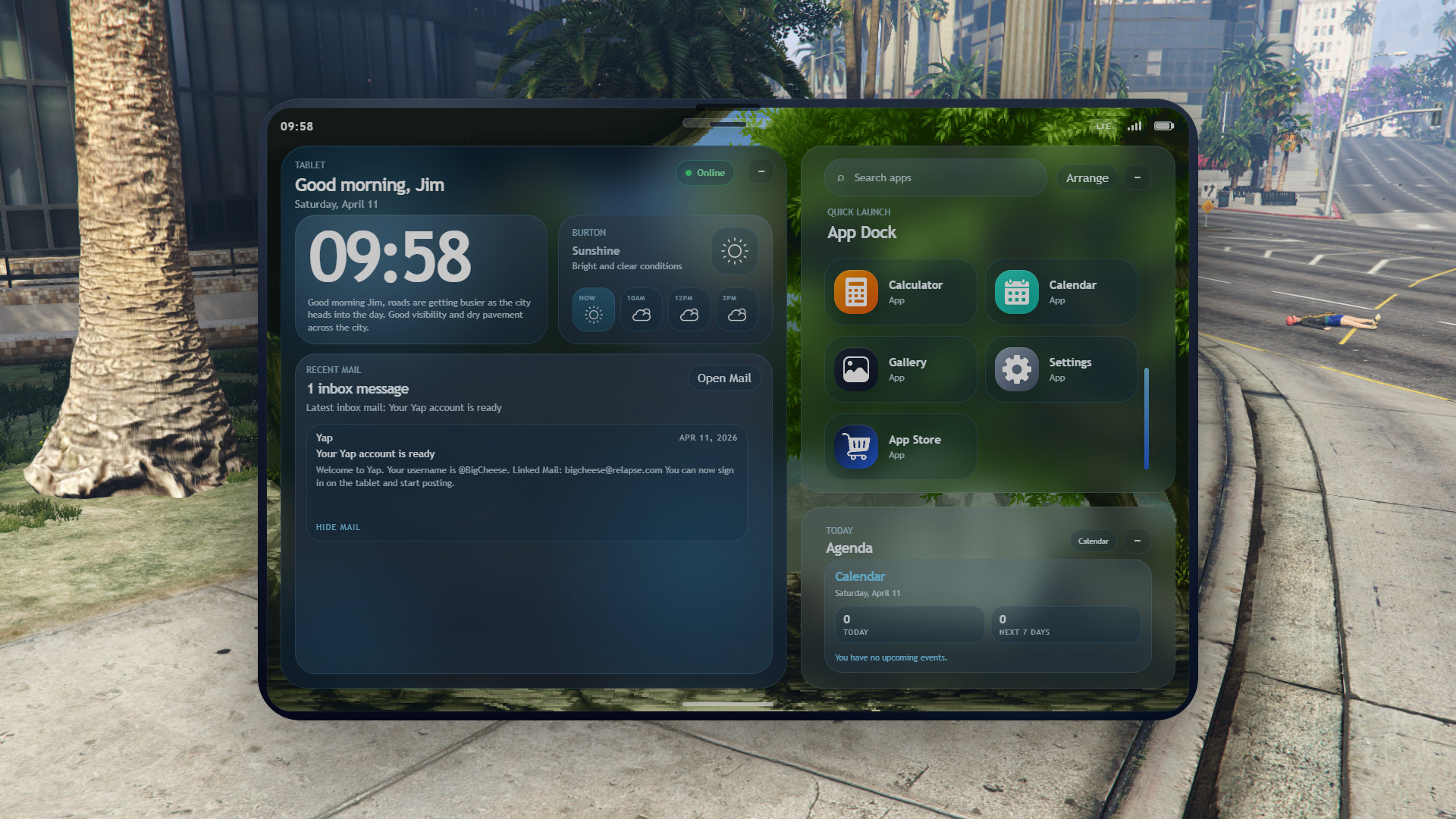
An advanced tablet and phone script featuring camera, video calls, a custom social media app, banking, garage, maps, stocks/crypto trading, unique weather and welcome messages, multilingual UI, and much more.
Features
- Tablet: Full home screen, lock screen, agenda, app store, and the full app suite. Opens with /wtablet by default.
- Phone: Separate phone UI with lock screen, home screen, folders, quick settings, voice calls, and compact apps. Two layouts (WLabs and MyPhone). Opens with /wphone by default.
- Optional physical devices: Item-synced devices with removable SIMs, battery drain/charging, charger items, vehicle charging, and world charge locations.
- Phone App: Dial contacts, anonymous caller ID, job lines (911/EMS/etc.), voice calls with pma-voice, and contact lookup.
- Messages: Text by phone number with chats, group chats, photos, video, emoji, and shared locations.
- Mail: Mailing app with configurable domain, separate inboxes for starred mail, and attachment support.
- Contacts: Save contacts with phone numbers and share email with nearby players.
- Camera & Gallery: Front/rear views, video recording, built-in photo editor, and a centralized gallery for all media.
- Video call: Call mail contacts or phone numbers using pma-voice and live WebRTC video.
- Maps: Interactive city map, saved pins, GPS routes, and business locations.
- Banking: View accounts and activity, send player transfers, and optional society/job accounts. Compatible with tgg-banking, Renewed-Banking, qb-banking, or framework money.
- Garage: Owned vehicles, favorites, garage transfers, tracking, and valet delivery.
- Business: Server-configured directory with open/closed status, on-duty counts, search, and GPS settings.
- Stocks: Trade framework crypto balance (QBIT) or custom simulated coins with live price graphs.
- App store: Install/delete apps, with support for custom server apps.
- Paint & Calendar: Create and save artwork or sync events with the home screen and lock screen agenda.
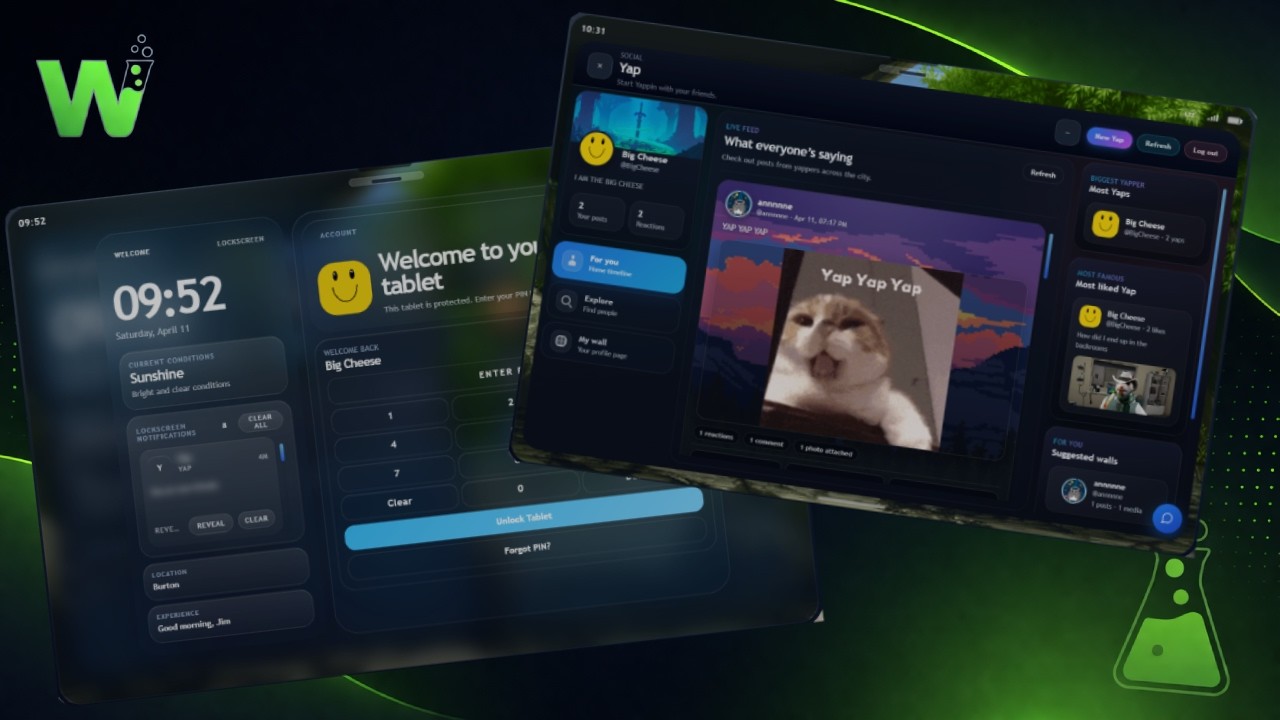
- Yap: Social media app with profiles, friend lists, wall posts, feed, comments, and DMs.
- Settings: Profile, security, account, notification options, themes, and airplane mode.
Installation Instructions
- Requires a FiveM server with Qbox, QB-Core, or ESX.
- ox_lib and oxmysql must be started before the tablet resource.
- Import the included SQL into MySQL (the script auto-adds missing columns on first start for existing servers).
- For camera cloud saves: choose Fivemanage or Fiveerr and set the convar from the README.
- For voice on calls: use pma-voice (or compatible).
- For Stocks on Qbox/QB: set Config.Stocks.CryptoWallet to your server’s crypto money type (commonly crypto).
- Optional: banking/garage bridges from the README, plus inventory items if you enable Device Sync, SIMs, or battery charging.
An advanced tablet and phone script featuring camera, video calls, a custom social media app, banking, garage, maps, stocks/crypto trading, unique weather and welcome messages, multilingual UI, and much more.
Features
- Tablet: Full home screen, lock screen, agenda, app store, and the full app suite. Opens with /wtablet by default.
- Phone: Separate phone UI with lock screen, home screen, folders, quick settings, voice calls, and compact apps. Two layouts (WLabs and MyPhone). Opens with /wphone by default.
- Optional physical devices: Item-synced devices with removable SIMs, battery drain/charging, charger items, vehicle charging, and world charge locations.
- Phone App: Dial contacts, anonymous caller ID, job lines (911/EMS/etc.), voice calls with pma-voice, and contact lookup.
- Messages: Text by phone number with chats, group chats, photos, video, emoji, and shared locations.
- Mail: Mailing app with configurable domain, separate inboxes for starred mail, and attachment support.
- Contacts: Save contacts with phone numbers and share email with nearby players.
- Camera & Gallery: Front/rear views, video recording, built-in photo editor, and a centralized gallery for all media.
- Video call: Call mail contacts or phone numbers using pma-voice and live WebRTC video.
- Maps: Interactive city map, saved pins, GPS routes, and business locations.
- Banking: View accounts and activity, send player transfers, and optional society/job accounts. Compatible with tgg-banking, Renewed-Banking, qb-banking, or framework money.
- Garage: Owned vehicles, favorites, garage transfers, tracking, and valet delivery.
- Business: Server-configured directory with open/closed status, on-duty counts, search, and GPS settings.
- Stocks: Trade framework crypto balance (QBIT) or custom simulated coins with live price graphs.
- App store: Install/delete apps, with support for custom server apps.
- Paint & Calendar: Create and save artwork or sync events with the home screen and lock screen agenda.
- Yap: Social media app with profiles, friend lists, wall posts, feed, comments, and DMs.
- Settings: Profile, security, account, notification options, themes, and airplane mode.
Installation Instructions
- Requires a FiveM server with Qbox, QB-Core, or ESX.
- ox_lib and oxmysql must be started before the tablet resource.
- Import the included SQL into MySQL (the script auto-adds missing columns on first start for existing servers).
- For camera cloud saves: choose Fivemanage or Fiveerr and set the convar from the README.
- For voice on calls: use pma-voice (or compatible).
- For Stocks on Qbox/QB: set Config.Stocks.CryptoWallet to your server’s crypto money type (commonly crypto).
- Optional: banking/garage bridges from the README, plus inventory items if you enable Device Sync, SIMs, or battery charging.
External Download Links:
- Modsfire.com - wlabs-tablet.pack.zip [11.49 MB]
Videos

You Might Also Like »






0 Comments
There are no comments. Be first to comment!