Crash Analyzer v1.0

0/5,
0
votes
Description
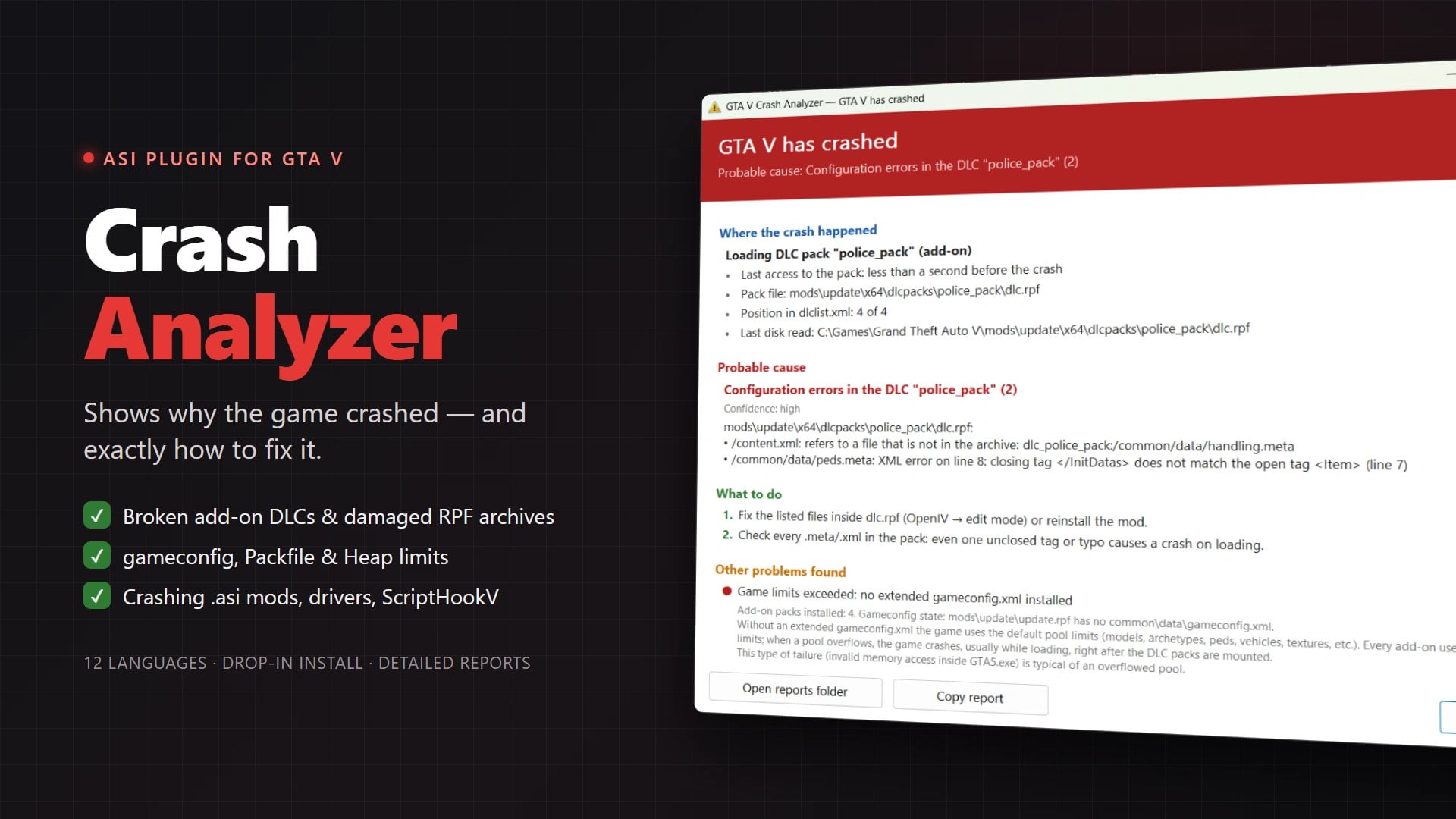
Crash Analyzer is an ASI plugin for GTA V that runs quietly in the background and activates when the game crashes. Instead of leaving you with little information about what went wrong, it opens a report window with the likely cause and possible fixes.
The analyzer takes your current setup into account, including your game version, gameconfig, Packfile Limit Adjuster and Heap Adjuster.
Features
- Crash Reports: identifies where the crash occurred, most likely cause with confidence level, suggested fixes, and technical information for mod developers.
- Game Limits Detection: detects missing extended gameconfig.xml, original encrypted Rockstar gameconfig used with add-on content, and Packfile Limit Adjuster limit issues.
- Damaged Files Detection: finds invalid RPF7 headers, truncated archive downloads, broken nested .rpf archives, and damaged .yft or .ytd resources.
- Configuration Analysis: detects XML errors in setup2.xml, content.xml, .meta and .xml files, missing files in content.xml, duplicate deviceName values, and invalid entries in dlclist.xml.
- Mod-Related Crash Detection: identifies issues with ASI plugins, Mod DLLs, ScriptHookV, ReShade, and ENB.
- Driver & Overlay Support: identifies problems involving NVIDIA, AMD, and Intel graphics drivers, as well as overlays like RTSS, Discord, and Steam.
- GTA V Error Recognition: explains various ERR_* errors (ERR_MEM_*, ERR_GFX_*, ERR_FIL_PACK, ERR_STR_*, ERR_SYS_INVALIDRESOURCE).
- General Issue Detection: detects out-of-memory conditions, disk read errors, unsupported ScriptHookV versions, and mods folder use without OpenIV.asi.
- Compatibility: supports GTA V Legacy and GTA V Enhanced.
Installation Instructions
An ASI Loader is required. If OpenIV.asi or ScriptHookV already works in your game, you already have one installed.
Copy these files into your GTA V root folder:
- CrashAnalyzer.asi
- CrashAnalyzer.exe
- CrashAnalyzer.ini
Configuration
Settings are available in CrashAnalyzer.ini:
- Enabled=1 – Enables or disables Crash Analyzer
- WriteMinidump=1 – Creates a .dmp minidump for each crash
- ChainToGameHandler=0 – Passes the exception to GTA V's own crash handler after analysis
- Language=auto – Sets the report language (auto follows game language, or specify locale like en-US, ru-RU, de-DE)
Crash Analyzer is an ASI plugin for GTA V that runs quietly in the background and activates when the game crashes. Instead of leaving you with little information about what went wrong, it opens a report window with the likely cause and possible fixes.
The analyzer takes your current setup into account, including your game version, gameconfig, Packfile Limit Adjuster and Heap Adjuster.
Features
- Crash Reports: identifies where the crash occurred, most likely cause with confidence level, suggested fixes, and technical information for mod developers.
- Game Limits Detection: detects missing extended gameconfig.xml, original encrypted Rockstar gameconfig used with add-on content, and Packfile Limit Adjuster limit issues.
- Damaged Files Detection: finds invalid RPF7 headers, truncated archive downloads, broken nested .rpf archives, and damaged .yft or .ytd resources.
- Configuration Analysis: detects XML errors in setup2.xml, content.xml, .meta and .xml files, missing files in content.xml, duplicate deviceName values, and invalid entries in dlclist.xml.
- Mod-Related Crash Detection: identifies issues with ASI plugins, Mod DLLs, ScriptHookV, ReShade, and ENB.
- Driver & Overlay Support: identifies problems involving NVIDIA, AMD, and Intel graphics drivers, as well as overlays like RTSS, Discord, and Steam.
- GTA V Error Recognition: explains various ERR_* errors (ERR_MEM_*, ERR_GFX_*, ERR_FIL_PACK, ERR_STR_*, ERR_SYS_INVALIDRESOURCE).
- General Issue Detection: detects out-of-memory conditions, disk read errors, unsupported ScriptHookV versions, and mods folder use without OpenIV.asi.
- Compatibility: supports GTA V Legacy and GTA V Enhanced.
Installation Instructions
An ASI Loader is required. If OpenIV.asi or ScriptHookV already works in your game, you already have one installed.
Copy these files into your GTA V root folder:
- CrashAnalyzer.asi
- CrashAnalyzer.exe
- CrashAnalyzer.ini
Configuration
Settings are available in CrashAnalyzer.ini:
- Enabled=1 – Enables or disables Crash Analyzer
- WriteMinidump=1 – Creates a .dmp minidump for each crash
- ChainToGameHandler=0 – Passes the exception to GTA V's own crash handler after analysis
- Language=auto – Sets the report language (auto follows game language, or specify locale like en-US, ru-RU, de-DE)
External Download Links:
- Modsfire.com - 08c7ff-CrashAnalyzer-1.0.0.zip [401.51 KB]
Direct Download Links
Version: v1.0Updated: 2 weeks ago
Total Size: 803.02 KB 08c7ff-CrashAnalyzer-100_modland.zip direct download · 401.51 KB · added 2 weeks ago
You Might Also Like »






0 Comments
There are no comments. Be first to comment!