Dlc Pack Creator 1.1

0/5,
0
votes
The "DLC Pack Creator" is a mod for Grand Theft Auto V that allows you to personalize your experience of the game. With this mod, you're not limited to the existing content in the game; you can create your own DLC packs. You have the freedom to add your own vehicles, weapons, maps and more into these packs.
It offers a user-friendly interface that makes it relatively easy to bundle your custom contents into a pack, manage them, and add them into your game. This mod provides an expanded platform for customization, enabling players to significantly transform their in-game experience according to their preferences. The modifications you may make are only limited by your creativity.
It should be noted that the mod's continued functionality is dependent on the game's version and other installed modifications. As such, some technical know-how and understanding of the base game's mechanics are beneficial.
Instructions
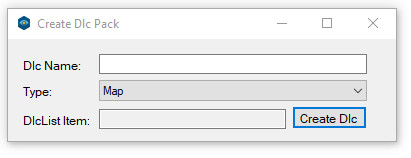
1. In Dlc Name Texbox type your desired dlc packs name...
2. Choose dlc pack type Map or Vehicle
3. Click Create Dlc and choose where to save it...
4. Drag and drop generated dlc pack in dlcpacks folder (located here: "Grand Theft Auto V\mods\update\x64\dlcpacks")
5. Copy and paste dlclist into your dlclist.xml (located here: "rand Theft Auto V\mods\update\update.rpf\common\data)
6. For map dlc pack drag and drop all meta files (ymap, ytyp, .ymf) inside "dlcname"_metadata.rpf
- Drag all drawable and collision files (ydr, ydd, ybn) inside "dlcname".rpf
7. For vehicle dlc pack drag and drop all meta datafiles(carcols, vehicles, etc) inside "dlc.rpf/data" folder
- Drag .gxt2 in lang rpf's
- Drag all .yft model files in vehicles.rpf
Credits:
skylumz
It offers a user-friendly interface that makes it relatively easy to bundle your custom contents into a pack, manage them, and add them into your game. This mod provides an expanded platform for customization, enabling players to significantly transform their in-game experience according to their preferences. The modifications you may make are only limited by your creativity.
It should be noted that the mod's continued functionality is dependent on the game's version and other installed modifications. As such, some technical know-how and understanding of the base game's mechanics are beneficial.
Instructions
1. In Dlc Name Texbox type your desired dlc packs name...
2. Choose dlc pack type Map or Vehicle
3. Click Create Dlc and choose where to save it...
4. Drag and drop generated dlc pack in dlcpacks folder (located here: "Grand Theft Auto V\mods\update\x64\dlcpacks")
5. Copy and paste dlclist into your dlclist.xml (located here: "rand Theft Auto V\mods\update\update.rpf\common\data)
6. For map dlc pack drag and drop all meta files (ymap, ytyp, .ymf) inside "dlcname"_metadata.rpf
- Drag all drawable and collision files (ydr, ydd, ybn) inside "dlcname".rpf
7. For vehicle dlc pack drag and drop all meta datafiles(carcols, vehicles, etc) inside "dlc.rpf/data" folder
- Drag .gxt2 in lang rpf's
- Drag all .yft model files in vehicles.rpf
Credits:
skylumz
Direct Download Links
Version: 1.1Updated: 2 years ago
Total Size: 916.15 KB DlcPackCreator_v11_modland.zip direct download · 916.15 KB · added 2 years ago
You Might Also Like »









0 Comments
There are no comments. Be first to comment!