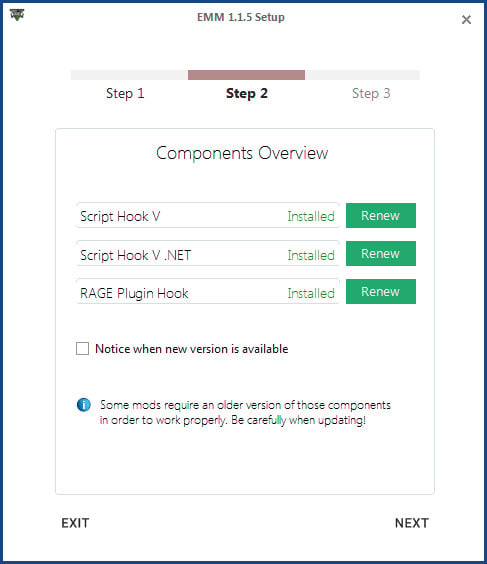
Easy Mod Manager 1.1.5

0/5,
0
votes
Changelog
16.11.2015
- added .vb compatibility
- performance improvements
Description
Features:
- Create custom profiles to manage different sorts of modifications
- Automatically downloads the newest versions of Script Hook V, Script Hook V .NET and RAGE Plugin Hook
- Enable and Disable Mods with one click
- Compatible with Steam and Socialclub version
Supported Mod Components:
- Script Hook V
- Script Hook V .NET
- RAGE Plugin Hook
Requirements:
- .NET Framework 4.5
Installation Instructions
- Setup will open automatically on the first start. Choose your GTA V main directory, download or renew the latest components and decide if you want to import your currently installed mods to the manager
- Start adding mods by clicking the "Add Modification" button. Insert a short name and add the required modification files. When finished, click on the submit button to add your modification
- To create or remove new profiles, click on the "Profiles" header in the menu bar. You can add up to 10 profiles and switch between them
- To remove mods or edit them, just select them by clicking on the label and click below on the specific buttons
- Use the checkboxes in the modification list to enable / disable the modification in the current selected profile
Credits
-Vegas-
16.11.2015
- added .vb compatibility
- performance improvements
Description
Features:
- Create custom profiles to manage different sorts of modifications
- Automatically downloads the newest versions of Script Hook V, Script Hook V .NET and RAGE Plugin Hook
- Enable and Disable Mods with one click
- Compatible with Steam and Socialclub version
Supported Mod Components:
- Script Hook V
- Script Hook V .NET
- RAGE Plugin Hook
Requirements:
- .NET Framework 4.5
Installation Instructions
- Setup will open automatically on the first start. Choose your GTA V main directory, download or renew the latest components and decide if you want to import your currently installed mods to the manager
- Start adding mods by clicking the "Add Modification" button. Insert a short name and add the required modification files. When finished, click on the submit button to add your modification
- To create or remove new profiles, click on the "Profiles" header in the menu bar. You can add up to 10 profiles and switch between them
- To remove mods or edit them, just select them by clicking on the label and click below on the specific buttons
- Use the checkboxes in the modification list to enable / disable the modification in the current selected profile
Credits
-Vegas-
Direct Download Links
Version: 1.1.5Updated: 3 days ago
Total Size: 3.88 MB Easy_Mod_Manager_115_modland.zip direct download · 3.88 MB · added 3 days ago
You Might Also Like »


0 Comments
There are no comments. Be first to comment!