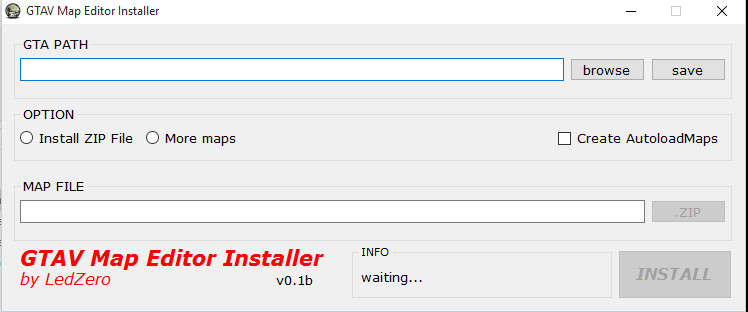
GTAV Map Editor Installer 0.1b

0/5,
0
votes
GTAV- Map Editor is a beginner- friendly installer for installing homemade maps in GTAV. This program automatically loads the map. Easy to use.
How To Use:
1. Select your GTAV main directory.
2. Select "Install Zip File".
3. Click "Create AutoloadMaps"
4. Browse your.zip file for the map.
5. Select install.
Installation:
- Framework 4.0 (required).
- Unzip all files into your folder.
Credits:
LedZero
How To Use:
1. Select your GTAV main directory.
2. Select "Install Zip File".
3. Click "Create AutoloadMaps"
4. Browse your.zip file for the map.
5. Select install.
Installation:
- Framework 4.0 (required).
- Unzip all files into your folder.
Credits:
LedZero
Direct Download Links
Version: 0.1bUpdated: 1 year ago
Total Size: 610.66 KB GTAV_MapEditor_Installer_modland.zip direct download · 610.66 KB · added 1 year ago
You Might Also Like »









0 Comments
There are no comments. Be first to comment!