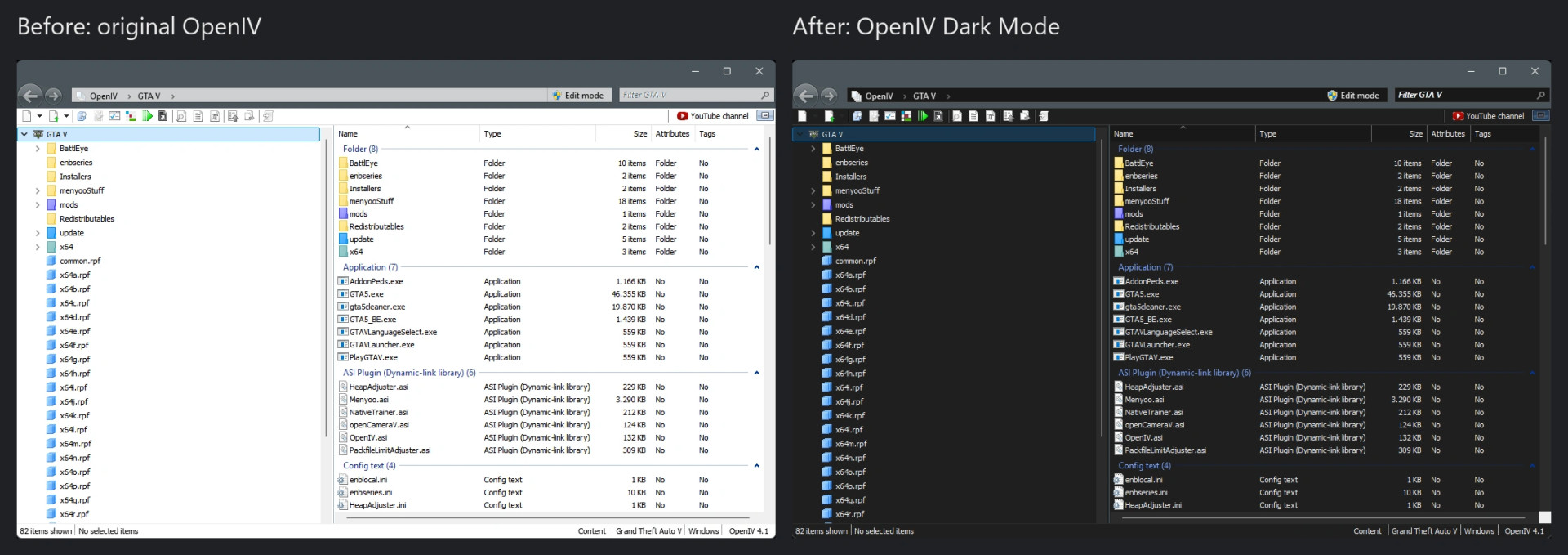
OpenIV Dark Mode (unofficial) v0.1.1

0/5,
0
votes
Description
Unofficial dark mode for OpenIV 4.1 (32-bit, Windows 10/11). OpenIV has no complete dark mode, so this small helper DLL darkens the window: file tree, file list, toolbar, address bar, status bar, scroll bars and the group headers. OpenIV.exe itself is not modified. Not affiliated with New Technology Studio or the OpenIV team.
Features
- Dark file tree, file list, toolbar, address bar and status bar
- Readable text and group headers on dark background
- Easy to remove: just delete one file
- Open source (MIT license)
Known issues
- Only the main window is tested. Settings, dialogs and message boxes may still have light areas.
- Colour tuning is made for Windows 11 (build 26100), so other Windows versions may look slightly different.
- Some antivirus programs may report the unsigned DLL as a false positive. The DLL is a proxy for dinput8.dll.
Installation Instructions
1. Close OpenIV.
2. Copy dinput8.dll from the zip into the OpenIV folder, next to OpenIV.exe.
3. Start OpenIV.
4. Optional, for a dark title bar and the Monokai text editor: open the file Application.xml in the folder AppData/Local/New Technology Studio/OpenIV of your user profile, set AppColorThemeIndex to 1 and TextEditorColorsJson to Monokai. Back up the file first.
Uninstall: delete dinput8.dll from the OpenIV folder.
Credits
- OpenIV by New Technology Studio
- M4XL1M1T
Unofficial dark mode for OpenIV 4.1 (32-bit, Windows 10/11). OpenIV has no complete dark mode, so this small helper DLL darkens the window: file tree, file list, toolbar, address bar, status bar, scroll bars and the group headers. OpenIV.exe itself is not modified. Not affiliated with New Technology Studio or the OpenIV team.
Features
- Dark file tree, file list, toolbar, address bar and status bar
- Readable text and group headers on dark background
- Easy to remove: just delete one file
- Open source (MIT license)
Known issues
- Only the main window is tested. Settings, dialogs and message boxes may still have light areas.
- Colour tuning is made for Windows 11 (build 26100), so other Windows versions may look slightly different.
- Some antivirus programs may report the unsigned DLL as a false positive. The DLL is a proxy for dinput8.dll.
Installation Instructions
1. Close OpenIV.
2. Copy dinput8.dll from the zip into the OpenIV folder, next to OpenIV.exe.
3. Start OpenIV.
4. Optional, for a dark title bar and the Monokai text editor: open the file Application.xml in the folder AppData/Local/New Technology Studio/OpenIV of your user profile, set AppColorThemeIndex to 1 and TextEditorColorsJson to Monokai. Back up the file first.
Uninstall: delete dinput8.dll from the OpenIV folder.
Credits
- OpenIV by New Technology Studio
- M4XL1M1T
Direct Download Links
Version: v0.1.1Updated: 1 day ago
Total Size: 20.32 KB dinput8_modland.rar direct download · 20.32 KB · added 1 day ago
You Might Also Like »

0 Comments
There are no comments. Be first to comment!