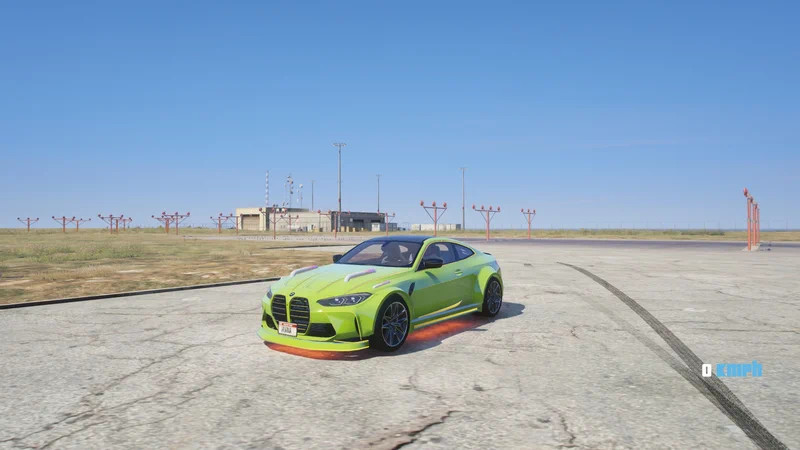
2020 BMW M4 COMPETITION (G82) CUSTOM RGB [ADD-ON] 🔥🤩😍 1.0

0/5,
0
votes
Description
Welcome to the official 2020 BMW M4 Competition (G82) Add-On DLC release for GTA V Single Player! This mod features fully functional custom RGB headlights and extensive vehicle modification support.
Features
- Working Custom RGB Lighting (Fully functional in-game)
- Full Tuning and Customization Supported (Custom bumpers, spoilers, wheels, and performance upgrades)
- High-Quality Textures (Detailed interior, bodywork, and glass)
- Working Steering Wheel and Gauges
- Stable Single Player Add-On DLC Build
In-Game Spawn Information
- Spawn Name / Model Code: m4comp
- Trainer Location: Sports Category under M Section (or use Spawn By Name with m4comp)
Installation Instructions
1. Extract the Download:
Extract the downloaded zip file: 2020 BMW M4 COMPETITION (G82) CUSTOM RGB [ADD-ON].
2. Copy DLC Folder:
Copy the m4comp folder and paste it into your GTA V directory:
Grand Theft Auto V/mods/update/x64/dlcpacks/
3. Edit dlclist.xml:
- Open OpenIV and enable Edit Mode.
- Navigate to: mods/update/update.rpf/common/data/
- Right-click dlclist.xml and click Edit.
- Scroll to the bottom and add the following line:
dlcpacks:/m4comp/
- Click Save.
4. Launch GTA V and spawn the car using m4comp via Menyoo or any trainer!
Credits
- Mod Converted and Built By: Diamond Gamerz
Welcome to the official 2020 BMW M4 Competition (G82) Add-On DLC release for GTA V Single Player! This mod features fully functional custom RGB headlights and extensive vehicle modification support.
Features
- Working Custom RGB Lighting (Fully functional in-game)
- Full Tuning and Customization Supported (Custom bumpers, spoilers, wheels, and performance upgrades)
- High-Quality Textures (Detailed interior, bodywork, and glass)
- Working Steering Wheel and Gauges
- Stable Single Player Add-On DLC Build
In-Game Spawn Information
- Spawn Name / Model Code: m4comp
- Trainer Location: Sports Category under M Section (or use Spawn By Name with m4comp)
Installation Instructions
1. Extract the Download:
Extract the downloaded zip file: 2020 BMW M4 COMPETITION (G82) CUSTOM RGB [ADD-ON].
2. Copy DLC Folder:
Copy the m4comp folder and paste it into your GTA V directory:
Grand Theft Auto V/mods/update/x64/dlcpacks/
3. Edit dlclist.xml:
- Open OpenIV and enable Edit Mode.
- Navigate to: mods/update/update.rpf/common/data/
- Right-click dlclist.xml and click Edit.
- Scroll to the bottom and add the following line:
dlcpacks:/m4comp/
- Click Save.
4. Launch GTA V and spawn the car using m4comp via Menyoo or any trainer!
Credits
- Mod Converted and Built By: Diamond Gamerz
This mod can be installed by using add-on method.
Videos


Direct Download Links
Version: 1.0Updated: 1 day ago
Total Size: 11.36 MB 2020 BMW M4 COMPETITION (G82) CUSTOM RGB [ADD-ON]_modland.rar direct download · 11.36 MB · added 1 day ago
You Might Also Like »




0 Comments
There are no comments. Be first to comment!