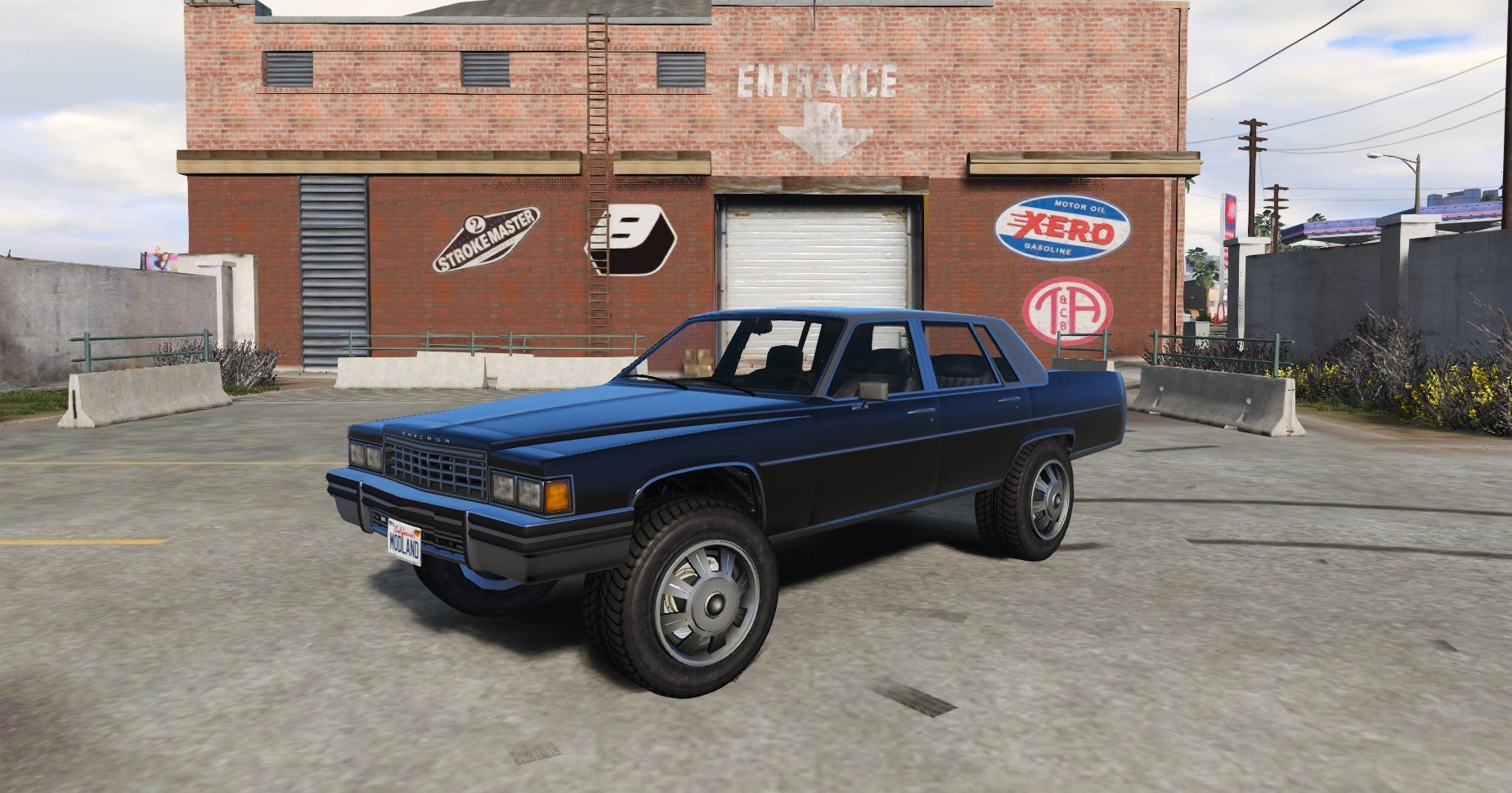
Albany Emperor Donk 1.1

0/5,
0
votes
Description
A lifted donk version of GTA's Albany Emperor. Vanilla edit, lore friendly.
Spawn name: empdonk
Features
- Lifted body with oversized, wider wheels
- Brakes/hubs moved to sit correctly inside the bigger wheels
- Custom handling: more power, higher top speed, 6 gears, stronger brakes
- Anti-tip tune so the lifted body doesn't roll in turns
- Uses GTA's own Duke O'Death engine sound (no extra sound files needed)
- FiveM version: built-in script that makes LS Customs rims match the wide donk wheels (works on any server, no framework needed)
Notes: Wide mod-shop rims are FiveM only. In Singleplayer, mod-shop rims fit at normal width.
Installation Instructions
(Singleplayer):
Requires OpenIV (with ASI installed), Script Hook V and a trainer like Menyoo.
1. Open OpenIV and turn on Edit mode.
2. If you don't have a mods folder yet, right-click update\update.rpf and choose Copy to "mods" folder.
3. Go to mods\update and make the folders x64\dlcpacks.
4. Copy the empdonk folder from Singleplayer\dlcpacks in the zip into mods\update\x64\dlcpacks.
5. Open mods\update\update.rpf\common\data\dlclist.xml, paste the line from "dlclist line.txt" on a new line right above the very last "Paths" line at the bottom, then save.
6. Launch the game and spawn it with your trainer: empdonk
- If mods don't load, add -nobattleye to your Steam launch options.
(FiveM):
1. Copy the empdonk folder from the FiveM folder in the zip into your server's resources folder.
2. Add ensure empdonk to your server.cfg.
3. Restart the server and spawn it with: empdonk
Credits
Base model: Rockstar Games
Lift, wheels, handling and rim script: zaktheking
A lifted donk version of GTA's Albany Emperor. Vanilla edit, lore friendly.
Spawn name: empdonk
Features
- Lifted body with oversized, wider wheels
- Brakes/hubs moved to sit correctly inside the bigger wheels
- Custom handling: more power, higher top speed, 6 gears, stronger brakes
- Anti-tip tune so the lifted body doesn't roll in turns
- Uses GTA's own Duke O'Death engine sound (no extra sound files needed)
- FiveM version: built-in script that makes LS Customs rims match the wide donk wheels (works on any server, no framework needed)
Notes: Wide mod-shop rims are FiveM only. In Singleplayer, mod-shop rims fit at normal width.
Installation Instructions
(Singleplayer):
Requires OpenIV (with ASI installed), Script Hook V and a trainer like Menyoo.
1. Open OpenIV and turn on Edit mode.
2. If you don't have a mods folder yet, right-click update\update.rpf and choose Copy to "mods" folder.
3. Go to mods\update and make the folders x64\dlcpacks.
4. Copy the empdonk folder from Singleplayer\dlcpacks in the zip into mods\update\x64\dlcpacks.
5. Open mods\update\update.rpf\common\data\dlclist.xml, paste the line from "dlclist line.txt" on a new line right above the very last "Paths" line at the bottom, then save.
6. Launch the game and spawn it with your trainer: empdonk
- If mods don't load, add -nobattleye to your Steam launch options.
(FiveM):
1. Copy the empdonk folder from the FiveM folder in the zip into your server's resources folder.
2. Add ensure empdonk to your server.cfg.
3. Restart the server and spawn it with: empdonk
Credits
Base model: Rockstar Games
Lift, wheels, handling and rim script: zaktheking
This mod can be installed by using add-on method.
Direct Download Links
Version: 1.1Updated: 6 days ago
Total Size: 4.76 MB empdonk-v10_modland.zip direct download · 4.76 MB · added 6 days ago
About Mod
| Latest Version | 1.1 |
| Game | GTA 5 |
| Category | Vehicles » Cars |
| Tags | Add-On FiveM |
| Downloads | 10 |
| Created | 6 days ago |
You Might Also Like »


0 Comments
There are no comments. Be first to comment!