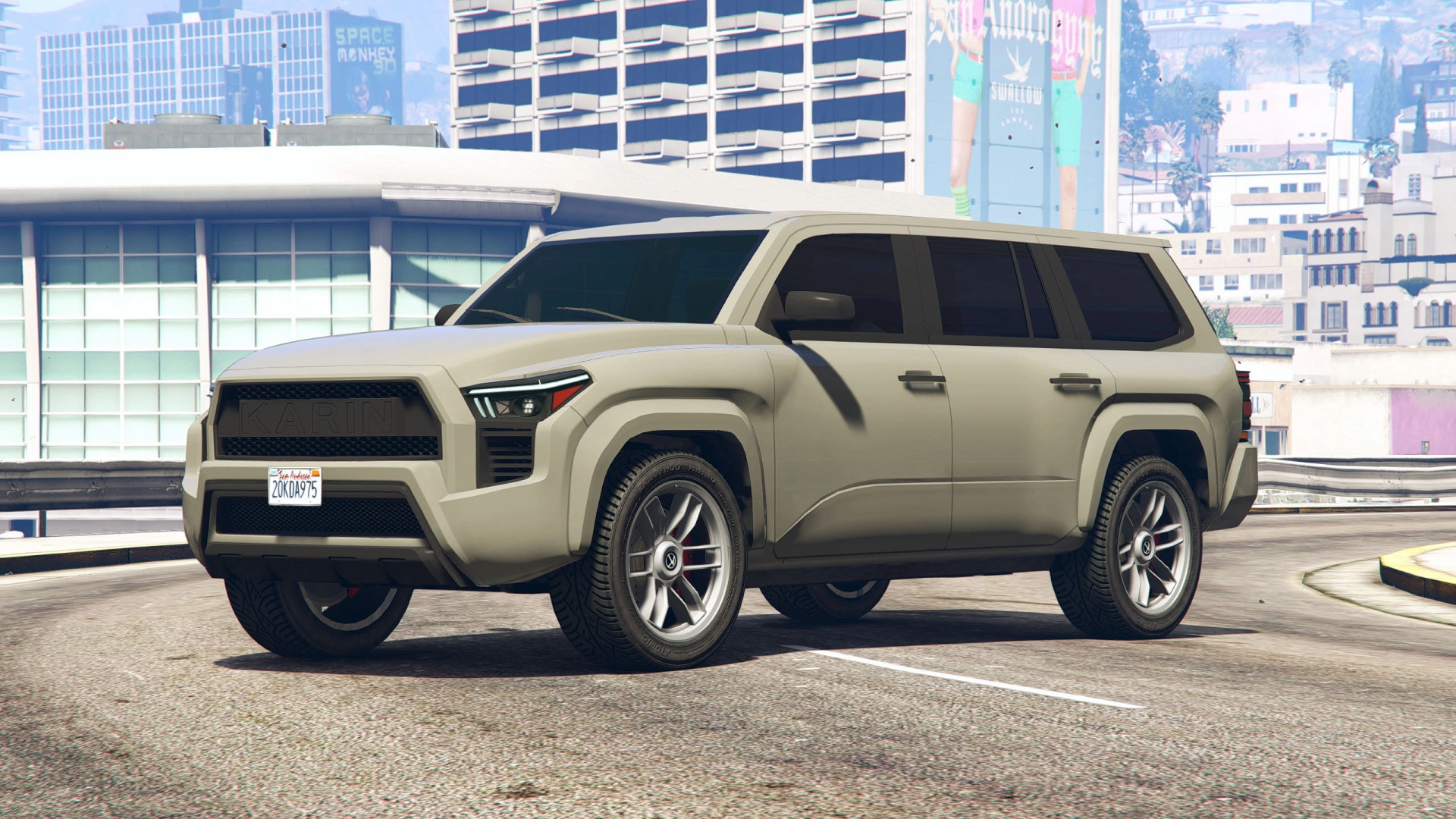
Karin Everon SUV v1.0
0/5,
0
votes
Changelog
Version 1.0.1111
- Fixed the roof texture
- Added seat belts to the interior
Description
The Karin Everon SUV mod introduces a modified and improved SUV model to GTA V, featuring custom vehicle styling, updated textures and additional interior details. Originally based on a Rockstar Games 3D model, this version has been reworked by DANZ / D3S DESIGN to provide a refreshed appearance and improved visual details.
Features
- Modified and improved SUV model
- Original 3D model by Rockstar Games
- Custom exterior improvements by DANZ / D3S DESIGN
- Updated roof textures
- Added seat belts for improved interior detail
- Separate body and rim color options
- Standalone Add-On vehicle installation
- Compatible with vehicle spawning through trainers
Vehicle Customization
The Karin Everon SUV supports two configurable color channels:
- Color 1: Vehicle body
- Color 4: Wheel rims
These settings allow players to customize the body and wheel colors independently.
Spawn Name
Use Menyoo, Simple Trainer or another compatible vehicle spawner and enter: D3SEVERON2
Installation Instructions
- Open your GTA V installation directory.
- Copy the included velar folder into: Grand Theft Auto V\mods\update\x64\dlcpacks\
- Launch OpenIV and navigate to: Grand Theft Auto V\mods\update\update.rpf\common\data\
- Open dlclist.xml in Edit Mode.
- Add the following entry before the closing </Paths> tag:
<Item>dlcpacks:/d3severon2/</Item>
- Save the changes and close OpenIV.
- Launch GTA V and use a compatible trainer to spawn the vehicle.
Important: The original installation instructions refer to a folder named velar, while the DLC entry uses d3severon2. Make sure the folder name and DLC entry match the actual files included in the archive.
Credits
- Rockstar Games – Original 3D model
- DANZ / D3S DESIGN – Vehicle modifications and improvements
Version 1.0.1111
- Fixed the roof texture
- Added seat belts to the interior
Description
The Karin Everon SUV mod introduces a modified and improved SUV model to GTA V, featuring custom vehicle styling, updated textures and additional interior details. Originally based on a Rockstar Games 3D model, this version has been reworked by DANZ / D3S DESIGN to provide a refreshed appearance and improved visual details.
Features
- Modified and improved SUV model
- Original 3D model by Rockstar Games
- Custom exterior improvements by DANZ / D3S DESIGN
- Updated roof textures
- Added seat belts for improved interior detail
- Separate body and rim color options
- Standalone Add-On vehicle installation
- Compatible with vehicle spawning through trainers
Vehicle Customization
The Karin Everon SUV supports two configurable color channels:
- Color 1: Vehicle body
- Color 4: Wheel rims
These settings allow players to customize the body and wheel colors independently.
Spawn Name
Use Menyoo, Simple Trainer or another compatible vehicle spawner and enter: D3SEVERON2
Installation Instructions
- Open your GTA V installation directory.
- Copy the included velar folder into: Grand Theft Auto V\mods\update\x64\dlcpacks\
- Launch OpenIV and navigate to: Grand Theft Auto V\mods\update\update.rpf\common\data\
- Open dlclist.xml in Edit Mode.
- Add the following entry before the closing </Paths> tag:
<Item>dlcpacks:/d3severon2/</Item>
- Save the changes and close OpenIV.
- Launch GTA V and use a compatible trainer to spawn the vehicle.
Important: The original installation instructions refer to a folder named velar, while the DLC entry uses d3severon2. Make sure the folder name and DLC entry match the actual files included in the archive.
Credits
- Rockstar Games – Original 3D model
- DANZ / D3S DESIGN – Vehicle modifications and improvements
External Download Links:
Direct Download Links
Version: v1.0Updated: 6 days ago
Total Size: 12.8 MB baeb02-D3S_Karin_Everon_SUV_modland.rar direct download · 6.4 MB · added 6 days ago
You Might Also Like »

0 Comments
There are no comments. Be first to comment!