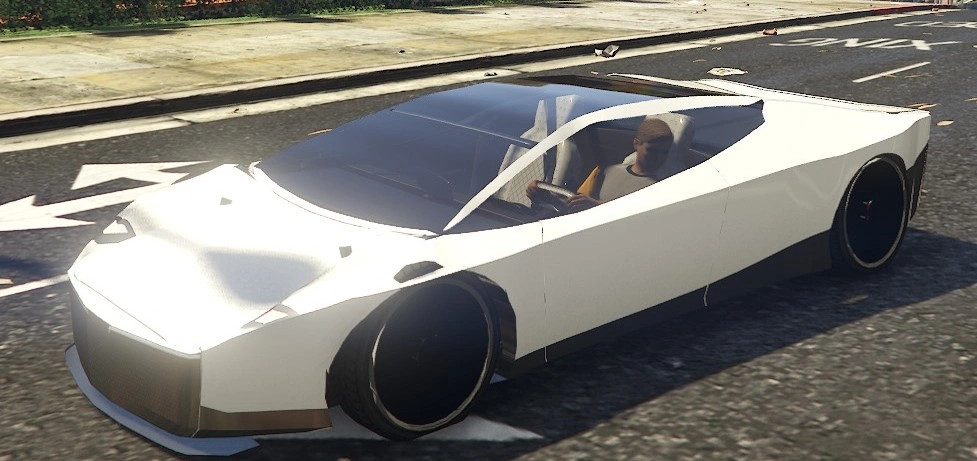
Tesla Roadster (2nd Gen) v1.0

0/5,
0
votes
Description
Tesla Roadster 2nd Gen [Add-On]
Adds the next-generation Tesla Roadster to GTA V Enhanced as a standalone vehicle. The car features a custom-built exterior, interior and wheels, with a low and wide hypercar stance and bronze-tinted glass. It is an add-on vehicle and does not replace anything from the base game.
Features
- Custom exterior model
- Full custom interior
- Custom wheels
- Scissor doors
- Active rear spoiler
- Electric vehicle sound with no engine noise
- Low, wide hypercar stance
Spawn Name: troadster
Requirements
An RPF loader capable of reading the mods folder is required, such as OpenRPF.asi together with an ASI loader.
Known Issues
- Doors may occasionally remain very slightly open after closing
- Designed specifically for GTA V Enhanced
- GTA V Legacy has not been tested
Add-On Vehicle Limit
If GTA V begins crashing during loading after installing many add-on vehicles, the game's add-on vehicle limit may have been reached.
Open gameconfig.xml inside: update.rpf\common\data
Change MaxExtraVehicleModelInfos from 640 to 1500.
Installation Instructions
1. Copy the troadster folder to: mods\update\x64\dlcpacks
2. Open: mods\update\update.rpf\common\data\dlclist.xml
3. Add the troadster DLC entry provided in the included README
4. Save the file and launch GTA V
5. Spawn the vehicle using any compatible trainer: troadster
Credits
- AurumGTA – Vehicle model, interior, wheels, textures and setup
Tesla Roadster 2nd Gen [Add-On]
Adds the next-generation Tesla Roadster to GTA V Enhanced as a standalone vehicle. The car features a custom-built exterior, interior and wheels, with a low and wide hypercar stance and bronze-tinted glass. It is an add-on vehicle and does not replace anything from the base game.
Features
- Custom exterior model
- Full custom interior
- Custom wheels
- Scissor doors
- Active rear spoiler
- Electric vehicle sound with no engine noise
- Low, wide hypercar stance
Spawn Name: troadster
Requirements
An RPF loader capable of reading the mods folder is required, such as OpenRPF.asi together with an ASI loader.
Known Issues
- Doors may occasionally remain very slightly open after closing
- Designed specifically for GTA V Enhanced
- GTA V Legacy has not been tested
Add-On Vehicle Limit
If GTA V begins crashing during loading after installing many add-on vehicles, the game's add-on vehicle limit may have been reached.
Open gameconfig.xml inside: update.rpf\common\data
Change MaxExtraVehicleModelInfos from 640 to 1500.
Installation Instructions
1. Copy the troadster folder to: mods\update\x64\dlcpacks
2. Open: mods\update\update.rpf\common\data\dlclist.xml
3. Add the troadster DLC entry provided in the included README
4. Save the file and launch GTA V
5. Spawn the vehicle using any compatible trainer: troadster
Credits
- AurumGTA – Vehicle model, interior, wheels, textures and setup
External Download Links:
- Modsfire.com - 957dca-Roadster.zip [11.58 MB]
Direct Download Links
Version: v1.0Updated: 2 weeks ago
Total Size: 23.16 MB 957dca-Roadster_modland.zip direct download · 11.58 MB · added 2 weeks ago
You Might Also Like »


0 Comments
There are no comments. Be first to comment!