


0/5,
0
votes
Installion:
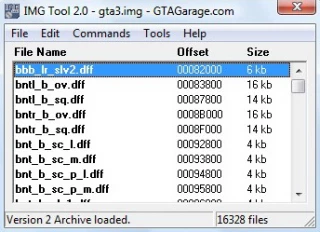
ImgTool: open gta3.img and delete bfinject.dff then add the new bfinject.dff.
Open txd.img and delete bfinject.txd then add new bfinject.txd
Handling: Open datahandling.cfg and replace the old bfinject with that
BFINJECT 500.0 2.0 3.5 1.5 0.0 0.0 0.0 80 0.90 0.8 0.48 4 190.0 38.0 4 P 6.1 0.45 0 30.0 2.0 0.08 0.38 1.0 98000 0.33 -0.07 0.5 A118 1 2
Default.ide: Open datadefault.ide and replace the old bfinjection
114, bfinject, bfinject, car, BFINJECT, BFINJC, ignore, 1, 4, 0, 089, 1.0
Must Be installed DmagicWheelmod!
By Krl99
Credits:
Krl99
ImgTool: open gta3.img and delete bfinject.dff then add the new bfinject.dff.
Open txd.img and delete bfinject.txd then add new bfinject.txd
Handling: Open datahandling.cfg and replace the old bfinject with that
BFINJECT 500.0 2.0 3.5 1.5 0.0 0.0 0.0 80 0.90 0.8 0.48 4 190.0 38.0 4 P 6.1 0.45 0 30.0 2.0 0.08 0.38 1.0 98000 0.33 -0.07 0.5 A118 1 2
Default.ide: Open datadefault.ide and replace the old bfinjection
114, bfinject, bfinject, car, BFINJECT, BFINJC, ignore, 1, 4, 0, 089, 1.0
Must Be installed DmagicWheelmod!
By Krl99
Credits:
Krl99
Direct Download Links
About Mod
| Game | GTA: Vice City |
| Category | Cars |
| Game Version | Original Edition |
| Downloads | 203 |
| Created | 3 years ago |
You Might Also Like »



0 Comments
There are no comments. Be first to comment!