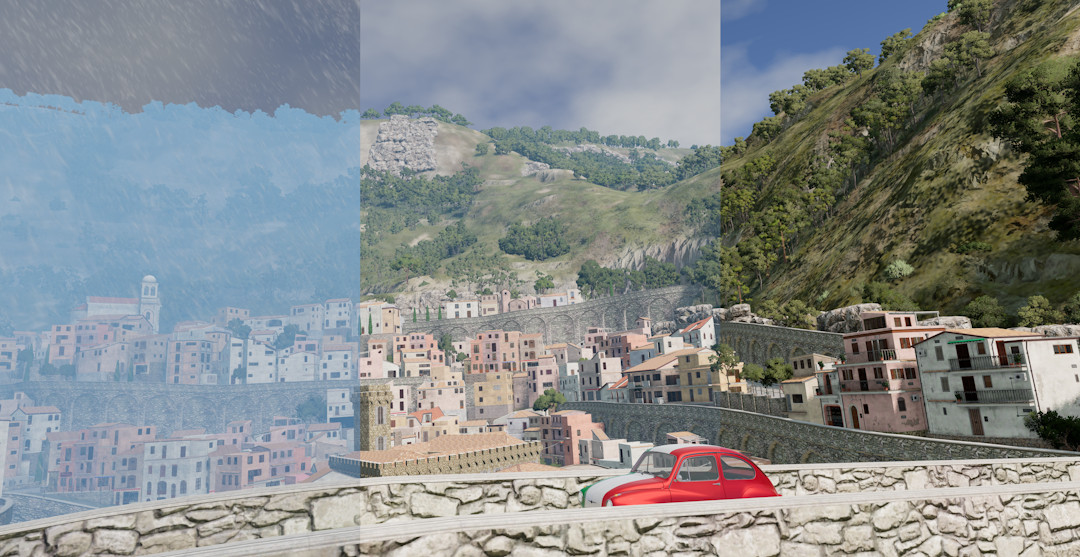
MK's Dynamic Weather 1.1

5/5,
10
votes
Latest Update
latest
Version
1.1
· Improvements to Career Support and Tornados
· BeamNG.drive
0.36.x
1 year ago
Improved Career Support
Tornado Improvements
Other Stuff
- weather extension is loaded automatically upon entry (can be turned off in UI, so load in a map in freeroam first before playing career if you dont want this)
- tornadoStorm event is turned off by default (can be changed in UI)
- weather is saved upon saving/exiting career or disabling the extension
- previous weather is loaded if saved weather for a career slot exists, else sunny
- active tornadoes are saved as well and are loaded back in when re-entering the save
Tornado Improvements
- increased default tornado movement speed (0.5/sec >> 1/sec)
- changed tornado spawn behavior, now spawns further away from the player
- added option to spawn tornado at player or camera position
- spawn tornado at any precise position using "local pos = vec3(x,y,z) dynaminWeatherMK_tornado.setSpawnPosition(pos) dynaminWeatherMK_tornado.startTornado()"
- added option to make tornado follow a specific vehicle (can be selected in UI from a dropdown-list)
- improved control of tornado movement speed (now two parameters: seconds between each move & meters/distance traveled per move)
- stationary tornadoes are now possible
- added control over tornado duration for customized tornadoes
- added preset system to tornado customization (save/load your custom tornado settings, comes with two default presets)
- added option to use localized ForestWindEmitter for tornado (very weird - try at your own risk)
Other Stuff
- changed UI layout
- added option to change shadow logWeight and texture size to UI (logWeight = 0.992, texSize 2048 recommended for best results)
- added support for AgentMooshroom's Simple Traffic Japan Pack
- (hopefully) fixed traffic cars turning off their headlights at night/in tunnels
- some internal code changes (added custom extension hooks for weather & tornado, extended interface)
- changed icon in keybind settings
This mod brings dynamic weather to BeamNG!
In order to activate this mod, press Alt + W on any map. If you want to hide the weather messages, you can press Ctrl + Alt + W. These keybinds can be changed in the settings.
To install, simply download the attached file and put it into your mods folder.
Here's a list of all current features:
- weather events: sunny, cloudy, rainy, foggy
- dynamic fog and rain
- dynamic wind for plants (if supported) and vehicles
- windbursts occuring randomly from time to time
This is the official reupload of my dynamic weather mod. This page as well as the BeamNG Forums and Repo are the only places you should download this mod. If you find this mod on any other site, it wasn't uploaded by me and may be unsecure to use or download.
Please do not reupload this mod anywhere!
External Download Links:
Direct Download Links
Version: 1.1Updated: 1 year ago
Total Size: 104 KB
dynamic_weather_mk_repo_v1_modland.zip
direct download
· 104 KB
· added 1 year ago
This File is Scanned by Antivirus and is Safe.
More Details
About Mod
| Latest Version | 1.1 |
| Game | BeamNG.drive |
| Category | Maps |
| Game Version | 0.36.x |
| Downloads | 10716 |
| Created | 1 year ago |
| Last Updated | 1 year ago |
| Last Virus Scan |
0/98
More Details |






![Mack Anthem / Pinnacle [PACK]](https://temp2.modland.net/i/6aa50a7184eaa/6ab9344368d3b/0_modland.webp)



map name on 2nd screenshot ?
this stupid mod doesnt even work dont waste ur time on getting this
u get it in repo
it doesnt work for me
My hi wont work
@Madmax neitjer
in what folder i have to put this?
@mega.knight. Thank you it works perfectly.
@Snickers Into the mods folder. Open the BeamNG launcher and go to Manage User Folder > Open In Explorer. You should see a mods folder in there, if not just create one. Put the zip file into there and it should work.
came here from simulation adventures video, great work!
this is the man who will save us all in the beamng community!