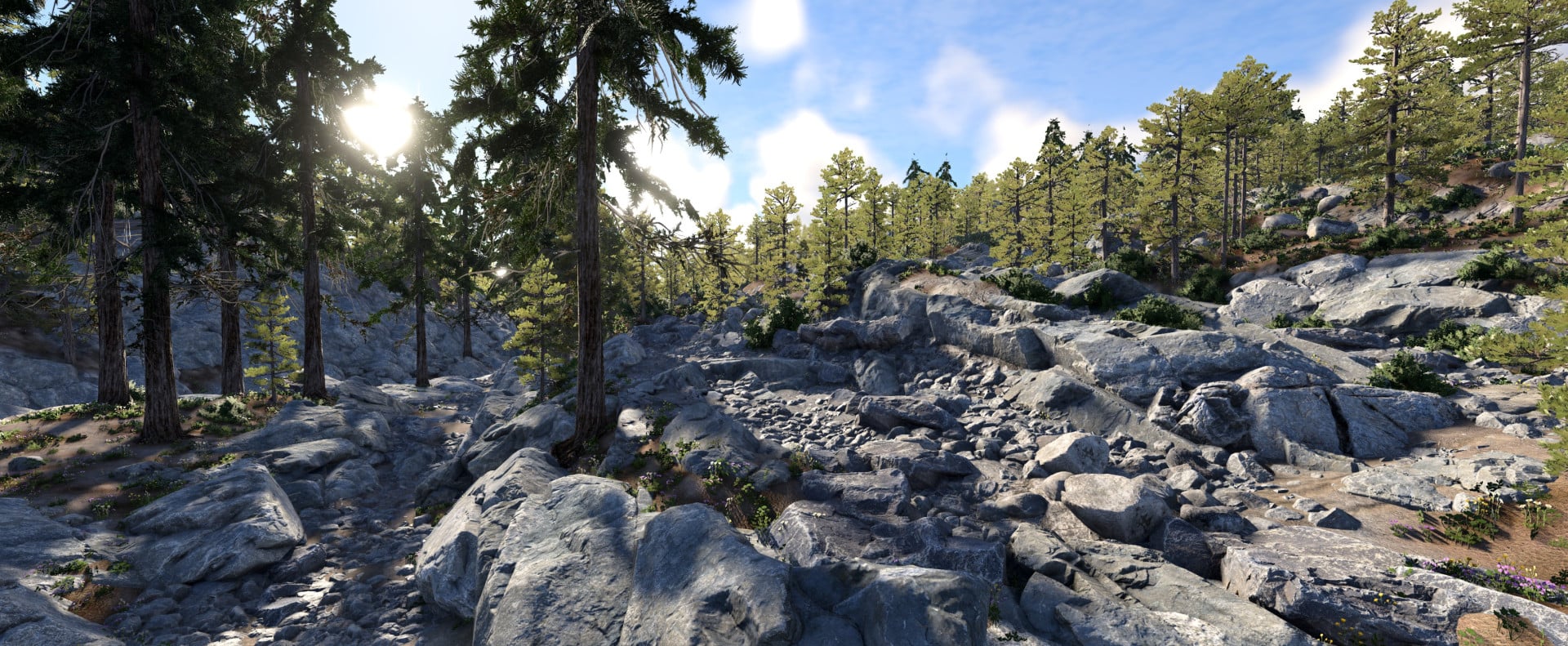
Rubicon Trail 0.7.3

Latest Update
Rubicon Trail – Version 0.7.3 Update (Hotfix)
Version 0.7.3 of Rubicon Trail is now available! This update fixes a collision issue affecting certain environmental objects.
Fixes in v0.7.3:
- 🪨 Fixed rock collisions: Rocks now have working collision, restoring the proper rock crawling experience.
Thank you to everyone who reported this issue and helped identify the problem!
Enjoy the trail!
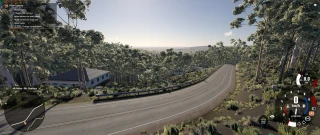
Discover Rubicon Trail, a map created for that immerses you in a wild environment inspired by the famous rocky landscapes of California. Designed for off-road exploration and crawling enthusiasts, this map features technical crawler paths, varied roads, and numerous sections that will challenge your driving skills.
Currently in development (version 0.1), this first release lays the foundation of the experience and will continue to evolve with new areas, visual improvements, and gameplay adjustments in future updates.
Although fictional, the map captures the natural atmosphere, rugged terrain, and spirit of adventure that make this type of environment legendary among off-road fans.
About the Rubicon Trail
The real Rubicon Trail is a legendary off-road route located near South Lake Tahoe in California, United States. Known for its massive rocks, technical passages, and spectacular mountain scenery, it is considered one of the most iconic rock-crawling trails in the world. For decades, it has attracted adventurers, 4×4 clubs, and nature enthusiasts eager to take on its demanding terrain.
This map is a fictional interpretation freely inspired by this unique environment.
External Download Links:
About Mod
| Latest Version | 0.7.3 |
| Game | BeamNG.drive |
| Category | Maps |
| Game Version | 0.40.x |
| Downloads | 12738 |
| Created | 9 months ago |
| Last Updated | 3 weeks ago |


All your maps are amazing, and you’re even sharing them for free. Could you please fix the link for Lake Trail?
@MatMapinG Thank you so much! I downloaded Lake Trail v1.2, but it had some issues and missing textures. I managed to fix most of them using AI, and then I realized this map is truly amazing—the scenery and the little paths are just fantastic. You’re a real genius!
Thank you so much!
@cui04546 I'm currently working on repairing both Lake Trail and Crawling Lands. I'll try to get them working again and make them available as soon as possible.
Thanks for your patience! 👍
I know you said you fixed it but when I load into the map, nothing appears. All the trees and rocks are gone.
@MatMapinG It was user error; I had to manually go in and clear my user data for it to show up. Awesome map!
@Josh Fowler Thanks for trying
Unfortunately, everything is working fine on my end, so I'm not sure what could be causing this issue.
It's difficult for me to identify the problem without being able to reproduce it.
Sorry I can't help more for now!
@MatMapinG tried that, still no change.
@MatMapinG yes I can try that
@Josh Fowler Hey!
Could you try clearing your BeamNG.drive game cache and then restarting the game?
Sometimes old cached files can cause issues with loading map assets.
Let me know if that fixes the problem.
For my part, the map is working again, but the GPU load is far too high—even with an RTX 4070 Super! What a shame; it’s one of the best mods for BeamNG!
@flo8140 Launch the game in D3D11 Rendered, it should run better.
Rocks appear invisible on my end. I can drive right through them, even though I can see them on the ground.
Link doesnt work for me :(
@NPC Hi!
The download link is working fine on my end. Could you please try again a few times throughout the day?
There might be too many people trying to download the map at the same time, which could cause temporary issues.
Sorry for the inconvenience, and thanks for your patience!
Possible to drive through every single rock & tree. Map runs better than ever before but something is seriously broken. You can literally drive through every rock, no collision at all. @MatMapinG
@VW Thanks for reporting this issue!
You're right, there is indeed a problem with collisions on the map. I'll investigate the issue and do my best to fix it in the next update.
Sorry for the inconvenience, and thanks for bringing this to my attention!
links not working bro
@Gully Hi!
The download link is working fine on my end. Could you please try again a few times throughout the day?
There might be too many people trying to download the map at the same time, which could cause temporary issues.
Sorry for the inconvenience, and thanks for your patience!
@Gully dude how do i fix that i tried everything
I love this map and it used to be my "go to" offroading map for a long time without any problems or performance issues, sadly after 0.39 and still in 0.40, BeamNG has an issue where VRAM usage sky rockets over what my GPU is capable (8GB). The map loads and i can roam around it, but the game is trying to use 9GB+ VRAM which makes every texture look blurry and they cannot load propperly, plus fps drops after a while. I have no idea if it's an issue with the map itself or a bug with the game, but it makes the map unplayable :(
@mano Thank you so much for your feedback and for supporting the map!
I'm sorry to hear about these performance issues. I'll try to work on an optimized version of Rubicon Trail specifically for lower-end PCs and GPUs with limited VRAM.
I'll do my best to reduce VRAM usage and improve performance while keeping the map's visual quality as much as possible.
Thanks again for taking the time to report this issue! Your feedback is greatly appreciated.
@mano wow same issue happening on my pc, on other maps i played like even on normal textures the textures look bad !
wowwwww this map is nice
crashes my game every time i really wanna ty this map how do i get it to load
Super!!!
@MatMapinG The map seems broken in version 0.39 (0.7.1). There is no "No texture" issue, but environmental elements, vegetation, and even the player's vehicle skin fail to load—not to mention the severe drop in frame rate.
@MatMapinG Hello. I might have found the problem for some of us: the card doesn't seem to be compatible with D3D12 (it works for me, but only with D3D11...).
@flo8140 On my side, I haven't experienced any texture loading issues or FPS drops while testing the map. I'll look into reducing the map's file size for the next update.I'll resume development and updates in September, after the summer break. Thanks for your patience and for reporting the issue!
@MatMapinG Okay, thanks, I'll give that a try. However, several of us are noticing that textures aren't loading and FPS is dropping. Is there a plan to reduce the map size (in GB)?
@flo8140 Hello,
Thank you for your feedback.
I recommend trying the following steps:
Clear the game cache.
Verify the integrity of the game files in BeamNG.drive.
These steps will most likely remove the map, so you'll need to reinstall it afterward.
This should fix the issue if it is caused by corrupted game or cache files.
@MatMapinG this map just crashes my game. any suggestions?
@sidsideways same
does this work in MP?
An amazing map! I contacted @MatMapinG to share some ideas. I'm really looking forward to the next updates. Thank you so much !