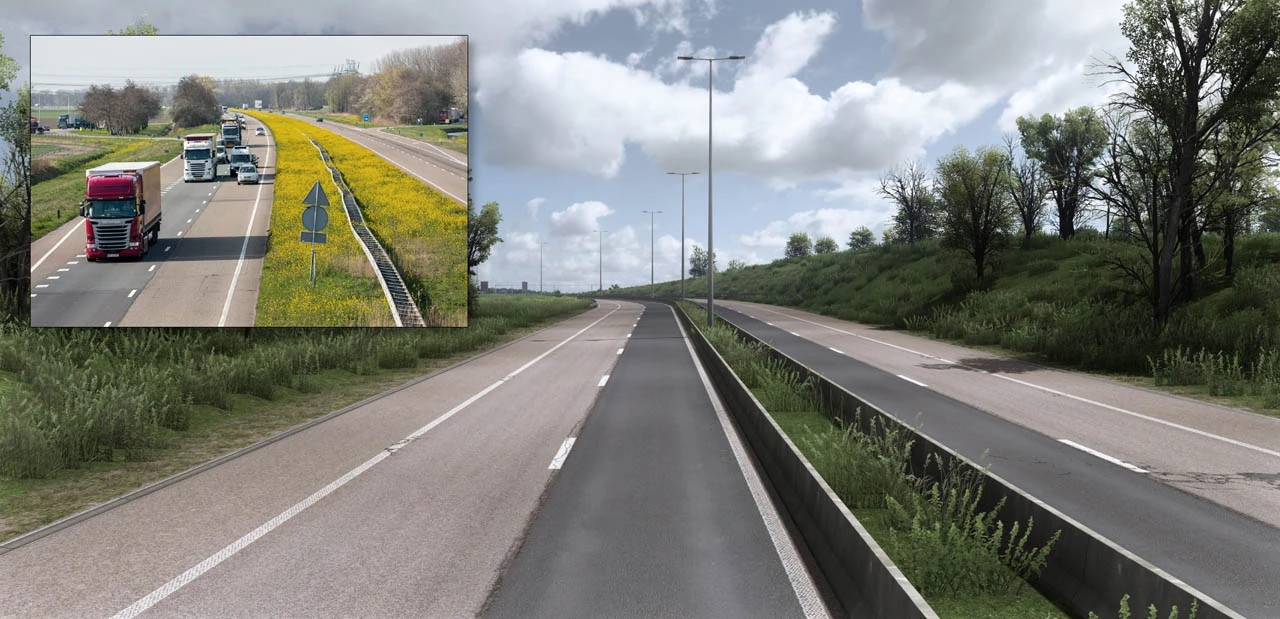
PNG Road to Spring v2.0.2

Latest Update
Changelog v2.0.2
-Fixed prefab problem on promods map (Baltic dlc)
-Fixed texture transition issues (France dlc)
-FIxed some materials (BLKE dlc)
-Update for 1.60.x
BASE_0 and BASE_3 is no longer needed! Map mods under PNG!
Changelog v2.0.1
- Huge Textures/Materials Update 1/2
- New rain environment
- Reworked Spring Addon
- And much more!
Changelog v2.0 HotFix
-Updated and fixed the base file
-fixed pink textures issue ETS2
Changelog v2.0 Fix
- Huge Textures/Materials Update 1/2
- New rain environment
- Reworked Spring Addon
- And much more!
The following mods have also been updated:
- PhotorealisticExperience [1.58 and 1.59]
- NorthExperience [1.58 and 1.59]
- Free mod Real Generic Logos [1.58 and 1.59]
PhotorealisticExperience:
-Huge Textures/Materials Update 1/2
-New rain environment
-Reworked Spring Addon
and more
NorthExperience:
-Added new textures for the Benelux region. Some of these textures are shared across multiple areas, which is why they are included in this update.
Real Generic Logos:
-2 new gas stations: Pirmel → Shell and ENZ → OMV
-Real container textures, including Maersk and more
What’s next?
-PE for ATS 1.59 and garage fixes
-WinterExperience 2026 — 1.59 update
And much more!
Credits
LilDame, Vary, Others
External Download Links:
- Boostylink.com - NGR20SPRET160BGFX3-UNPACK.part1.rar [Modsfire Part 1] [2.5 GB]
- Boostylink.com - NGR20SPRET160BGFX3-UNPACK.part2.rar [Modsfire Part 2] [1.67 GB]
- Boostylink.com - NGR20SPRET160BGFX3-UNPACK.part1.rar [Sharemods Part 1 (Mirror link)] [2.5 GB]
- Boostylink.com - NGR20SPRET160BGFX3-UNPACK.part2.rar [Sharemods Part 2 (Mirror link)] [1.7 GB]


Part 2 when downloaded is not in zip format and cannot be used.
@Truckers All files are extracted at the same time, this is a multi-volume archive. In the comments, I already explained how to unpack such archives.
Update it already, Emmoğlu— when are you finally going to update it?
günncellesene emmoglu artık ne zaman güncelleyecen
What is this 'boostylink' bull**** bro get that the **** outta here
@T3slaTV its called i wanna get some money from these people too,idiot
@DieselSmoak It's called 'people who helped you get the paid mod for free' Respect them, dip****.
Hey please update it, the update for PNG ets 1.61 is out by the by the creator so please upload the new files here as well
lol...look at these fkktards...puts the download links on a compulsory ad watching website to "unlock"...
Thank u man
Thank you
how to extract second file? i extract the first one just fine but im missing NorthExperience. it doesnt extract the second file
@Guest123 All files are extracted at the same time, this is a multi-volume archive. In the comments, I already explained how to unpack such archives.
Link doesn't work - I can't downoload this mod.
@SilesianBear Nevermind it works
Both parts contain the same files.
@iEyyadd I've already written in the comments many times that this is a multi-volume archive and how to unpack it. The multi-volume archive includes all the mod files, but it's divided into parts so they can be uploaded to an exchange site, as the exchange site won't allow uploads of a total size of 7 gigabytes or more.
Hi Thanks for this modI am using promods as well & I have kept all png files above promods. however most of the roads are pink indicating there is a missing road texture pack. If I remove png all mods, there is no issue. Below is my png orderPNG: Real Air Traffic[ETS]PNG: Street LampsPNG: Real Generic Logos[ETS]PNG: PE-SUMMERPNG: PE-RAINPNG: NorthExperiencePNG: PE-FOGGY WEATHERPNG: PE-WEATHERPNG: PE-BASE2PNG: PE-BASE1*Promods*
Ok I just saw mod order and placed mods. Bugfix file which was not in mod order image solved the issue.
Does it work on 1.60 or not?
@mods82
@John Yes
Is it compatible with version 1.55?
Có tương thích bản 1.55 ko ạ
Will this mod work in version 1.58?
@Ahmetaga Click the files button and download version v2.0 HotFix · ETS 2 1.59.x try it, in theory it should.
Thanks mate, but spring and rain files are not working for me, they make the make crash when loading. Using the others mods besides those 2 is good. Would appreciate an update, i'm using it with latest promods map mods. I'm sure those files are making it crash.