
Discussion: Radial Cheat Menu + imGUI menu

7
replies
3.4K
views

Discussion for the mod Radial Cheat Menu + imGUI menu

Donate patreon
YT Channel


How to use Radial menu:
Open Radial Menu by button E
and go to Freeroam Actions > Cheat Menu

How to use imGUI menu(new):
Open Radial Menu by button E
and go to Freeroam Actions > Cheat Menu
Click on "Open imGUI menu" (Blue star ★)

How to assign opening Menu to button:
1. Open game settings -> keyboard controls
2. Search - Radial Cheat Menu
3. Assign opening to any key on your keyboard/mouse/gamepad

FAQ:
- Tires exploding at 600-5000 km/h - is normal.
- When reducing the weight of the car, failure - is normal.
- When encountering an insoluble mode, the car disappears - is normal.
- Does this work in career mode? - Yes.
- Does this affect FPS? - No. (on v1.1.6, no function affects in-game FPS. FPS remained at 72 both before and after enabling all functions. Only the max RPM tweak may delay UI loading, but in-game FPS is unaffected.)
- Gamepad support - Yes.
- Is it free and safe? - Yes.
- There is a checked mod on modland - yes, video modland

Mod didn't appear, solution methods:
1. Re-enter the Map/Game.
2. Go to Game Settings -> Controls, find the Radial Cheat Menu, and assign a key to open it.
3. Reinstall the mod and re-enter the map.
4. If all else fails, re-enter the map, create a vehicle, and copy all errors from the console(press the tilde (~) or ` key on your keyboard). Send errors for topic.

If you have problems with installation:
1. Launch the game
2. open "Modifications," and click "Open Modifications Folder"
3. Copy the zip archive to this folder.
example: C:\Users\USERNAME\AppData\Local\BeamNG\BeamNG.drive\current\mods\RadialCheatMenu.zip
To ensure the mod updates automatically, copy the archive to the "repo" folder, example: C:\Users\USERNAME\AppData\Local\BeamNG\BeamNG.drive\current\mods\repo\RadialCheatMenu.zip

Or find the mod in the BeamNG repository search: Radial Cheat Menu.

Activate Menu in the Multiplayer:

1. you need to unpack the mod
2. copy codeCheatMenu.lua to C:\Program Files (x86)\Steam\steamapps\common\BeamNG.drive\lua\vehicle\extensions\auto\codeCheatMenu.lua
3. copy cheatMenuu.lua to C:\Program Files (x86)\Steam\steamapps\common\BeamNG.drive\lua\ge\extensions\cheatMenuu.lua

Cheat menu BeamNG: https://www.modland.net/beamng.drive-mods/other/radial-cheat-menu.html

Soon

wQzmhmmpnwSN5i9nnoC2vsMVamckXoeiIzrn2QTl-lg_modland.webp

Cheat menu BeamNG: https://www.modland.net/beamng.drive-mods/other/radial-cheat-menu.html

New version v1.3.3

Radial Cheat Menu + imGUI menu

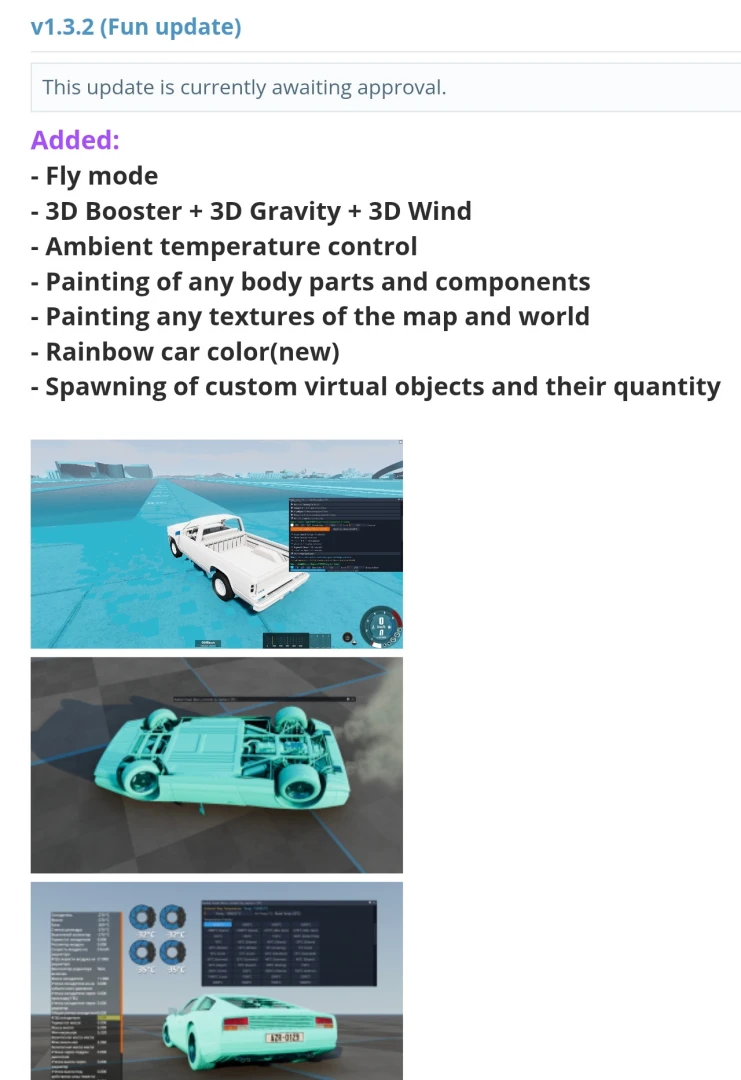
Added:
Size Map Multiplier

Virtual Rocket Booster. Switching on the gas pedal.

Fly mode

3D Booster + 3D Gravity + 3D Wind

Ambient temperature control

Painting of any parts and components

Painting any textures of the map and world

Rainbow car color(new)

Spawning of custom virtual objects and their quantity

Strength multiplier(v2 for parts, stable)

Parts Strength Editor

fix lua errors for Career mode

full tinting glass in any color

headlight color editor

movability of any car parts

wheel alignment

Manage all tire parameters in real time


Activate Menu in the Multiplayer:
YouTube video


Cheat menu BeamNG: https://www.modland.net/beamng.drive-mods/other/radial-cheat-menu.html

fix for version 0.39 will be published soon...

Cheat menu BeamNG: https://www.modland.net/beamng.drive-mods/other/radial-cheat-menu.html

The fixed version 1.3.5 is already awaiting publication for the game version 0.39

Cheat menu BeamNG: https://www.modland.net/beamng.drive-mods/other/radial-cheat-menu.html

v1.3.5 of the mod is only suitable for game version 0.39 (New, Published)

https://www.modland.net/beamng.drive-mods/other/radial-cheat-menu.html


v1.3.3 of the mod is only suitable for game version 0.38

Cheat menu BeamNG: https://www.modland.net/beamng.drive-mods/other/radial-cheat-menu.html

v1.3.5 of the mod is only suitable for game version 0.39 (New, Published)

v1.3.3 of the mod is only suitable for game version 0.38

If you continue to experience errors, they may be due to file caching.

To clear the mod cache, do the following:

1. Uninstall the mod Radial Cheat Menu

2. Close and reopen the game

3. Install the mod Radial Cheat Menu

The errors should 100% disappear

If the issue persists, please report

Cheat menu BeamNG: https://www.modland.net/beamng.drive-mods/other/radial-cheat-menu.html

New v1.3.9

https://www.modland.net/beamng.drive-mods/other/radial-cheat-menu.html


Added (imGUI):
- Virtual Braking Booster
- Part Softness Multiplier (Jelly Car)
- Freeze Strength Multiplier(v2 STABLE, for parts)
- Sticky Tires and Rollover protection
- Tire Protection v2 (Any speed)
- 3D Object Spawner: Spawn any static object in any quantity, size and location
- Individual Component Failures
- Easter egg management: speed, start/stop
- More ready-made buttons for "Why's This Dealer?"
- City Traffic Lights Control: Manage all traffic lights in the city using the menu
- 5-second banner at the top of the screen when physics instability is detected and prevented (physics instability protection function)
- Special Camera Controls
- Weather Control & Sky Customizer
- Real Astrnomical sky

Fixed:
- imGUI menu is now always in the game, not a separate Windows window (Now it doesn't disappear).
- Cleaning code from useless lines.
- Instability protection feature now places vehicles at their first spawn point OR at valid coordinates recorded 5 seconds ago (instead of placing them under the map).
- Instability Protection no longer respawns other vehicles you're not currently playing as (to ensure a smooth online experience).
- Displaying all objects in the Vehicles tab.

Cheat menu BeamNG: https://www.modland.net/beamng.drive-mods/other/radial-cheat-menu.html

Reply to Discussion: Radial Cheat Menu + imGUI menu

Use @ to mention users.