





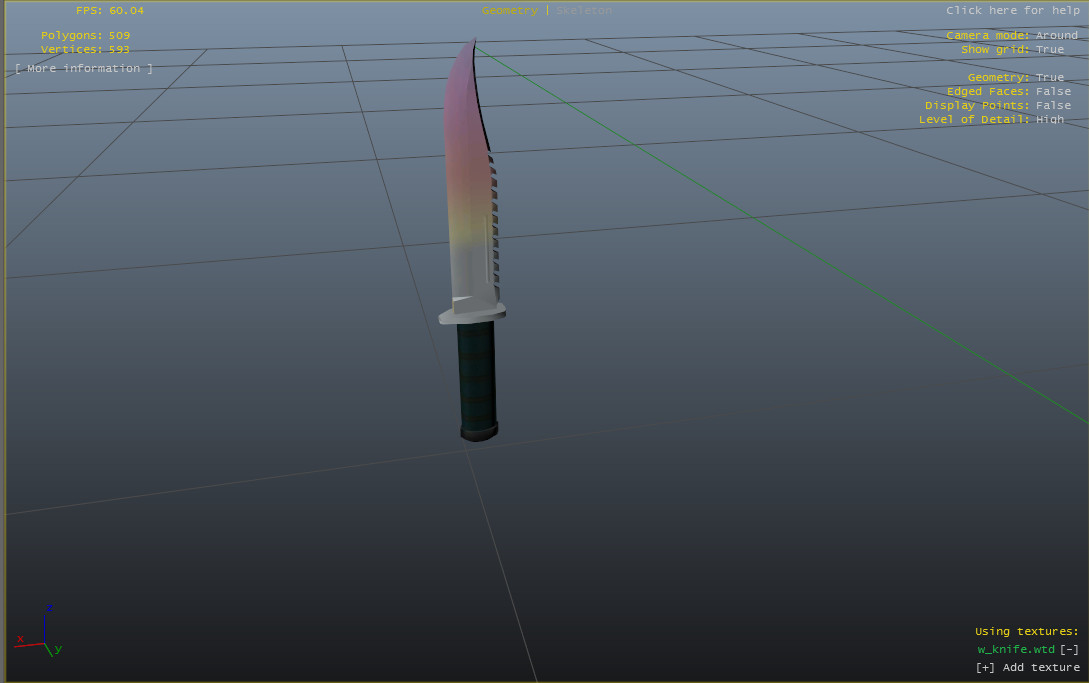
0/5,
0
votes
CS:GO Fade Knife skin for the regular knife.
INSTALL:
1. Go to OpenIv
2. Go into 'Models'
3. Go into 'Weapons.img'
4. Scroll down til you find 'w_knife.wtd'
5. Click 'Edit Mode'
6. Click on 'w_knife.wtd'
7. Click 'Replace'
8. Click on the skin
9. Click 'Save'
-------------------
I will gladly make any skins/models you guys would like, I am also making a sticker bomb pack since my M4 skin did so well. Please rate!
Credits:
illxst
INSTALL:
1. Go to OpenIv
2. Go into 'Models'
3. Go into 'Weapons.img'
4. Scroll down til you find 'w_knife.wtd'
5. Click 'Edit Mode'
6. Click on 'w_knife.wtd'
7. Click 'Replace'
8. Click on the skin
9. Click 'Save'
-------------------
I will gladly make any skins/models you guys would like, I am also making a sticker bomb pack since my M4 skin did so well. Please rate!
Credits:
illxst
Direct Download Links
You Might Also Like »





![4K Ultra HD Graphics V 4 Last [Final]](https://i2.modland.net/i/667c09fbb29e9/jsVs6CK76TjfogbFGmzSwPdpiQIaa7BuifA5wchn_modland.jpg)

0 Comments
There are no comments. Be first to comment!