
![NeoForge Installer [Minecraft 1.21.1, 1.20.6 - 1.20.1]](https://i2.modland.net/i/66c5cbeb7e5ee/neoforge_modland.webp)
![Timeless and Classics Zero (TaCZ) [Minecraft 1.20.1, 1.19.2, 1.18.2]](https://i2.modland.net/i/669683678b42d/description_0ac47139-8e79-4b76-8a0c-d79bcb9039df_modland.webp)
Timeless and Classics Zero (TaCZ) [Minecraft 1.20.1, 1.19.2, 1.18.2]
45099
919
6
2 years ago
by
Rol_nd
![Armor Durability HUD [Minecraft 1.21.4, 1.21.3, 1.21.2, 1.21.1, 1.21]](https://i2.modland.net/i/674bc2c2c404b/190618141923060623_modland.webp)
Armor Durability HUD [Minecraft 1.21.4, 1.21.3, 1.21.2, 1.21.1, 1.21]
24876
346
8
1 year ago
by
Rol_nd
0/5,
0
votes
Description
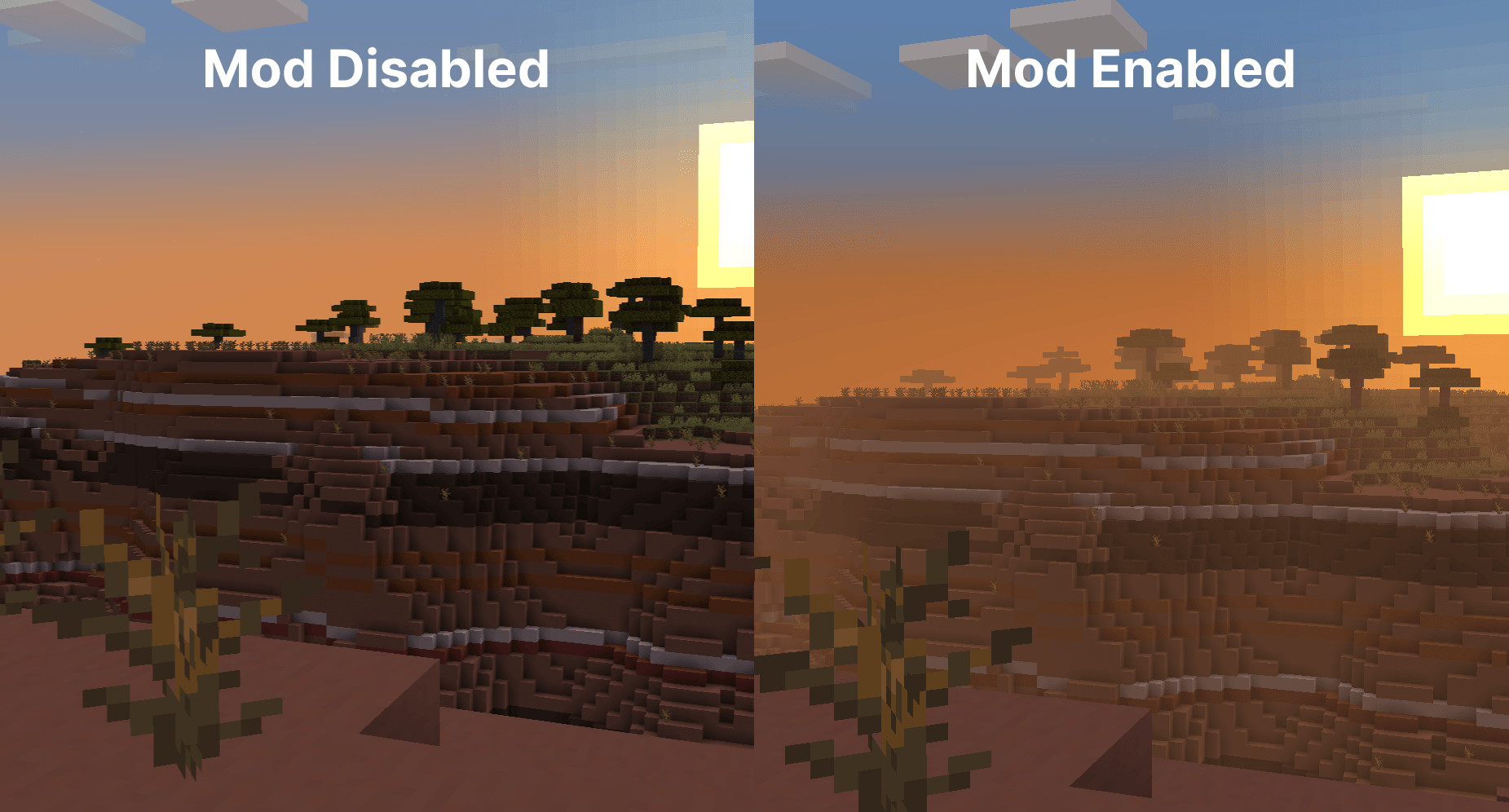
Fog completely reworks Minecraft's fog system, changing its color, start distance and end distance to give the world more depth and atmosphere. It shifts the beginning of the fog closer while maintaining the same overall view distance.
Most visual effects can be customized through the configuration menu or resource packs.
Features
- Cave Fog: Fog gradually becomes denser as you travel deeper underground, giving caves a darker and more atmospheric appearance.
- Weather Effects: Rain and snow can modify the fog, allowing different weather conditions to have their own visual atmosphere.
- Time & Moon Phase: Fog colors change throughout the day, with more vibrant colors during sunrise and sunset, and nighttime fog changes according to the current moon phase.
- Biome Fog: Different biomes can use their own fog colors, supporting modded biomes and customization through resource packs.
- Sky Improvements: When flying above the clouds with an Elytra, fog gradually fades away to provide a clearer view and remove unnatural horizon lines. Clouds are kept separate from fog coloration for consistency.
Configuration
Fog uses YetAnotherConfigLib for its configuration system.
- Fabric – Access settings through Mod Menu
- NeoForge – Access settings through the Mods List
Compatibility
- Mod Menu – Provides access to the configuration screen
- Sodium – Fully compatible
- True Darkness – Works alongside the moon phase modifiers
- Shaders using Minecraft's default fog system – Compatible
- Distant Horizons – Compatibility is planned for a future update
Supported Versions
Fog is available for Fabric and NeoForge on Minecraft 1.21–1.21.4.
Installation Instructions
Required Dependencies:
- Fabric API
- YetAnotherConfigLib
- M.R.U.
On Fabric, Mod Menu is needed to open the configuration screen.
Fog completely reworks Minecraft's fog system, changing its color, start distance and end distance to give the world more depth and atmosphere. It shifts the beginning of the fog closer while maintaining the same overall view distance.
Most visual effects can be customized through the configuration menu or resource packs.
Features
- Cave Fog: Fog gradually becomes denser as you travel deeper underground, giving caves a darker and more atmospheric appearance.
- Weather Effects: Rain and snow can modify the fog, allowing different weather conditions to have their own visual atmosphere.
- Time & Moon Phase: Fog colors change throughout the day, with more vibrant colors during sunrise and sunset, and nighttime fog changes according to the current moon phase.
- Biome Fog: Different biomes can use their own fog colors, supporting modded biomes and customization through resource packs.
- Sky Improvements: When flying above the clouds with an Elytra, fog gradually fades away to provide a clearer view and remove unnatural horizon lines. Clouds are kept separate from fog coloration for consistency.
Configuration
Fog uses YetAnotherConfigLib for its configuration system.
- Fabric – Access settings through Mod Menu
- NeoForge – Access settings through the Mods List
Compatibility
- Mod Menu – Provides access to the configuration screen
- Sodium – Fully compatible
- True Darkness – Works alongside the moon phase modifiers
- Shaders using Minecraft's default fog system – Compatible
- Distant Horizons – Compatibility is planned for a future update
Supported Versions
Fog is available for Fabric and NeoForge on Minecraft 1.21–1.21.4.
Installation Instructions
Required Dependencies:
- Fabric API
- YetAnotherConfigLib
- M.R.U.
On Fabric, Mod Menu is needed to open the configuration screen.
External Download Links:
- Modsfire.com - fog-1.12.126.2-neoforge.jar [283.86 KB]
Direct Download Links
You Might Also Like »
![[1.5] THE DROPPER](https://li1.modland.net/minecraft/maps/thumbnail/th_ModLandNet_1.jpg)
_modland.webp)
0 Comments
There are no comments. Be first to comment!