Cummins L10 Straight pipe sound 1.0

5/5,
4
votes
[1/31/2022|1.43]
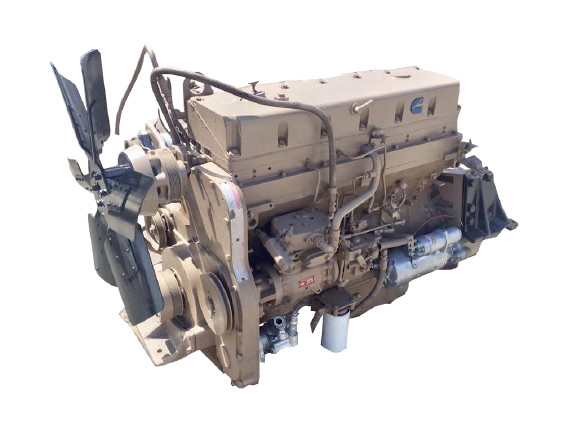
This mod is Cummins L10 engine with straight pipe sound for SCS and truck mods in ATS
and XBS Sisu M-Series and RJL Sisu R & C-Series in ETS2
Version 1.0 Feature:
-Cummins L10 240-310HP and 500HP tuned engines with straight pipe sound
-Custom sound orientation for realistic sound from different angles
-New Improved sound attenuation for realistic sound fade off and distortion effects on distance
-New Improved exhaust distortion for realistic exhaust tone
depends on throttle pressed, rpm, intake pressure and works along with sound attenuation
-Included Customizable Additional Supported Trucks (CAST) in the mod
If you don't know what CAST is :
https://steamcommunity.com/workshop/filedetails/discussion/665335536/3156453942274154402/
Quick tutorial on how to use CAST
1. Goto def/vehicle/truck/
2. Rename one of zcustom_xx into truck def name you want
(optional but should do)
3. get inside that folder/engine/
4. Open every l10_xxx.sii files and look at line 3
5. change "l10_xxx.custom.engine" to "l10_xxx.(truck def name).engine" for every files in that folder
and you should good to go
Credits:
Slav Jerry - sound modding and samples
This mod is Cummins L10 engine with straight pipe sound for SCS and truck mods in ATS
and XBS Sisu M-Series and RJL Sisu R & C-Series in ETS2
Version 1.0 Feature:
-Cummins L10 240-310HP and 500HP tuned engines with straight pipe sound
-Custom sound orientation for realistic sound from different angles
-New Improved sound attenuation for realistic sound fade off and distortion effects on distance
-New Improved exhaust distortion for realistic exhaust tone
depends on throttle pressed, rpm, intake pressure and works along with sound attenuation
-Included Customizable Additional Supported Trucks (CAST) in the mod
If you don't know what CAST is :
https://steamcommunity.com/workshop/filedetails/discussion/665335536/3156453942274154402/
Quick tutorial on how to use CAST
1. Goto def/vehicle/truck/
2. Rename one of zcustom_xx into truck def name you want
(optional but should do)
3. get inside that folder/engine/
4. Open every l10_xxx.sii files and look at line 3
5. change "l10_xxx.custom.engine" to "l10_xxx.(truck def name).engine" for every files in that folder
and you should good to go
Credits:
Slav Jerry - sound modding and samples
External Download Links:
Videos

You Might Also Like »



0 Comments
There are no comments. Be first to comment!