Retro Sophisticated Backpacks v1.0



Timeless and Classics Zero (TaCZ) [Minecraft 1.20.1, 1.19.2, 1.18.2]
45347
920
6
2 years ago
by
Rol_nd



0/5,
0
votes
Description
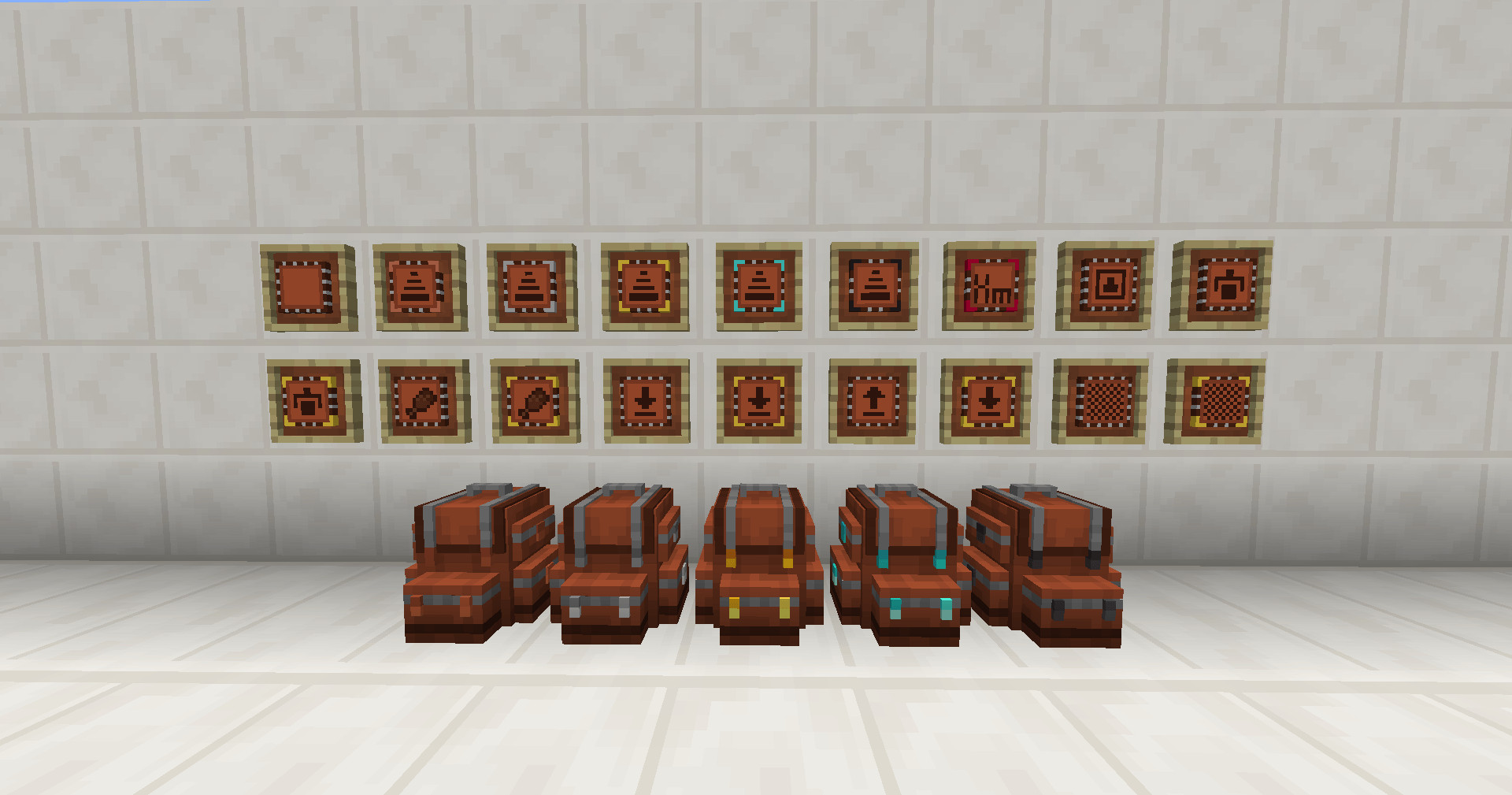
Retro Sophisticated Backpacks brings the storage and backpack customization features of Sophisticated Backpacks to Minecraft 1.12.2. This unofficial backport aims to recreate as many features of the original mod as possible while making adjustments to suit the older version of Minecraft.
Features
- Backpacks that can be carried and placed in the world
- Multiple backpack tiers, ranging from Leather to Obsidian
- Various upgrades for customizing portable storage
- Adjustable backpack and upgrade settings
- Extensive configuration options
- Gameplay adjustments designed for Minecraft 1.12.2
- Ongoing development with additional improvements and bug fixes
Development Status
This mod is still in early development and may contain bugs or compatibility issues. Some features may not work as expected. Backing up your worlds and game files before installation is strongly recommended, especially when using the mod in an existing modpack.
Retro Sophisticated Backpacks is an unofficial project and is not developed or maintained by P3pp3rF1y, the creator of the original Sophisticated Backpacks.
RLCraft Compatibility
Some players may experience crashes when installing Retro Sophisticated Backpacks alongside RLCraft. A possible workaround for standard, unmodified installations of the latest RLCraft version is provided.
Important: This solution is not guaranteed to work with every installation and may not be compatible with modified or forked versions of RLCraft.
Installation Instructions
Requirements:
- Minecraft 1.12.2
- Compatible mod loader and required dependencies for the selected release
RLCraft Installation Workaround:
- Back up your entire RLCraft instance before changing any files.
- Remove the following mods from your mods folder: Shadowfacts' Forgelin, LibrarianLib, Phosphor.
- Install the following mods: Mixin Booter, Modular UI, Forgelin Continuous, Retro Sophisticated Backpacks, LibrarianLib Continuous.
- Make sure you are using compatible, up-to-date versions of these dependencies.
- Launch RLCraft and check whether the game starts successfully.
Compatibility and Notes
- Designed to bring Sophisticated Backpacks functionality to Minecraft 1.12.2
- Includes adjustments for older Minecraft gameplay mechanics
- May contain unfinished features and bugs
- Compatibility with heavily modified modpacks is not guaranteed
- World backups are recommended before installation or updates
Credits
- P3pp3rF1y – Creator of the original Sophisticated Backpacks mod
- Retro Sophisticated Backpacks – Unofficial Minecraft 1.12.2 backport
Retro Sophisticated Backpacks brings the storage and backpack customization features of Sophisticated Backpacks to Minecraft 1.12.2. This unofficial backport aims to recreate as many features of the original mod as possible while making adjustments to suit the older version of Minecraft.
Features
- Backpacks that can be carried and placed in the world
- Multiple backpack tiers, ranging from Leather to Obsidian
- Various upgrades for customizing portable storage
- Adjustable backpack and upgrade settings
- Extensive configuration options
- Gameplay adjustments designed for Minecraft 1.12.2
- Ongoing development with additional improvements and bug fixes
Development Status
This mod is still in early development and may contain bugs or compatibility issues. Some features may not work as expected. Backing up your worlds and game files before installation is strongly recommended, especially when using the mod in an existing modpack.
Retro Sophisticated Backpacks is an unofficial project and is not developed or maintained by P3pp3rF1y, the creator of the original Sophisticated Backpacks.
RLCraft Compatibility
Some players may experience crashes when installing Retro Sophisticated Backpacks alongside RLCraft. A possible workaround for standard, unmodified installations of the latest RLCraft version is provided.
Important: This solution is not guaranteed to work with every installation and may not be compatible with modified or forked versions of RLCraft.
Installation Instructions
Requirements:
- Minecraft 1.12.2
- Compatible mod loader and required dependencies for the selected release
RLCraft Installation Workaround:
- Back up your entire RLCraft instance before changing any files.
- Remove the following mods from your mods folder: Shadowfacts' Forgelin, LibrarianLib, Phosphor.
- Install the following mods: Mixin Booter, Modular UI, Forgelin Continuous, Retro Sophisticated Backpacks, LibrarianLib Continuous.
- Make sure you are using compatible, up-to-date versions of these dependencies.
- Launch RLCraft and check whether the game starts successfully.
Compatibility and Notes
- Designed to bring Sophisticated Backpacks functionality to Minecraft 1.12.2
- Includes adjustments for older Minecraft gameplay mechanics
- May contain unfinished features and bugs
- Compatibility with heavily modified modpacks is not guaranteed
- World backups are recommended before installation or updates
Credits
- P3pp3rF1y – Creator of the original Sophisticated Backpacks mod
- Retro Sophisticated Backpacks – Unofficial Minecraft 1.12.2 backport
External Download Links:
Direct Download Links
You Might Also Like »







0 Comments
There are no comments. Be first to comment!