
![Timeless and Classics Zero (TaCZ) [Minecraft 1.20.1, 1.19.2, 1.18.2]](https://i2.modland.net/i/669683678b42d/description_0ac47139-8e79-4b76-8a0c-d79bcb9039df_modland.webp)
Timeless and Classics Zero (TaCZ) [Minecraft 1.20.1, 1.19.2, 1.18.2]
44354
916
6
2 years ago
by
Rol_nd
![NeoForge Installer [Minecraft 1.21.1, 1.20.6 - 1.20.1]](https://i2.modland.net/i/66c5cbeb7e5ee/neoforge_modland.webp)
![Armor Durability HUD [Minecraft 1.21.4, 1.21.3, 1.21.2, 1.21.1, 1.21]](https://i2.modland.net/i/674bc2c2c404b/190618141923060623_modland.webp)
Armor Durability HUD [Minecraft 1.21.4, 1.21.3, 1.21.2, 1.21.1, 1.21]
24490
341
8
1 year ago
by
Rol_nd
![[1.5] THE DROPPER](https://li1.modland.net/minecraft/maps/thumbnail/th_ModLandNet_1.jpg)

2/5,
1
votes
Description
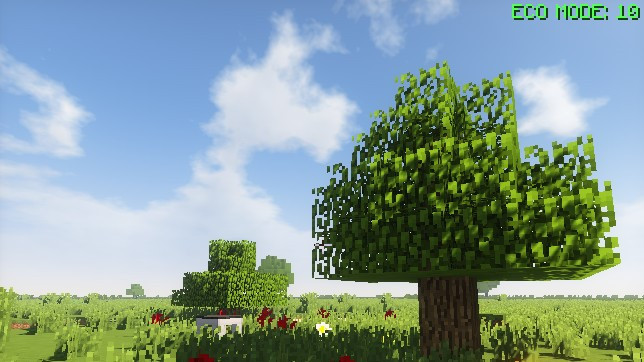
FPS Reducer helps lower Minecraft's CPU and GPU usage when you aren't actively playing. It automatically limits the frame rate while the game is minimized, unfocused or left idle, then restores your normal FPS as soon as you start using the game again.
This is a client-side mod, so nothing needs to be installed on the server.
Features
- Automatically reduces FPS when Minecraft is minimized or running in the background
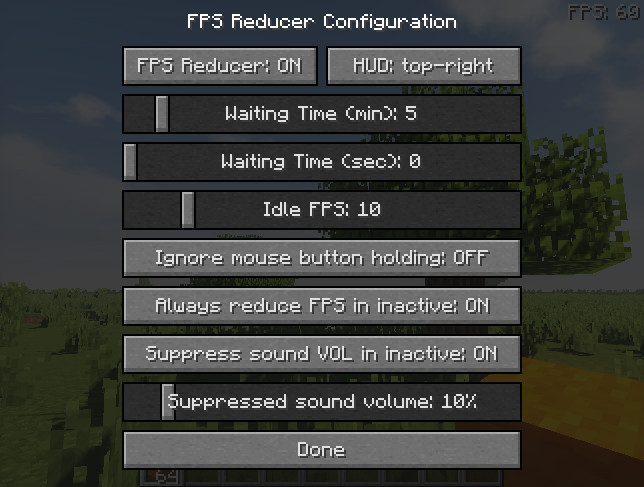
- Can lower FPS after a configurable period without player input
- Restores the normal frame rate when activity is detected
- Reduces game volume while the window is inactive
- Optional FPS counter displayed at the edge of the screen
- Can display CPU usage for the client thread
- Manual FPS reduction using the PAUSE key
- Configuration menu available through the END key by default
Default Behavior
When the Minecraft window becomes inactive or minimized, the frame rate is limited to 10 FPS. Version 2.0 and newer can also reduce FPS after a chosen amount of inactivity, although this option needs to be enabled in the configuration. Older 1.x versions use five minutes of inactivity by default before reducing the game to 10 FPS.
Why Use It?
FPS Reducer is useful if you frequently leave Minecraft running in the background, especially with automated farms, machines or other systems that don't require constant interaction. Reducing the frame rate while you're away also lowers unnecessary power usage and reduces the workload and heat generated by your PC.
Translations
Community translations are available for several languages, including Turkish, Polish, Simplified and Traditional Chinese, Russian, French, Brazilian Portuguese, German, Korean, Ukrainian, Dutch, Spanish and Classical Chinese.
FPS Reducer helps lower Minecraft's CPU and GPU usage when you aren't actively playing. It automatically limits the frame rate while the game is minimized, unfocused or left idle, then restores your normal FPS as soon as you start using the game again.
This is a client-side mod, so nothing needs to be installed on the server.
Features
- Automatically reduces FPS when Minecraft is minimized or running in the background
- Can lower FPS after a configurable period without player input
- Restores the normal frame rate when activity is detected
- Reduces game volume while the window is inactive
- Optional FPS counter displayed at the edge of the screen
- Can display CPU usage for the client thread
- Manual FPS reduction using the PAUSE key
- Configuration menu available through the END key by default
Default Behavior
When the Minecraft window becomes inactive or minimized, the frame rate is limited to 10 FPS. Version 2.0 and newer can also reduce FPS after a chosen amount of inactivity, although this option needs to be enabled in the configuration. Older 1.x versions use five minutes of inactivity by default before reducing the game to 10 FPS.
Why Use It?
FPS Reducer is useful if you frequently leave Minecraft running in the background, especially with automated farms, machines or other systems that don't require constant interaction. Reducing the frame rate while you're away also lowers unnecessary power usage and reduces the workload and heat generated by your PC.
Translations
Community translations are available for several languages, including Turkish, Polish, Simplified and Traditional Chinese, Russian, French, Brazilian Portuguese, German, Korean, Ukrainian, Dutch, Spanish and Classical Chinese.
External Download Links:
Direct Download Links
You Might Also Like »
_modland.webp)
_modland.webp)


![Mod Menu [Minecraft 1.21.1 - 1.14]](https://i2.modland.net/i/670844d8dfaa0/220113162237010137 (1)_modland.webp)
0 Comments
There are no comments. Be first to comment!