Just Enough Items (JEI) v19.27

![Timeless and Classics Zero (TaCZ) [Minecraft 1.20.1, 1.19.2, 1.18.2]](https://i2.modland.net/i/669683678b42d/description_0ac47139-8e79-4b76-8a0c-d79bcb9039df_modland.jpg)
Timeless and Classics Zero (TaCZ) [Minecraft 1.20.1, 1.19.2, 1.18.2]
![NeoForge Installer [Minecraft 1.21.1, 1.20.6 - 1.20.1]](https://i2.modland.net/i/66c5cbeb7e5ee/neoforge_modland.jpg)
![Armor Durability HUD [Minecraft 1.21.4, 1.21.3, 1.21.2, 1.21.1, 1.21]](https://i2.modland.net/i/674bc2c2c404b/190618141923060623_modland.jpg)
Armor Durability HUD [Minecraft 1.21.4, 1.21.3, 1.21.2, 1.21.1, 1.21]
![[1.5] THE DROPPER](https://li1.modland.net/minecraft/maps/thumbnail/th_ModLandNet_1.jpg)
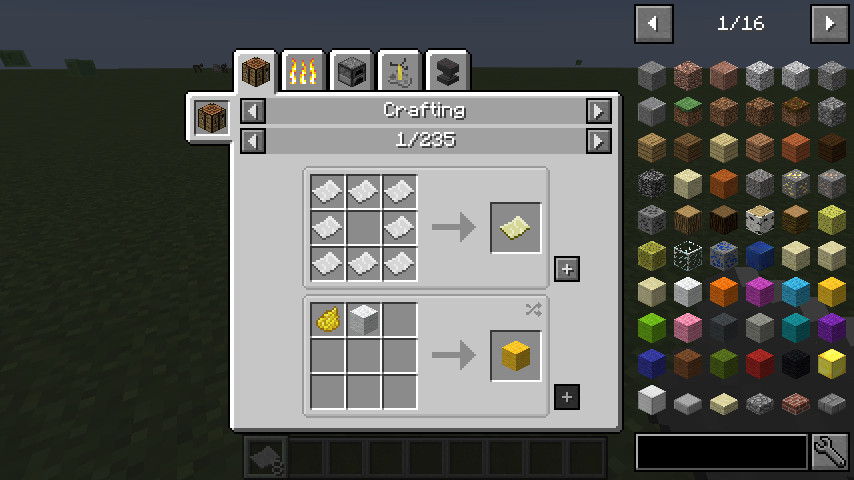
Just Enough Items (JEI)
Minecraft mod for viewing recipes and item uses.
Basic Controls:
Inventory:
– Show Recipes: Hover over item + R
– Show Uses: Hover over item + U
– Toggle Item List Overlay: Ctrl + O
Item List:
– Show Recipes: Click item or type R
– Show Uses: Right-click item or type U
– Next/Previous page: Scroll wheel
Config:
– Open menu: Click wrench at bottom-right
– Toggle Cheat Mode: Ctrl + click wrench
Search:
– Select: Click search bar or Ctrl + F
– Clear: Right-click
– By Mod Name: @modname (e.g., @thaum)
– Exclude: -word (e.g., @thaum -wand)
– Spaces: Use quotes ("two words")
Recipe View:
– Next/Previous page: Scroll wheel
– Show all recipes: Click category name
– Move items to crafting area: Click [+] (Shift-Click for multiple sets)
Advanced Search:
– Tooltip only: #word
– OreDict name: $word
– Creative tab: %word
– Multiple: Separate terms with |
Cheat Mode:
– Get full stack: Click item
– Get one item: Right-click item
– Delete item: Drop item into list
Item List Edit Mode:
– Hide item: Ctrl + Click
– Hide item & sub-items: Ctrl + Right-click
– Hide all from mod: Ctrl + Shift + Click
Compatibility:
– Can be used in mod packs
– 1.21.1 or lower: client-only features work with some limits
– 1.21.2+: server install required for recipe sync
Support:
– Issues and requests: JEI GitHub Issues page
_modland.jpg)
_modland.jpg)

![Mod Menu [Minecraft 1.21.1 - 1.14]](https://i2.modland.net/i/670844d8dfaa0/220113162237010137 (1)_modland.jpg)