Kev's Attributes Panel v1.0



Timeless and Classics Zero (TaCZ) [Minecraft 1.20.1, 1.19.2, 1.18.2]
45447
920
6
2 years ago
by
Rol_nd


0/5,
0
votes
Description
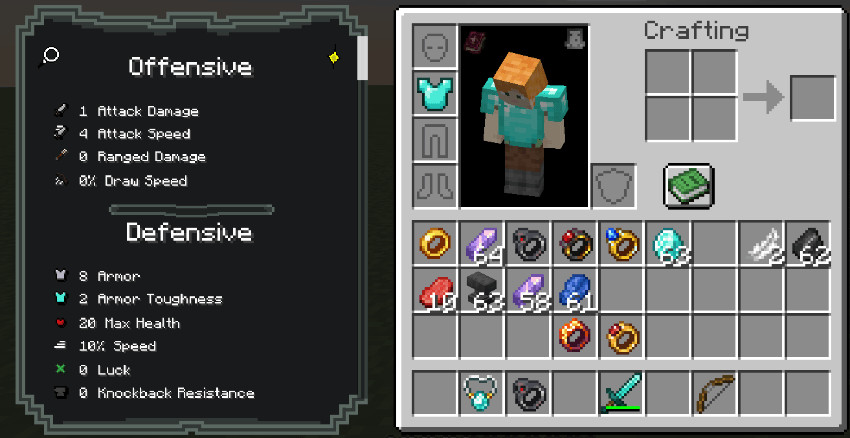
Kev's Attributes Panel is a Minecraft mod designed to provide support for displaying attributes from various RPG, equipment and progression mods. It includes built-in compatibility with several popular mods and allows resource pack creators to add custom descriptions to attributes, making their effects easier to understand.
Features
- Support for attributes from multiple Minecraft mods
- Built-in integration with RPG and progression systems
- Compatibility with equipment and accessory attributes
- Custom attribute descriptions through resource packs
- Support for attributes added by other mods
- Simple JSON-based localization system
Supported Mods
Kev's Attributes Panel currently includes native support for:
- TieredZ
- Trinkets
- Curios
- Accessories
- Reskillable Reimagined
- Apotheosis
- Pufferfish Skill Trees
- RPG Systems
- Spell Engine (Set Equipment)
- More Quest Types (Rewards)
- RPG Systems (Titles)
Adding Custom Attribute Descriptions
Custom descriptions can be added to attributes through a resource pack. This allows modpack creators to provide explanations for attributes that do not already have built-in descriptions.
The description system uses Minecraft's standard language files, allowing additional attribute explanations to be supplied without modifying the mod itself. This is particularly useful for modpacks combining multiple RPG systems, equipment modifications and character progression mechanics.
Additional Notes
- Custom descriptions are defined through resource-pack language files
- Attribute identifiers must match their corresponding mod and attribute names
- The included integrations provide support for the listed mods
- Additional attribute descriptions can be supplied using the same localization format
Installation Instructions
1. Create a resource pack or open an existing one.
2. Navigate to the following location inside the resource pack:
assets/<your_namespace>/lang/en_us.json
3. Add description entries using the following format:
{ "description.attribute.name.modid.attributename": "Your attribute description here.", "description.attribute.name.spell_engine.healing_taken": "Modifies how much healing is received." }
- Replace modid with the corresponding mod's identifier.
- Replace attributename with the attribute's registry name.
4. Save the JSON file and enable the resource pack in Minecraft.
The panel can then use the provided localization entries to display descriptions for the corresponding attributes.
Kev's Attributes Panel is a Minecraft mod designed to provide support for displaying attributes from various RPG, equipment and progression mods. It includes built-in compatibility with several popular mods and allows resource pack creators to add custom descriptions to attributes, making their effects easier to understand.
Features
- Support for attributes from multiple Minecraft mods
- Built-in integration with RPG and progression systems
- Compatibility with equipment and accessory attributes
- Custom attribute descriptions through resource packs
- Support for attributes added by other mods
- Simple JSON-based localization system
Supported Mods
Kev's Attributes Panel currently includes native support for:
- TieredZ
- Trinkets
- Curios
- Accessories
- Reskillable Reimagined
- Apotheosis
- Pufferfish Skill Trees
- RPG Systems
- Spell Engine (Set Equipment)
- More Quest Types (Rewards)
- RPG Systems (Titles)
Adding Custom Attribute Descriptions
Custom descriptions can be added to attributes through a resource pack. This allows modpack creators to provide explanations for attributes that do not already have built-in descriptions.
The description system uses Minecraft's standard language files, allowing additional attribute explanations to be supplied without modifying the mod itself. This is particularly useful for modpacks combining multiple RPG systems, equipment modifications and character progression mechanics.
Additional Notes
- Custom descriptions are defined through resource-pack language files
- Attribute identifiers must match their corresponding mod and attribute names
- The included integrations provide support for the listed mods
- Additional attribute descriptions can be supplied using the same localization format
Installation Instructions
1. Create a resource pack or open an existing one.
2. Navigate to the following location inside the resource pack:
assets/<your_namespace>/lang/en_us.json
3. Add description entries using the following format:
{ "description.attribute.name.modid.attributename": "Your attribute description here.", "description.attribute.name.spell_engine.healing_taken": "Modifies how much healing is received." }
- Replace modid with the corresponding mod's identifier.
- Replace attributename with the attribute's registry name.
4. Save the JSON file and enable the resource pack in Minecraft.
The panel can then use the provided localization entries to display descriptions for the corresponding attributes.
External Download Links:
Direct Download Links
You Might Also Like »




0 Comments
There are no comments. Be first to comment!