
![Timeless and Classics Zero (TaCZ) [Minecraft 1.20.1, 1.19.2, 1.18.2]](https://i2.modland.net/i/669683678b42d/description_0ac47139-8e79-4b76-8a0c-d79bcb9039df_modland.jpg)
Timeless and Classics Zero (TaCZ) [Minecraft 1.20.1, 1.19.2, 1.18.2]
44360
916
6
2 years ago
by
Rol_nd
![NeoForge Installer [Minecraft 1.21.1, 1.20.6 - 1.20.1]](https://i2.modland.net/i/66c5cbeb7e5ee/neoforge_modland.jpg)
![Armor Durability HUD [Minecraft 1.21.4, 1.21.3, 1.21.2, 1.21.1, 1.21]](https://i2.modland.net/i/674bc2c2c404b/190618141923060623_modland.jpg)
Armor Durability HUD [Minecraft 1.21.4, 1.21.3, 1.21.2, 1.21.1, 1.21]
24492
341
8
1 year ago
by
Rol_nd
![[1.5] THE DROPPER](https://li1.modland.net/minecraft/maps/thumbnail/th_ModLandNet_1.jpg)
0/5,
0
votes
Description
Realistic Furnace Ignition adds a new layer of realism to your survival experience. With this mod, furnaces no longer ignite automatically; you must light them yourself before they can start cooking.
Features
- Manual furnace ignition
- Supports vanilla and many modded furnaces
- Custom ignition items can be added through the configuration
- Reacts to environmental conditions such as fire and rain
- Introduces simple early-game progression through natural resource gathering
- Campfires and selected compatible modded blocks are placed in their unlit state and must be lit manually
Getting Started
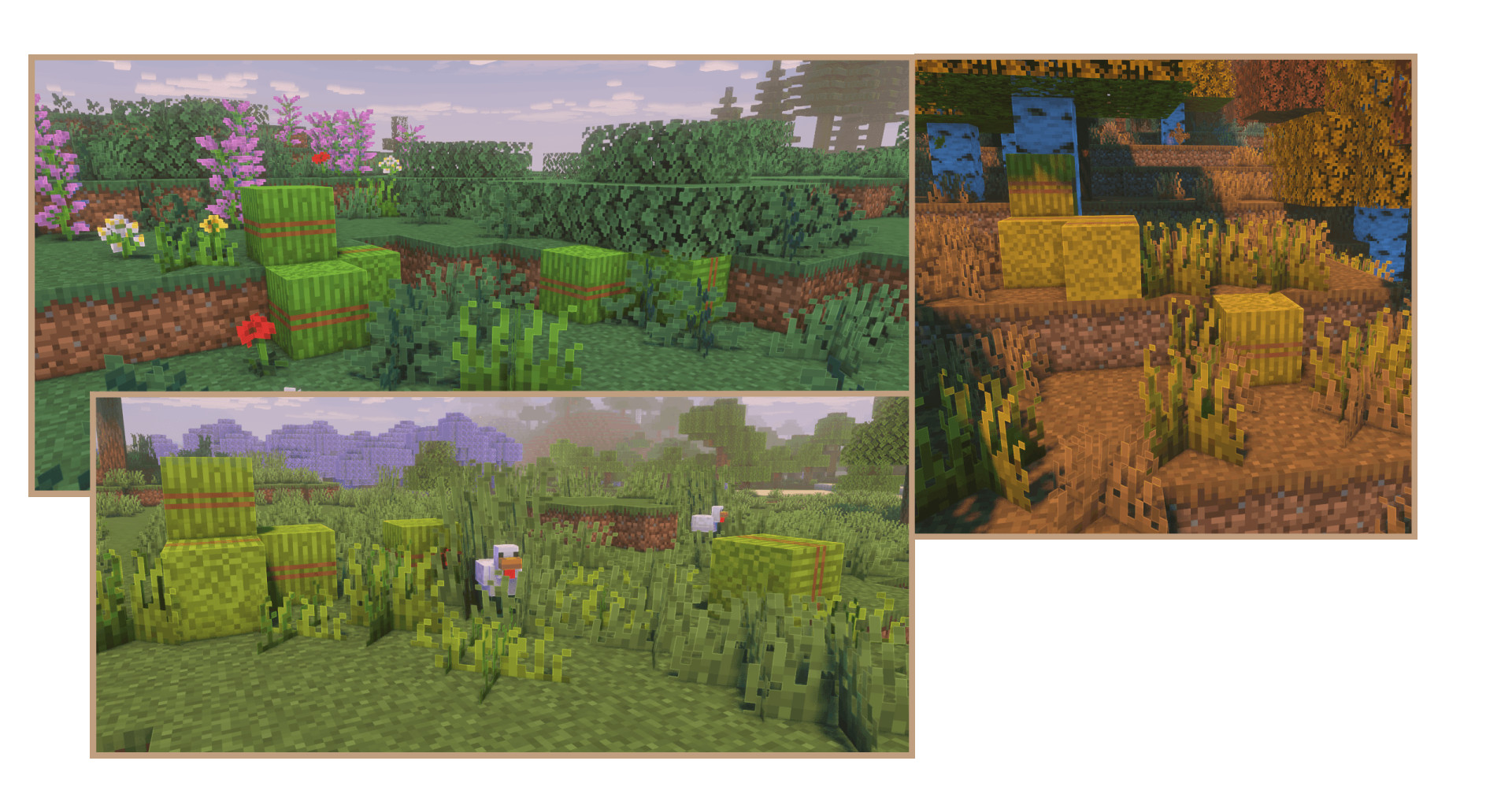
Find Switchgrass. It looks similar to regular grass but has a warmer yellow-green color. Its appearance changes with the biome, and it grows through three stages.
Harvesting
- Stage 1: No drops
- Stage 2: Drops 1 Switchgrass Fiber
- Stage 3: Drops 1 Switchgrass Fiber with a 40% chance to drop an additional fiber
Ignition Methods
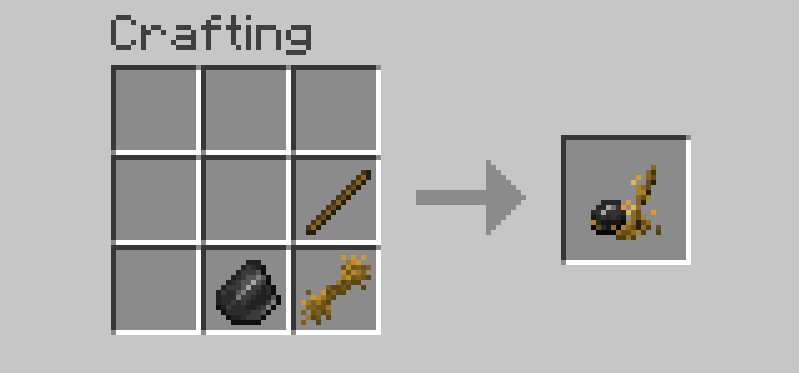
- Sparkling Flint: Crafted using Switchgrass Fiber and consumes one fiber per use
- Flint and Steel: Lights furnaces without consuming fiber
- Custom ignition items: Additional ignition tools can be configured through the mod settings
Using the Furnace
Place the correct ingredients and fuel inside the furnace, then ignite it to begin cooking. The furnace will continue working until the flame goes out. If you have limited fiber, keeping the fire burning will reduce how often you need to relight it.
Configuration
For modpack creators, the Bookling Gear configuration menu provides extensive customization options, including:
- Adjusting Sparkling Flint requirements
- Managing supported ignition items
- Enabling or disabling Switchgrass world generation
- Configuring additional gameplay options
Special Ignition Methods
- Double Flint Ignition: Hold flint in both hands and place Switchgrass Fiber or Baled Switchgrass in the fuel slot. Right-click to create sparks and ignite the furnace (Disabled by default).
- Golden Lighter: When the Curios mod is installed, equip the Golden Lighter to ignite furnaces regardless of the item held in your hands.
- Fire Aspect: Any item enchanted with Fire Aspect can light a furnace. Each use consumes 1 durability or one item if the item is stackable.
Environmental Ignition
Furnaces can also ignite automatically under certain conditions:
- Place a furnace above lava, fire, another configured heat source, or a lit block to ignite it automatically.
- Automatic ignition is disabled while the furnace is exposed to rain during rainstorms or thunderstorms, requiring manual ignition instead.
Guide Book
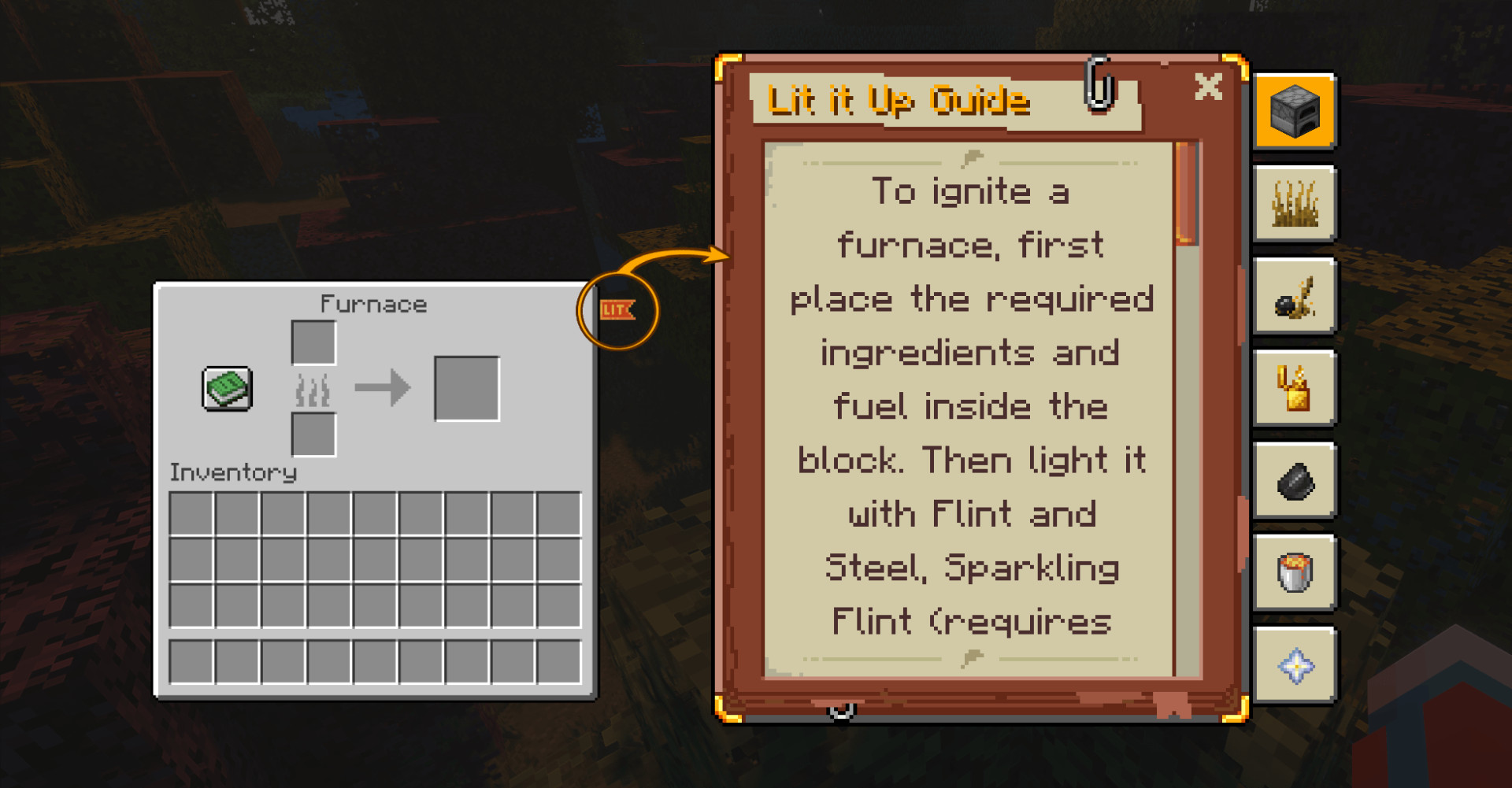
A built-in Guide Book is available from the right side of supported furnace interfaces. It provides ignition instructions, helpful usage tips, and compatibility information. If the "LIT" banner does not appear, the furnace is either unsupported or compatibility has been disabled.
Advancements
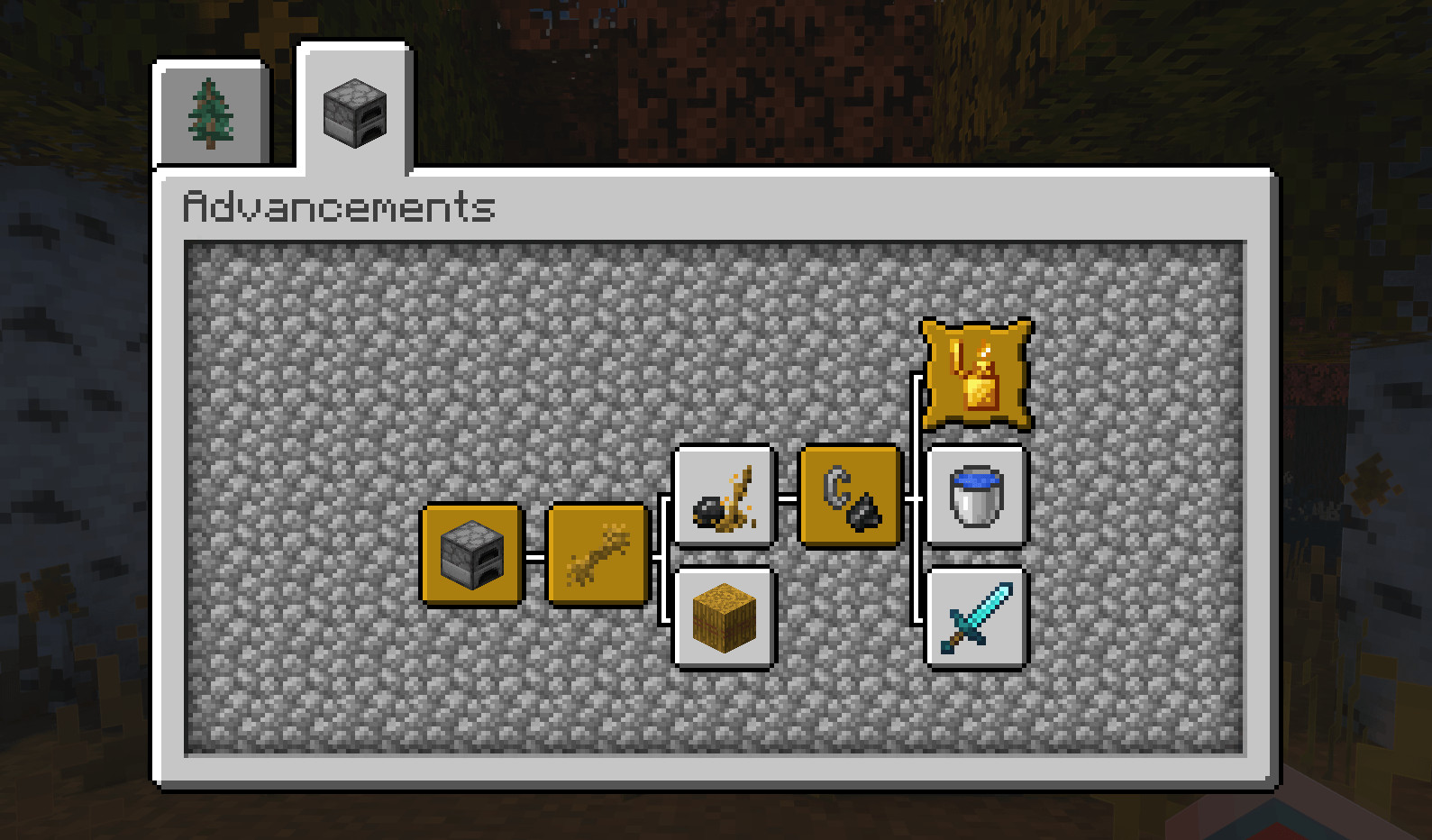
The mod includes a custom advancement system that introduces its mechanics through natural gameplay progression.
Realistic Furnace Ignition adds a new layer of realism to your survival experience. With this mod, furnaces no longer ignite automatically; you must light them yourself before they can start cooking.
Features
- Manual furnace ignition
- Supports vanilla and many modded furnaces
- Custom ignition items can be added through the configuration
- Reacts to environmental conditions such as fire and rain
- Introduces simple early-game progression through natural resource gathering
- Campfires and selected compatible modded blocks are placed in their unlit state and must be lit manually
Getting Started
Find Switchgrass. It looks similar to regular grass but has a warmer yellow-green color. Its appearance changes with the biome, and it grows through three stages.
Harvesting
- Stage 1: No drops
- Stage 2: Drops 1 Switchgrass Fiber
- Stage 3: Drops 1 Switchgrass Fiber with a 40% chance to drop an additional fiber
Ignition Methods
- Sparkling Flint: Crafted using Switchgrass Fiber and consumes one fiber per use
- Flint and Steel: Lights furnaces without consuming fiber
- Custom ignition items: Additional ignition tools can be configured through the mod settings
Using the Furnace
Place the correct ingredients and fuel inside the furnace, then ignite it to begin cooking. The furnace will continue working until the flame goes out. If you have limited fiber, keeping the fire burning will reduce how often you need to relight it.
Configuration
For modpack creators, the Bookling Gear configuration menu provides extensive customization options, including:
- Adjusting Sparkling Flint requirements
- Managing supported ignition items
- Enabling or disabling Switchgrass world generation
- Configuring additional gameplay options
Special Ignition Methods
- Double Flint Ignition: Hold flint in both hands and place Switchgrass Fiber or Baled Switchgrass in the fuel slot. Right-click to create sparks and ignite the furnace (Disabled by default).
- Golden Lighter: When the Curios mod is installed, equip the Golden Lighter to ignite furnaces regardless of the item held in your hands.
- Fire Aspect: Any item enchanted with Fire Aspect can light a furnace. Each use consumes 1 durability or one item if the item is stackable.
Environmental Ignition
Furnaces can also ignite automatically under certain conditions:
- Place a furnace above lava, fire, another configured heat source, or a lit block to ignite it automatically.
- Automatic ignition is disabled while the furnace is exposed to rain during rainstorms or thunderstorms, requiring manual ignition instead.
Guide Book
A built-in Guide Book is available from the right side of supported furnace interfaces. It provides ignition instructions, helpful usage tips, and compatibility information. If the "LIT" banner does not appear, the furnace is either unsupported or compatibility has been disabled.
Advancements
The mod includes a custom advancement system that introduces its mechanics through natural gameplay progression.
External Download Links:
- Modsfire.com - lititup-1.20.1-4.26.1.jar [253.83 KB]
Direct Download Links
You Might Also Like »
![Timeless and Classics Zero (TaCZ) [Minecraft 1.20.1, 1.19.2, 1.18.2]](https://i2.modland.net/i/669683678b42d/description_0ac47139-8e79-4b76-8a0c-d79bcb9039df_modland.webp)
![NeoForge Installer [Minecraft 1.21.1, 1.20.6 - 1.20.1]](https://i2.modland.net/i/66c5cbeb7e5ee/neoforge_modland.webp)
![Armor Durability HUD [Minecraft 1.21.4, 1.21.3, 1.21.2, 1.21.1, 1.21]](https://i2.modland.net/i/674bc2c2c404b/190618141923060623_modland.webp)
_modland.webp)
_modland.webp)

![Mod Menu [Minecraft 1.21.1 - 1.14]](https://i2.modland.net/i/670844d8dfaa0/220113162237010137 (1)_modland.webp)
0 Comments
There are no comments. Be first to comment!