Rewire - Perk and Attributes Loadout System v1.0





0/5,
0
votes
Description
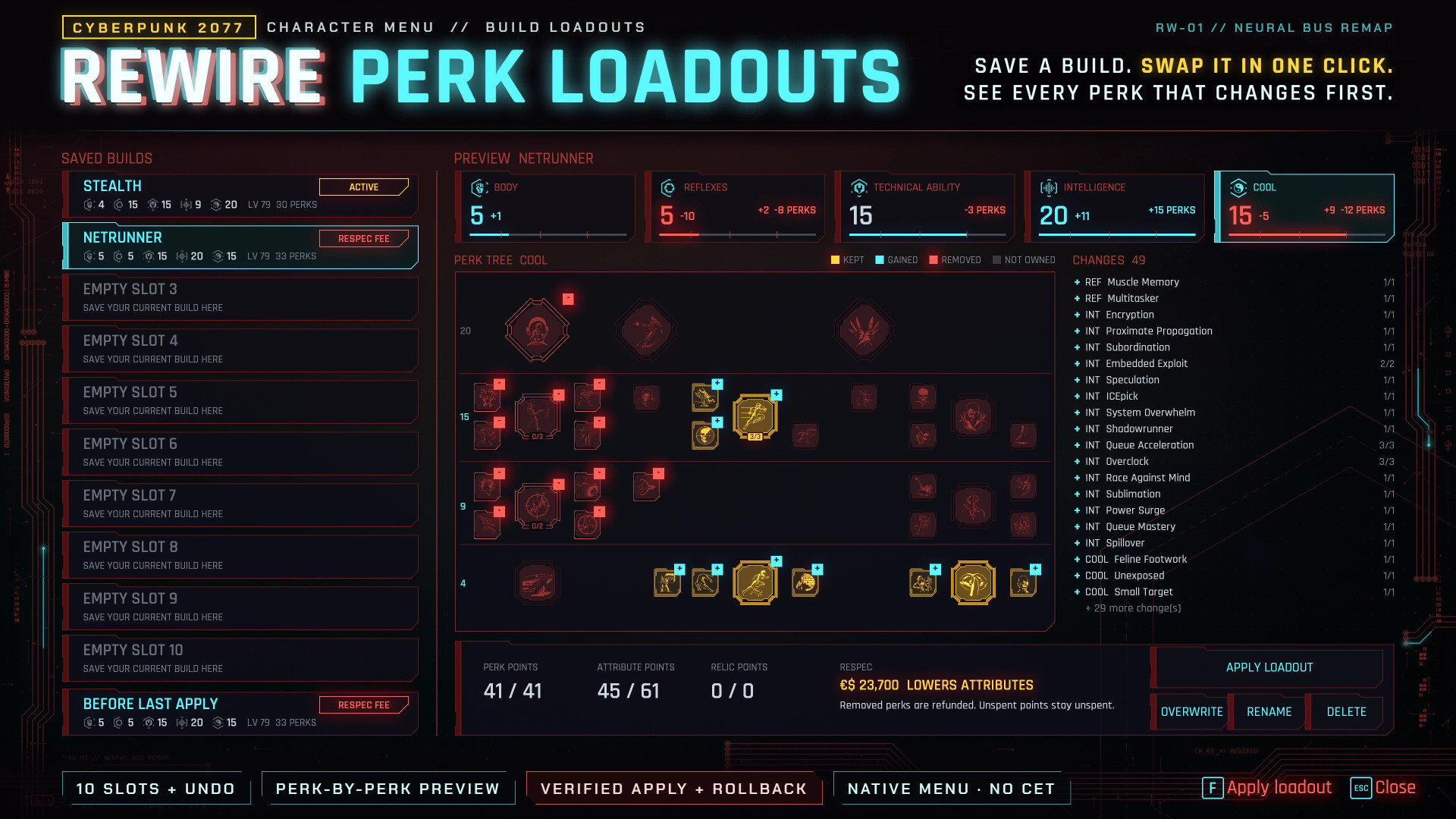
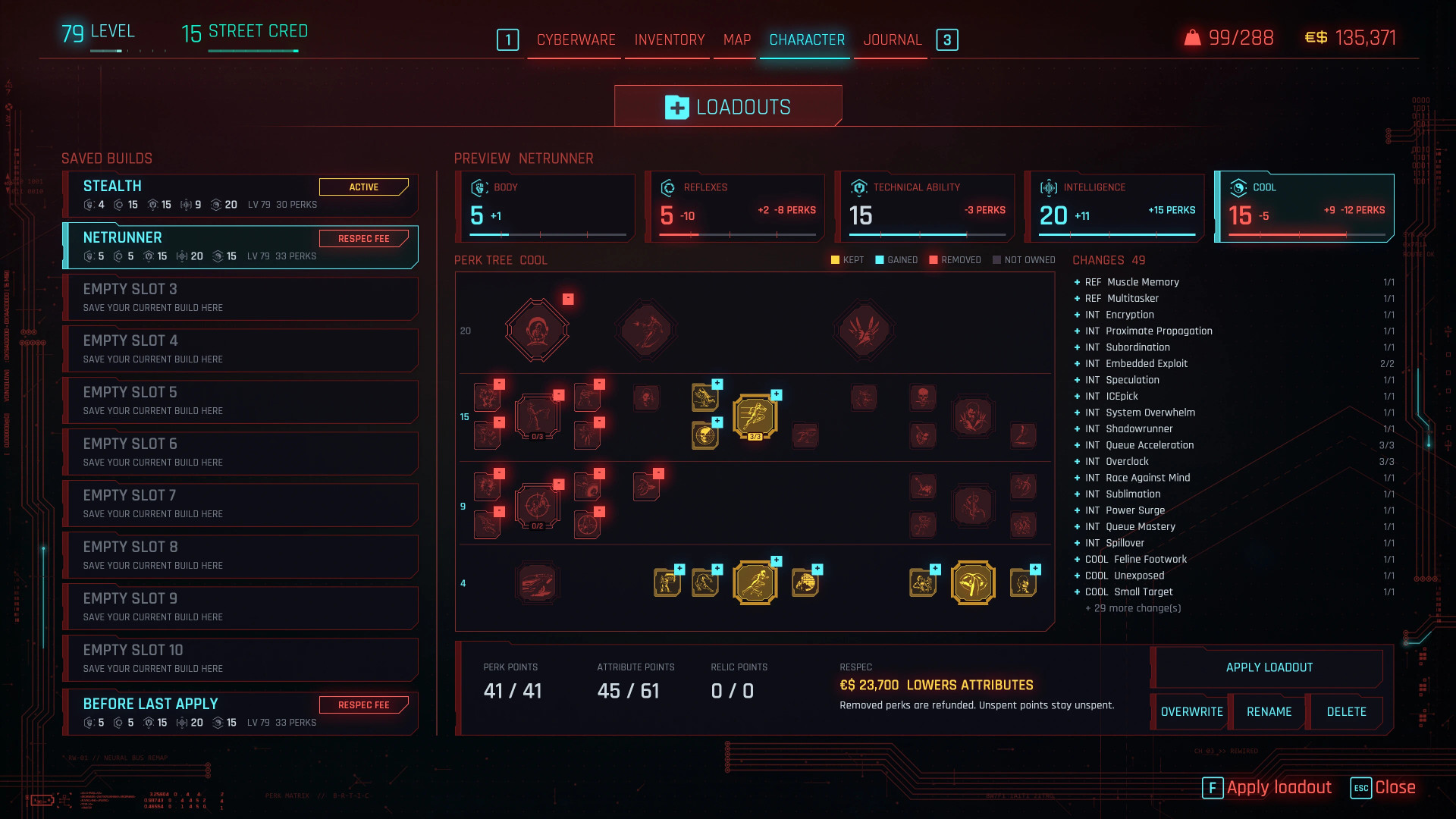
REWIRE adds a complete loadout system to Cyberpunk 2077's Character menu. Save your attributes and perks as named builds, preview exactly what will change, and swap between them without manually rebuilding your perk trees each time.
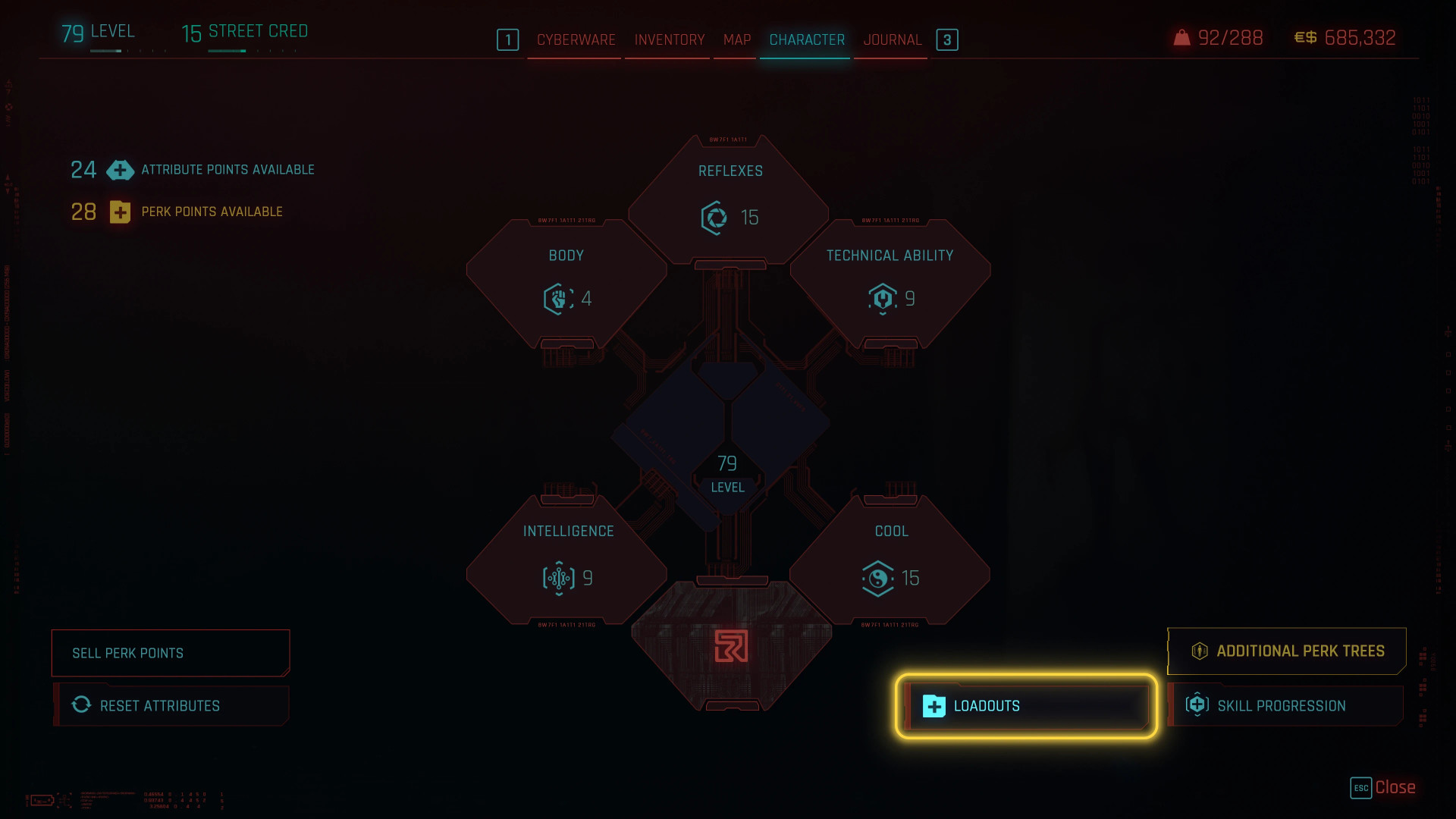
The new LOADOUTS button appears next to SKILL PROGRESSION and opens a screen designed around the game's existing perk interface.
Features
- 10 named loadout slots
- Additional undo slot containing your build from before the last swap
- Loadouts are stored directly in the save file, keeping them separate between playthroughs
- Saves all five attributes, their perk trees and the Relic tree
- Complete preview of changes, including target values and differences for every attribute
- Visual indicators for perks being kept, gained or removed
- Separate list showing every perk being added, removed or re-levelled
- Automatic restoration of previous build if the resulting setup does not match the selected loadout
- Full controller support (D-pad for selection and tree switching)
- Compatible with Custom Perk Framework
Respec Rules
REWIRE follows the vanilla progression system rather than providing unrestricted free respecs:
- Perk changes remain free
- Increasing attributes consumes available attribute points
- Lowering any attribute costs Player Level × 300 eddies per apply
- The fee is only charged after a successful loadout change
- Loadouts cannot be applied during combat
Additional Notes
Cyberware restrictions are respected; Technical Ability perks required by installed cyberware cannot be removed. Relic perks are supported after unlocking the Relic tree in Phantom Liberty. If a loadout requires more perk points than available, REWIRE applies as much of the saved build as possible.
How to Use
- Open the Character menu
- Select LOADOUTS, located to the left of SKILL PROGRESSION
- Select an empty slot and choose SAVE
- Give the build a name
- Select a saved loadout to preview its changes
- Choose APPLY LOADOUT or press F
- Review the summary and any applicable respec fee before confirming
OVERWRITE replaces a saved slot with your current build, while RENAME and DELETE can be used to manage existing loadouts.
Requirements
- Cyberpunk 2077 2.3 (Built and tested on version 2.31)
- RED4ext
- redscript
- Codeware
Installation Instructions
Copy the archive and r6 folders into your Cyberpunk 2077 game directory, or install the mod through Vortex. REWIRE can safely be added to an existing save.
Uninstallation
Delete:
r6/scripts/Rewire
archive/pc/mod/RewirePerkLoadouts.archive
Credits
- psiberx – Codeware
- jac3km4 – redscript
- WopsS – RED4ext
- CDPR – Original perk system
REWIRE adds a complete loadout system to Cyberpunk 2077's Character menu. Save your attributes and perks as named builds, preview exactly what will change, and swap between them without manually rebuilding your perk trees each time.
The new LOADOUTS button appears next to SKILL PROGRESSION and opens a screen designed around the game's existing perk interface.
Features
- 10 named loadout slots
- Additional undo slot containing your build from before the last swap
- Loadouts are stored directly in the save file, keeping them separate between playthroughs
- Saves all five attributes, their perk trees and the Relic tree
- Complete preview of changes, including target values and differences for every attribute
- Visual indicators for perks being kept, gained or removed
- Separate list showing every perk being added, removed or re-levelled
- Automatic restoration of previous build if the resulting setup does not match the selected loadout
- Full controller support (D-pad for selection and tree switching)
- Compatible with Custom Perk Framework
Respec Rules
REWIRE follows the vanilla progression system rather than providing unrestricted free respecs:
- Perk changes remain free
- Increasing attributes consumes available attribute points
- Lowering any attribute costs Player Level × 300 eddies per apply
- The fee is only charged after a successful loadout change
- Loadouts cannot be applied during combat
Additional Notes
Cyberware restrictions are respected; Technical Ability perks required by installed cyberware cannot be removed. Relic perks are supported after unlocking the Relic tree in Phantom Liberty. If a loadout requires more perk points than available, REWIRE applies as much of the saved build as possible.
How to Use
- Open the Character menu
- Select LOADOUTS, located to the left of SKILL PROGRESSION
- Select an empty slot and choose SAVE
- Give the build a name
- Select a saved loadout to preview its changes
- Choose APPLY LOADOUT or press F
- Review the summary and any applicable respec fee before confirming
OVERWRITE replaces a saved slot with your current build, while RENAME and DELETE can be used to manage existing loadouts.
Requirements
- Cyberpunk 2077 2.3 (Built and tested on version 2.31)
- RED4ext
- redscript
- Codeware
Installation Instructions
Copy the archive and r6 folders into your Cyberpunk 2077 game directory, or install the mod through Vortex. REWIRE can safely be added to an existing save.
Uninstallation
Delete:
r6/scripts/Rewire
archive/pc/mod/RewirePerkLoadouts.archive
Credits
- psiberx – Codeware
- jac3km4 – redscript
- WopsS – RED4ext
- CDPR – Original perk system
External Download Links:
Direct Download Links
About Mod
| Latest Version | v1.0 |
| Game | Cyberpunk 2077 |
| Category | Gameplay |
| Game Version | 1.11 |
| Downloads | 68 |
| Created | 2 weeks ago |
You Might Also Like »





0 Comments
There are no comments. Be first to comment!