Stream Ahead - Work In Progress - Beta v1.0



0/5,
0
votes
Description
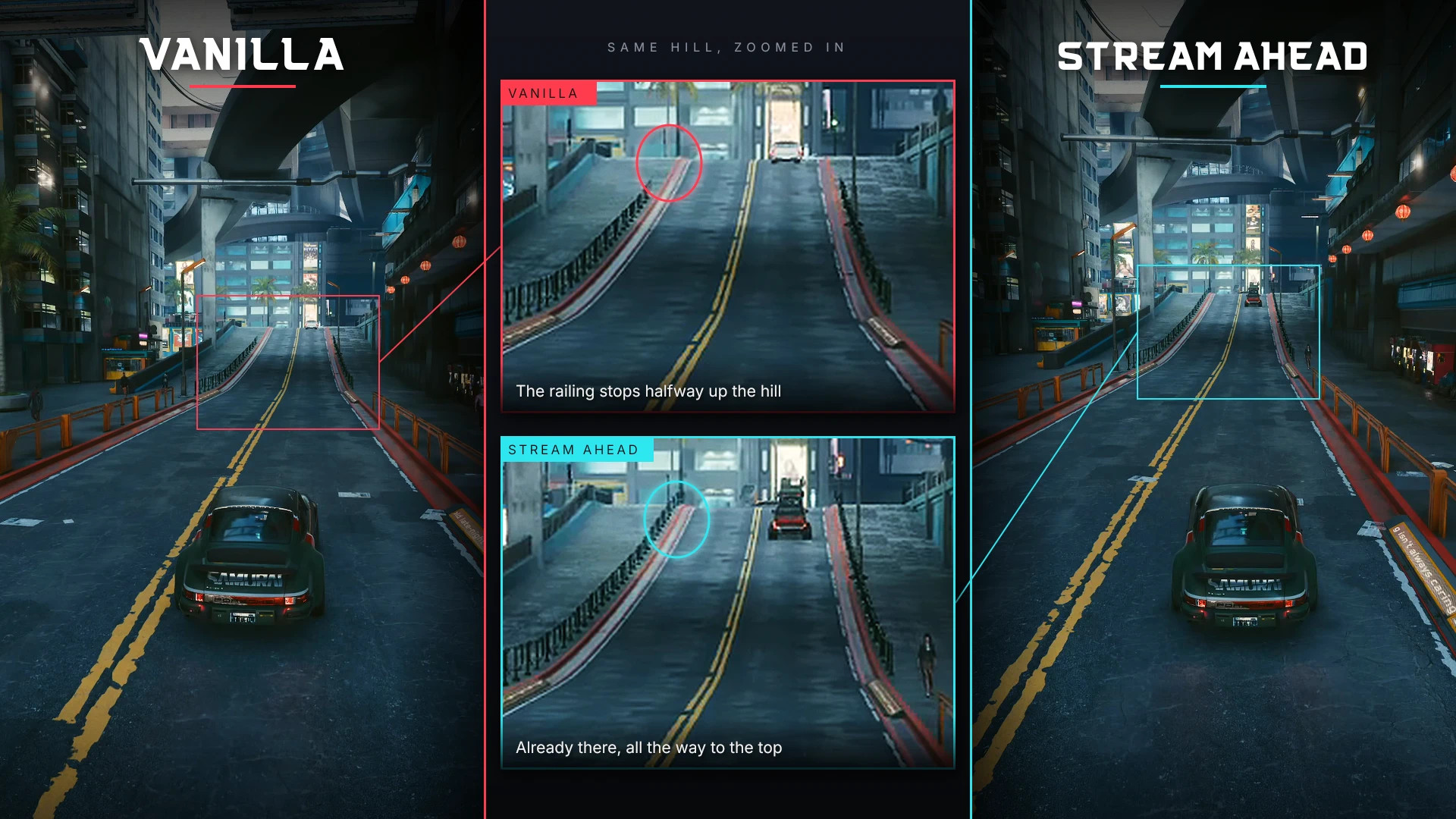
Stream Ahead is a visual improvement mod for Cyberpunk 2077 that increases the loading and rendering distance of various environmental objects. Its main purpose is to reduce noticeable pop-in while driving through Night City.
In the base game, many smaller street objects only become visible at approximately 60 meters. At driving speeds, this can cause traffic signs, streetlights, advertisements, and other details to suddenly appear just ahead of the player. Stream Ahead extends their visibility range, allowing more environmental details to load before you reach them.
Features
- Extended Object Rendering: Small environmental props load and remain visible from greater distances.
- Reduced Pop-In: Traffic signs, poles, posters, advertisements, and road markings appear earlier.
- Improved Intersections: Traffic lights and signs become visible farther down the road.
- Distant Advertisements: Billboards and advertisements can be seen from greater distances.
- Streetlight Improvements: Street lamps remain visible and illuminated farther away, especially noticeable at night.
- Extended Shadows: Streetlight shadows and sunlight shadows from smaller objects can appear at greater distances.
- Outdoor Optimization: Changes focus on the open world without modifying interior rendering.
- LOD Compatibility: Can be used alongside Improved Environment LODs.
Rendering Distance Changes
Stream Ahead adjusts several environmental rendering limits:
Small Street Objects
- Rendering distance increased by 2x.
- Maximum distance of approximately 128 meters.
Larger Street Objects
- Rendering distance increased by 2x.
- Maximum distance of approximately 256 meters.
Streetlights
- Light visibility increased by 2.5x.
- Maximum lighting distance of approximately 250 meters.
Streetlight Shadows
- Shadow distance increased by 2.5x.
- Maximum distance of approximately 25 meters, compared with roughly 10 meters in the base game.
Sunlight Shadows
- Smaller environmental props can cast sunlight shadows from farther away.
- This adjustment is controlled through a separate .ini configuration file.
Performance
The mod has a relatively small performance impact. Test results:
- GPU: AMD Radeon RX 9060 XT
- Resolution: 1440p
- Approximately 0–3 FPS difference compared with the unmodified game.
- Around 0.3 GB of additional VRAM usage.
Requirements
- Cyberpunk 2077 version 2.5
- redscript
- Codeware
Configuration
Advanced users can manually adjust values in r6/scripts/StreamAhead/StreamAhead.reds under the StreamAheadConfig section:
- Scale: Controls how much farther environmental props are rendered (1.0 is vanilla).
- AdFloor: Sets the visibility distance for advertisements (Default: 250).
- LightScale: Adjusts the streetlight rendering distance multiplier (1.0 is vanilla).
- LightMaxHide: Controls the maximum visibility distance for streetlights.
- ShadowFadeScale: Adjusts how far streetlight shadows remain visible (1.0 is vanilla).
- ShadowFadeMax: Sets the maximum streetlight shadow distance.
- PadLevel: Controls additional loading distance for smaller objects.
- CapLevel: Controls the upper loading level used by the mod.
Note: It is recommended to leave PadLevel and CapLevel unchanged. Setting PadLevel to 0 can extend loading distances to 256 meters, but may cause more noticeable freezes while driving.
Disabling Extended Sunlight Shadows
If you prefer original sunlight shadow distances, delete: engine/config/platform/pc/streamahead_shadows.ini
Known Issues and Limitations
- Occasional Freezes: Brief freezes of approximately 0.2 seconds may occur at certain locations while driving.
- Vehicles, NPCs, and Loot: The mod does not change spawning or generation systems.
- Certain Environmental Props: Vending machines and trash bags may still appear at short distances due to internal engine controls.
- Interiors: Indoor environments retain original rendering behavior.
- Level of Detail: This mod increases loading distance but does not replace LOD models. It is compatible with Improved Environment LODs.
Installation Instructions
Mod Manager: Install using Vortex or Mod Organizer 2.
Manual Installation:
1. Download and extract the mod archive.
2. Open your main Cyberpunk 2077 installation directory.
3. Copy the included r6 and engine folders into the game directory.
4. Allow the folders to merge when prompted.
5. Launch Cyberpunk 2077.
Uninstallation
Delete the following files and folders: r6/scripts/StreamAhead and engine/config/platform/pc/streamahead_shadows.ini. The mod does not affect save files.
External Download Links:
Direct Download Links
About Mod
| Latest Version | v1.0 |
| Game | Cyberpunk 2077 |
| Category | Graphics |
| Game Version | 1.11 |
| Downloads | 2 |
| Created | 1 hour ago |
You Might Also Like »
0 Comments
There are no comments. Be first to comment!