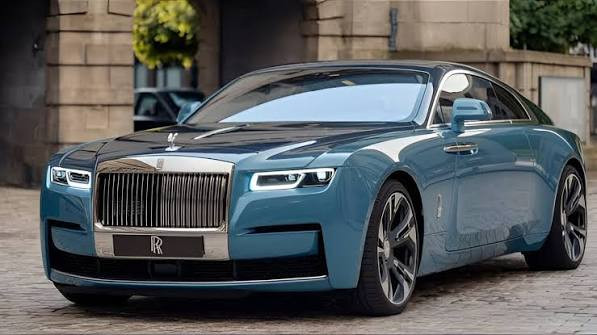
Rolls Royce Wraith Remake 2026 Latest
34
downloads
87.27 MB
files size
0
comments
0
videos
by
Guest
6 days ago



STEP 1
move "rg_bizedyne.dll" to Cyberpunk 2077\red4ext\plugins
STEP 2
Drag and drop the archive and r6 folders from the mod archive into that game root folder. Choose to merge/overwrite files if Windows asks.
STEP 3 How to Get the Car in the Game
Once you launch the game, you can obtain the Rolls-Royce Wraith in two ways:
1. Via Car Dealer: Access V’s computer in their apartment or use any net terminal, go to the Virtual Car Dealer tab, and purchase the vehicle. It costs 300,000 eurodollars.
2. Via CET Console: Open the Cyber Engine Tweaks console in-game (usually by pressing the ~ key) and paste the following code, then press Enter:
Game.GetVehicleSystem():EnablePlayerVehicle("Vehicle.rolls_royce_wraith_basic_01", true, false)
move "rg_bizedyne.dll" to Cyberpunk 2077\red4ext\plugins
STEP 2
Drag and drop the archive and r6 folders from the mod archive into that game root folder. Choose to merge/overwrite files if Windows asks.
STEP 3 How to Get the Car in the Game
Once you launch the game, you can obtain the Rolls-Royce Wraith in two ways:
1. Via Car Dealer: Access V’s computer in their apartment or use any net terminal, go to the Virtual Car Dealer tab, and purchase the vehicle. It costs 300,000 eurodollars.
2. Via CET Console: Open the Cyber Engine Tweaks console in-game (usually by pressing the ~ key) and paste the following code, then press Enter:
Game.GetVehicleSystem():EnablePlayerVehicle("Vehicle.rolls_royce_wraith_basic_01", true, false)
Direct Download Links
About Mod
| Latest Version | Latest |
| Game | Cyberpunk 2077 |
| Category | Vehicles |
| Game Version | 1.11 |
| Downloads | 34 |
| Created | 6 days ago |
You Might Also Like »




0 Comments
There are no comments. Be first to comment!