Weapon Skin Changer Plus v1.0




0/5,
0
votes
Description
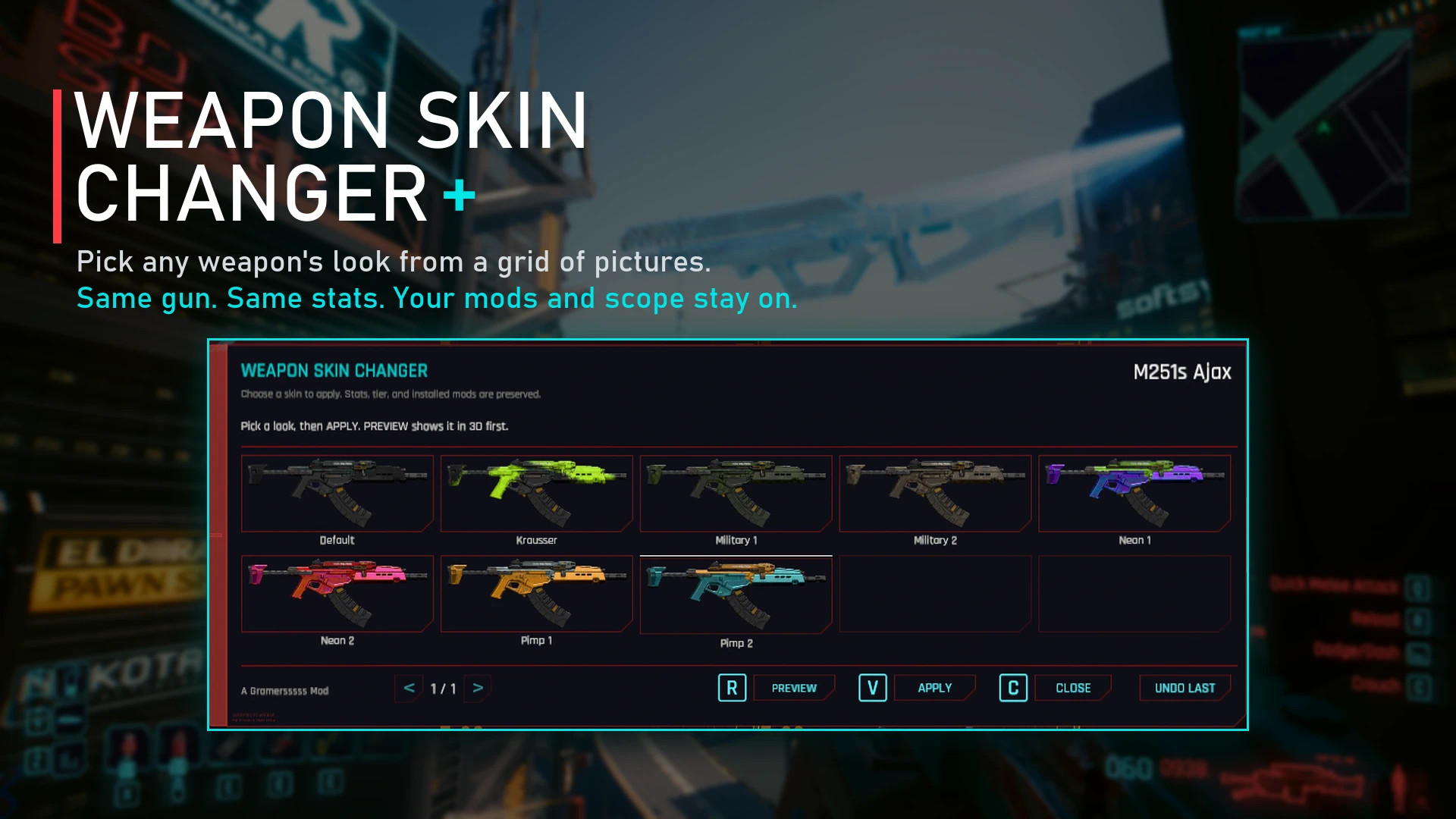
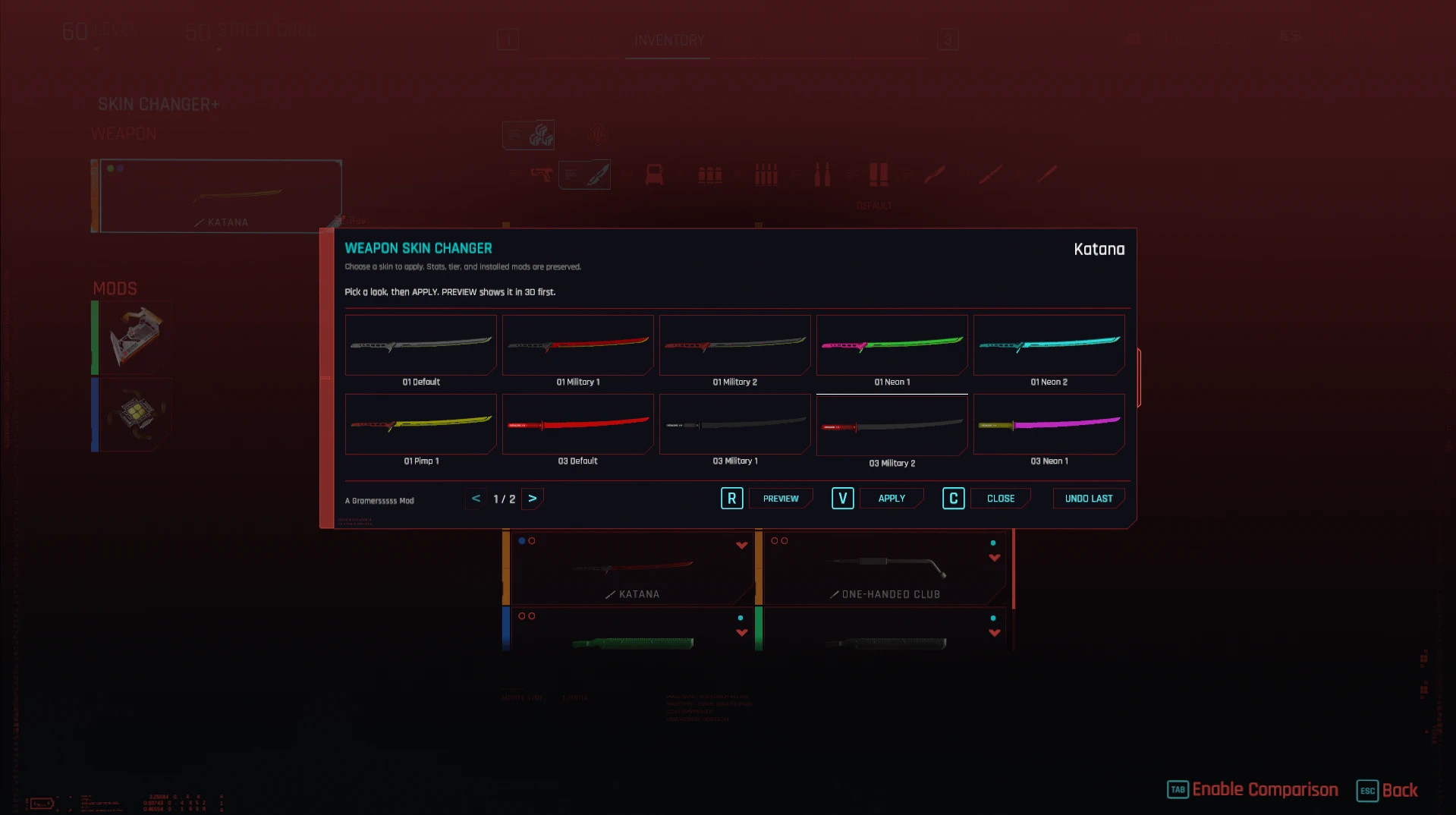
Weapon Skin Changer Plus lets you choose the appearance of your weapons instead of relying on the random skin assigned by Cyberpunk 2077.
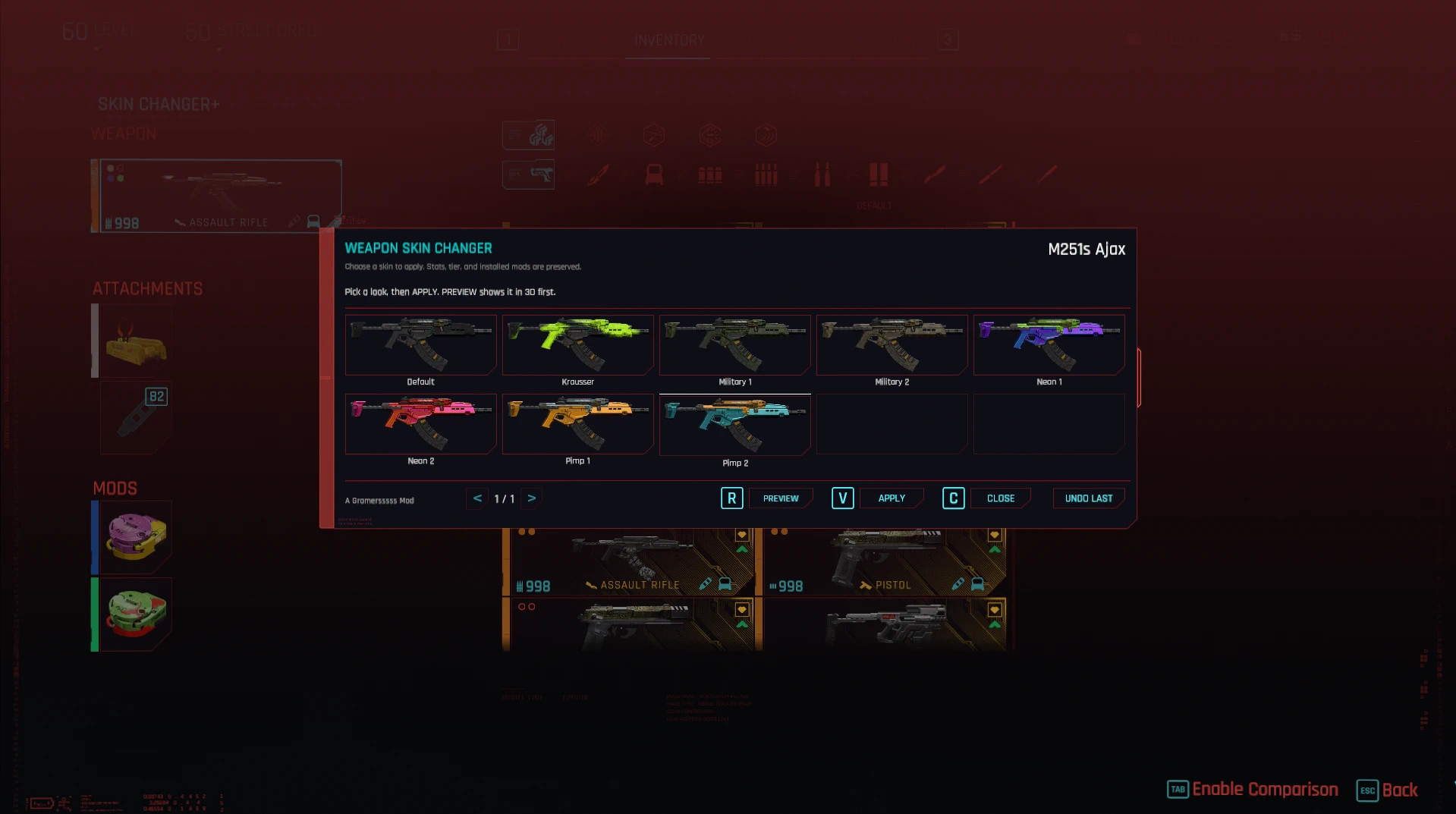
A new button is added to the weapon screen in your inventory. Opening it shows all available skins for the selected weapon as actual weapon images. You can preview a skin in the 3D viewer before applying it, while keeping the weapon itself unchanged.
Features
- Supports 56 weapon families and 398 skins
- Covers firearms and melee weapons with multiple appearances
- Shows an image for every available skin
- 3D preview before applying a new look
- Undo Last option restores the previous skin
- Keeps weapon tier, quality, stats and installed mods
- Scopes and silencers remain attached when supported by the selected skin
- Incompatible attachments are returned to your inventory instead of being deleted
- Weapons without alternative skins are marked as having no variations
- Q and E switch pages when there are too many skins for one screen
The mod is cosmetic only. Changing a skin has no effect on damage, rarity, tier or other weapon stats.
Limitations
Iconic weapons are not supported because their appearances are connected to their unique weapon records. Changing those records would also affect their stats and special abilities.
Some regular weapons only have a single appearance in the game files. For these weapons, the skin button is disabled and "No variations" is displayed.
Requirements
- Cyber Engine Tweaks
- RED4ext
- redscript
- Codeware
- RedFileSystem
- TweakXL
ArchiveXL is not required.
Known Issues
- The Senkoh preview appears glossy gold instead of the nearly black finish shown by the game's original icon. The model and pattern are otherwise correct.
- Controller users currently need to navigate the picker with the left-stick cursor. D-pad, shoulder buttons and triggers don't fully control it.
- L1/R1 can still change the inventory tab behind the skin picker.
- The Grad preview doesn't display the scope visible in its original game icon. This is only a visual issue.
Installation Instructions
Vortex:
- Install the archive through Vortex.
- Deploy the mod and restart the game.
Manual:
- Extract the archive into your Cyberpunk 2077 folder.
- Allow the bin, r6 and archive folders to merge with the existing ones.
- Restart the game.
When upgrading from an older version, remove the previous version before installing the new release.
Credits
Weapon Skin Changer Plus is based on the original Skin Changer by s1sp. It has been rebuilt as a standalone mod, so the original is not required.
The rework adds fixed skin selection, weapon images, 3D previews, undo support and attachment preservation.
Additional thanks to the developers of Cyber Engine Tweaks, RED4ext, redscript, Codeware, RedFileSystem and TweakXL. Weapon images were created using WolvenKit.
Weapon Skin Changer Plus lets you choose the appearance of your weapons instead of relying on the random skin assigned by Cyberpunk 2077.
A new button is added to the weapon screen in your inventory. Opening it shows all available skins for the selected weapon as actual weapon images. You can preview a skin in the 3D viewer before applying it, while keeping the weapon itself unchanged.
Features
- Supports 56 weapon families and 398 skins
- Covers firearms and melee weapons with multiple appearances
- Shows an image for every available skin
- 3D preview before applying a new look
- Undo Last option restores the previous skin
- Keeps weapon tier, quality, stats and installed mods
- Scopes and silencers remain attached when supported by the selected skin
- Incompatible attachments are returned to your inventory instead of being deleted
- Weapons without alternative skins are marked as having no variations
- Q and E switch pages when there are too many skins for one screen
The mod is cosmetic only. Changing a skin has no effect on damage, rarity, tier or other weapon stats.
Limitations
Iconic weapons are not supported because their appearances are connected to their unique weapon records. Changing those records would also affect their stats and special abilities.
Some regular weapons only have a single appearance in the game files. For these weapons, the skin button is disabled and "No variations" is displayed.
Requirements
- Cyber Engine Tweaks
- RED4ext
- redscript
- Codeware
- RedFileSystem
- TweakXL
ArchiveXL is not required.
Known Issues
- The Senkoh preview appears glossy gold instead of the nearly black finish shown by the game's original icon. The model and pattern are otherwise correct.
- Controller users currently need to navigate the picker with the left-stick cursor. D-pad, shoulder buttons and triggers don't fully control it.
- L1/R1 can still change the inventory tab behind the skin picker.
- The Grad preview doesn't display the scope visible in its original game icon. This is only a visual issue.
Installation Instructions
Vortex:
- Install the archive through Vortex.
- Deploy the mod and restart the game.
Manual:
- Extract the archive into your Cyberpunk 2077 folder.
- Allow the bin, r6 and archive folders to merge with the existing ones.
- Restart the game.
When upgrading from an older version, remove the previous version before installing the new release.
Credits
Weapon Skin Changer Plus is based on the original Skin Changer by s1sp. It has been rebuilt as a standalone mod, so the original is not required.
The rework adds fixed skin selection, weapon images, 3D previews, undo support and attachment preservation.
Additional thanks to the developers of Cyber Engine Tweaks, RED4ext, redscript, Codeware, RedFileSystem and TweakXL. Weapon images were created using WolvenKit.
External Download Links:
Direct Download Links
About Mod
| Latest Version | v1.0 |
| Game | Cyberpunk 2077 |
| Category | Weapons |
| Game Version | 1.11 |
| Downloads | 11 |
| Created | 5 days ago |
You Might Also Like »


0 Comments
There are no comments. Be first to comment!